AI agent for property managers
Lease Violation Notice Workflow Agent
Run each lease violation from logged evidence to a correct notice and a tracked cure date
What it does
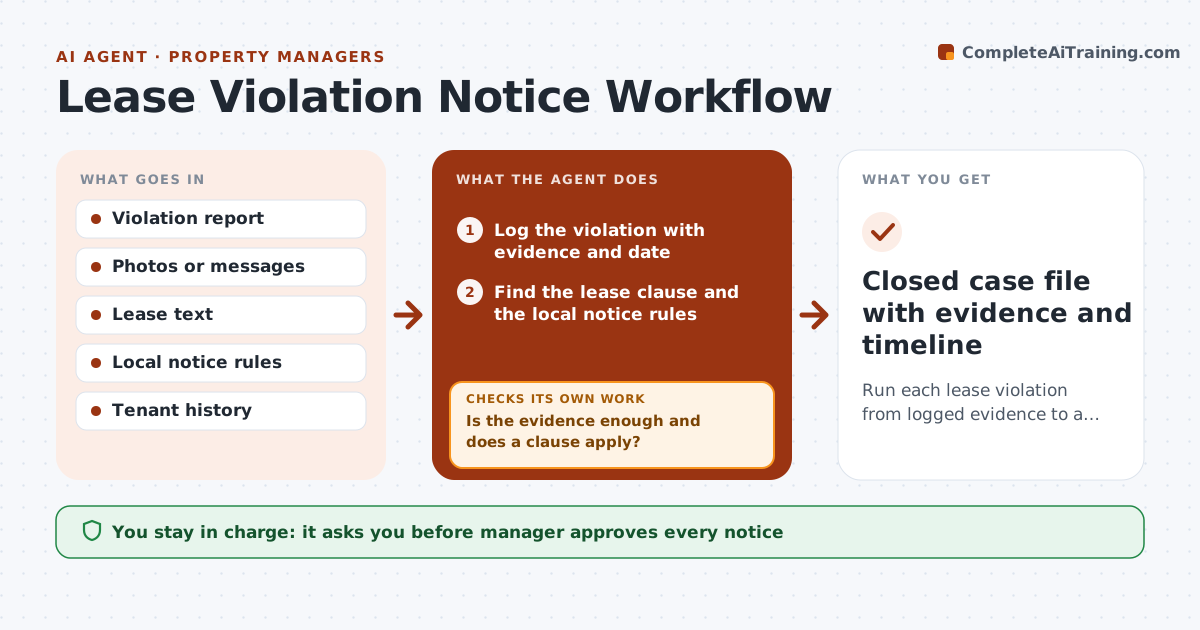
A wrong notice period or wording can get a notice thrown out months later. When a violation is reported, the agent logs it with the evidence and checks the lease for the clause broken. It then looks up the local rules for which notice applies and how long the tenant has to cure. It drafts the notice with the exact clause, dates and delivery method. It tracks the cure date and, when that date passes, asks for a re-inspection result. If the issue is not resolved, it prepares the next step, such as a second notice or a referral to counsel. The manager approves every notice. Edge case: a noise complaint cites only one witness, so the agent asks for a second source before drafting.
How it works
Follow the arrows from top to bottom. The orange dashed arrow is the loop: when a check fails, the agent goes back and tries again.
Read the steps as a list
- Violation reported
- Log the violation with evidence and date
- Find the lease clause and the local notice rules
- Is the evidence enough and does a clause apply?If not: Ask the manager for more evidence or hold the case. Back to step 2.
- Draft the notice with clause, cure period and delivery method
- Manager approves the notice before it is sentThe agent waits here for your OK.
- Set the cure date and reminders
- Collect the re-inspection result after the cure date
- Is the violation cured?If not: Prepare the next notice or counsel referral and set a new date. Back to step 6.
- Closed case file with evidence and timeline
How it decides
The notice type and period come from the lease and local rules; a case is closed only when a new inspection confirms the cure.
- Use the longer period when the lease and local law differ
- Require two evidence items for subjective violations
- Draft the next step only after a documented failed cure
- Never mix repeat violations across different clauses
Make it yours
Every agent is a starting point. You choose these settings for your own situation.
- Jurisdiction rules to use
- Cure periods by violation type
- Evidence needed per type
- Notice delivery method
What keeps you in control
It always asks you first
- Manager approves every notice
- Manager approves any escalation to counsel or eviction steps
Hard limits
- Never send a notice without manager approval
- Never state legal conclusions, only the clause and the facts
It stops when
- Done: the cure is confirmed or the case is handed to counsel
- Stop: local rules for the case are unclear and the manager must check them
Set it up
We guide you through the set-up, step by step
Members get the full set-up guide for this agent. No technical skills needed: you copy, paste and upload.
- One set of instructions to paste into your AI, with the clicks for ChatGPT, Claude, Microsoft 365 Copilot, Gemini and Grok
- The agent then walks you through connecting your own data, one source at a time
- A downloadable copy with the flow chart, the rules and the full guide