AI agent for network engineers
Load Balancer Health and Tuning Agent
A load balancer configuration whose health checks and distribution are tested as better
What it does
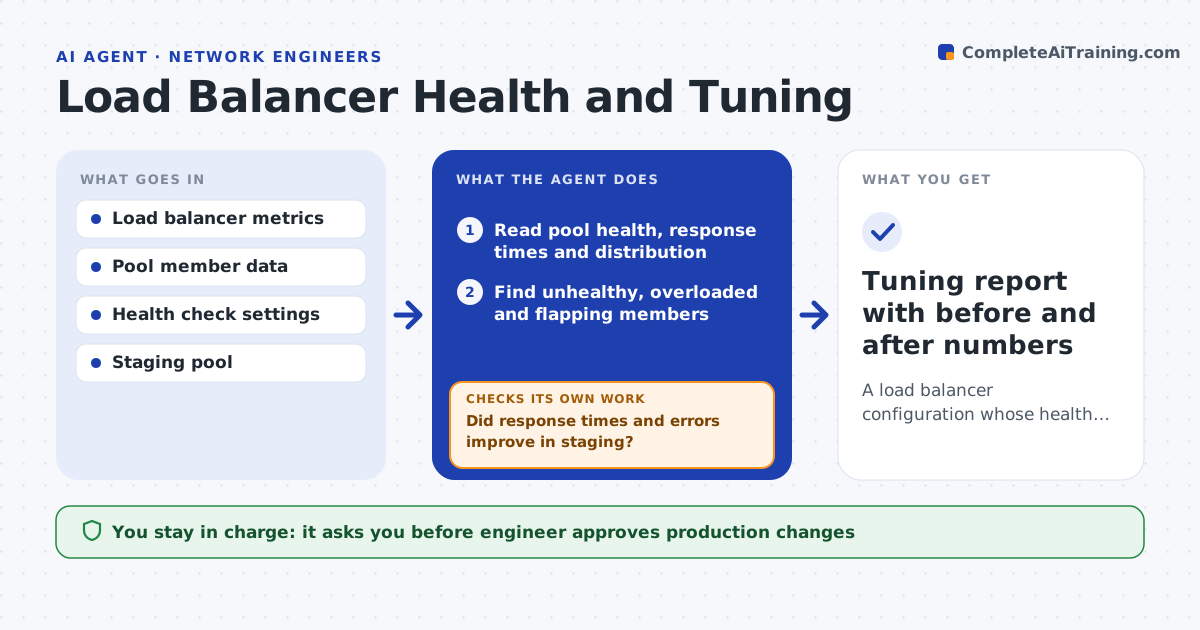
Uneven load and bad health checks cause slow or failed requests. This agent reads pool health, response times and traffic distribution on the load balancer. It finds unhealthy or overloaded members and tests changes to health check settings in a staging pool first. It compares response times and error rates before and after to see whether the change helped. Only the settings that clearly help go forward for production. The engineer approves production changes. Edge case: a health check is so strict that healthy servers keep dropping out, so the agent relaxes the interval and tests that real failures are still caught.
How it works
Follow the arrows from top to bottom. The orange dashed arrow is the loop: when a check fails, the agent goes back and tries again.
Read the steps as a list
- Weekly load balancer review
- Read pool health, response times and distribution
- Find unhealthy, overloaded and flapping members
- Propose health check or distribution changes
- Test the changes in a staging pool
- Did response times and errors improve in staging?If not: try a different setting and compare again. Back to step 3.
- Does the new health check still catch a real failure?If not: tighten the check and retest. Back to step 3.
- Engineer approves the production changeThe agent waits here for your OK.
- Apply and measure after the change
- Tuning report with before and after numbers
How it decides
A change goes forward only when staging shows lower latency or errors and real failures are still detected.
- Compare before and after on the same traffic
- Keep failure detection time under the target
- Flag members with uneven share of traffic
- Roll back when production errors rise
Make it yours
Every agent is a starting point. You choose these settings for your own situation.
- Latency and error thresholds
- Health check ranges
- Review frequency
- Staging pool
What keeps you in control
It always asks you first
- Engineer approves production changes
Hard limits
- Never changes production without approval
- Never removes a member from a pool on its own
It stops when
- Done: production results improve and the report is saved
- Stop: no staging pool is available
Set it up
We guide you through the set-up, step by step
Members get the full set-up guide for this agent. No technical skills needed: you copy, paste and upload.
- One set of instructions to paste into your AI, with the clicks for ChatGPT, Claude, Microsoft 365 Copilot, Gemini and Grok
- The agent then walks you through connecting your own data, one source at a time
- A downloadable copy with the flow chart, the rules and the full guide