AI agent for network engineers
Firewall Rule Cleanup Agent
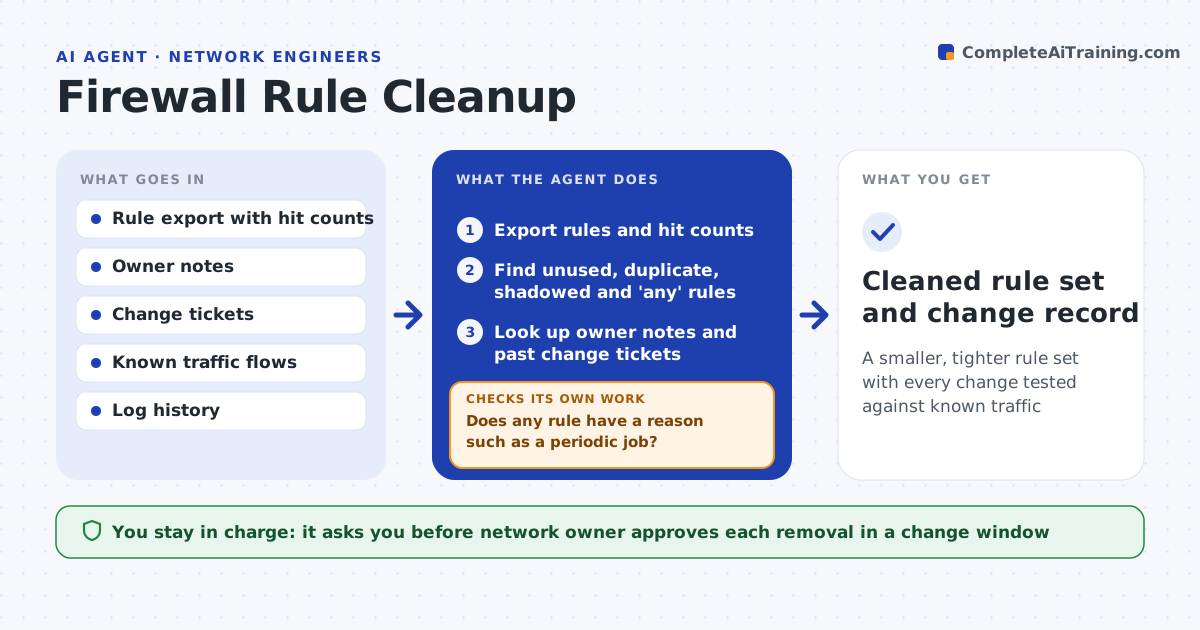
A smaller, tighter rule set with every change tested against known traffic
What it does
Firewall rule sets grow with unused, shadowed and overly broad rules. This agent reads the rules and their hit counts. It finds unused rules, duplicates and 'any' rules. For each one, it checks owner notes and tickets to see why it exists. It drafts a removal or tightening list and simulates the effect on known traffic flows so nothing in use breaks. The network owner approves each removal in a change window. Edge case: a rule shows zero hits but is the quarterly payment file transfer, so the agent keeps it and notes the schedule.
How it works
Follow the arrows from top to bottom. The orange dashed arrow is the loop: when a check fails, the agent goes back and tries again.
Read the steps as a list
- Quarterly rule review
- Export rules and hit counts
- Find unused, duplicate, shadowed and 'any' rules
- Look up owner notes and past change tickets
- Does any rule have a reason such as a periodic job?If not: keep it, add the reason to its notes and note the next expected use. Back to step 3.
- Draft the removal and tightening list
- Simulate the list against known traffic flows
- Does any known flow break in the simulation?If not: take that rule off the list or narrow the change. Back to step 4.
- Network owner approves each removal in a change windowThe agent waits here for your OK.
- Cleaned rule set and change record
How it decides
A rule is a removal candidate when it has no hits over the review period and no owner reason. Broad rules are tightened to the traffic seen.
- Use at least 90 days of hits, or a full business cycle
- Keep rules tied to periodic jobs
- Tighten 'any' rules to the traffic seen
- Never remove a rule with no owner note without asking
Make it yours
Every agent is a starting point. You choose these settings for your own situation.
- Review period for hits (default: 12 months)
- Rules always kept
- Change window
- Owner notes location
What keeps you in control
It always asks you first
- Network owner approves each removal in a change window
Hard limits
- Never changes the firewall itself
- Never removes a rule during a freeze period
It stops when
- Done: the approved changes are applied
- Stop: the hit count data is missing or too short
Set it up
We guide you through the set-up, step by step
Members get the full set-up guide for this agent. No technical skills needed: you copy, paste and upload.
- One set of instructions to paste into your AI, with the clicks for ChatGPT, Claude, Microsoft 365 Copilot, Gemini and Grok
- The agent then walks you through connecting your own data, one source at a time
- A downloadable copy with the flow chart, the rules and the full guide