AI agent for bank branch managers
Lobby Service Level Monitor Agent
Find long wait windows, link them to staffing and transactions, test changes and check the effect
What it does
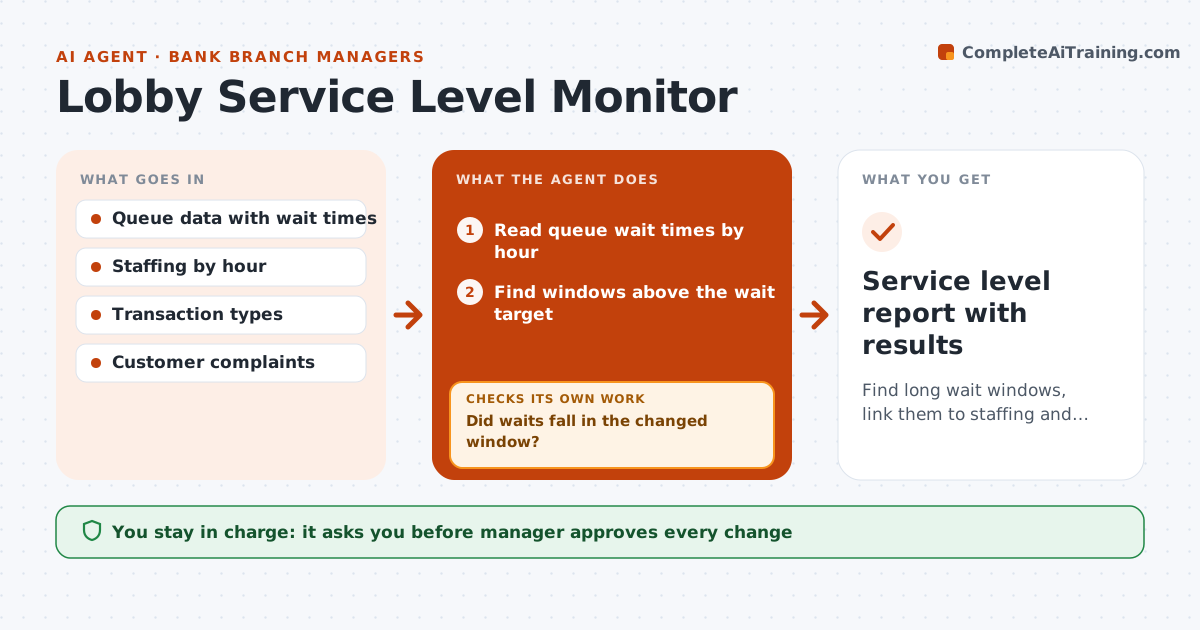
Long waits drive complaints, but the causes are hidden in queue data. Each week the agent reads queue times and finds the windows when waits pass the target. It matches each window to staffing and the types of transactions, such as long loan or notary tasks. It proposes tests, such as moving a break, adding a person to a peak hour or sending long tasks to appointments. After one week it rechecks the queue data and compares wait times with the baseline. If waits did not fall, it tries the next idea. The manager approves each change. Edge case: waits are highest on Mondays at 10, when a business cash deposit batch arrives.
How it works
Follow the arrows from top to bottom. The orange dashed arrow is the loop: when a check fails, the agent goes back and tries again.
Read the steps as a list
- Weekly queue data ready
- Read queue wait times by hour
- Find windows above the wait target
- Match each window to staffing and transaction types
- Propose a change with an expected effect
- Manager approves the changeThe agent waits here for your OK.
- Run the change for one week
- Read the new queue data
- Did waits fall in the changed window?If not: Reverse the change and propose a different one. Back to step 4.
- Did waits rise in another window?If not: Adjust and test again. Back to step 3.
- Service level report with results
How it decides
Waits are tied to specific hours and causes; a change counts only if waits fall in the next week.
- Flag windows with average wait over 6 minutes
- Compare with the same weekday in earlier weeks
- Test one change per window at a time
- Keep a change only if waits fall by 20% or more
Make it yours
Every agent is a starting point. You choose these settings for your own situation.
- Wait target (default 6 minutes)
- Improvement threshold (default 20%)
- Weeks to test (default 1)
- Windows to monitor
What keeps you in control
It always asks you first
- Manager approves every change
- Manager approves schedule moves affecting employees
Hard limits
- Never reduce coverage in a window without testing
- Never change schedules without approval
It stops when
- Done: waits are below target for two weeks
- Stop: data is too sparse to compare
Set it up
We guide you through the set-up, step by step
Members get the full set-up guide for this agent. No technical skills needed: you copy, paste and upload.
- One set of instructions to paste into your AI, with the clicks for ChatGPT, Claude, Microsoft 365 Copilot, Gemini and Grok
- The agent then walks you through connecting your own data, one source at a time
- A downloadable copy with the flow chart, the rules and the full guide