AI agent for receptionists
Lost Property and Found Items Agent
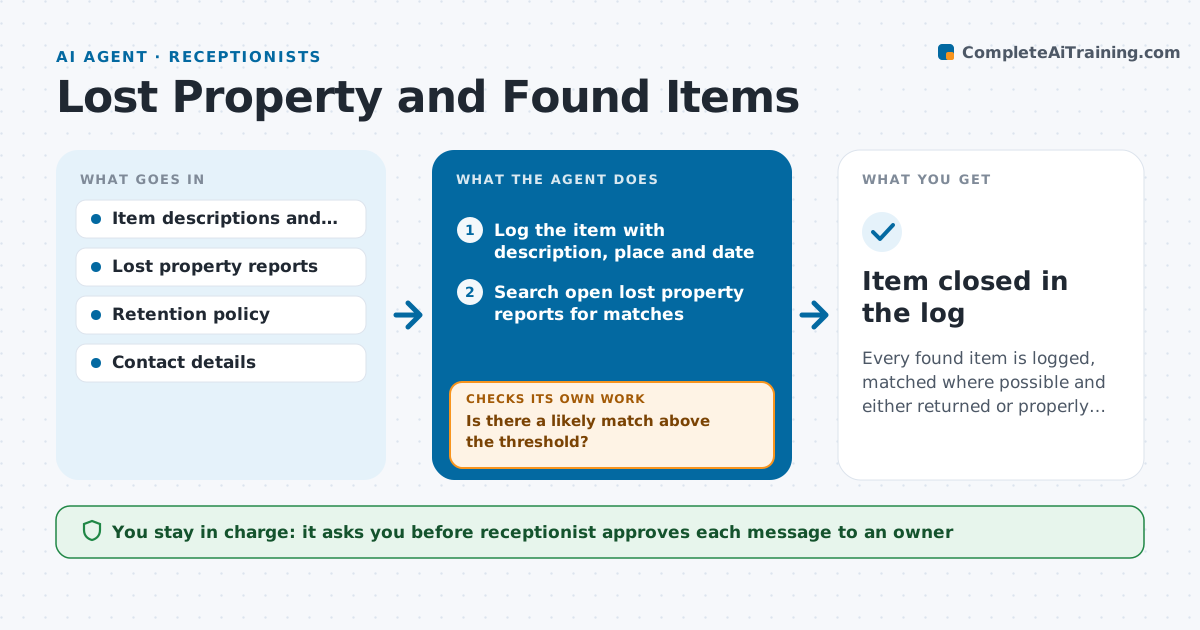
Every found item is logged, matched where possible and either returned or properly disposed of within policy.
What it does
Found items pile up in a drawer with no record, and owners who ask never hear back. The agent logs each item with a photo, description, place and date, then matches it against lost property reports and enquiries. When it finds a likely match, it drafts a message asking the owner to describe an unlisted detail before collecting. It checks daily for replies and for items older than the retention rule, and it escalates unclaimed ones toward disposal or donation as the policy says. The receptionist approves every contact and every disposal. Edge case: two reports that both fit a black umbrella, where the agent asks each owner for a detail only the owner would know.
How it works
Follow the arrows from top to bottom. The orange dashed arrow is the loop: when a check fails, the agent goes back and tries again.
Read the steps as a list
- Item handed in at the desk
- Log the item with description, place and date
- Search open lost property reports for matches
- Is there a likely match above the threshold?If not: Keep the item open and recheck when a new report arrives. Back to step 3.
- Draft a message that asks the owner to describe a hidden detail
- Receptionist approves the messageThe agent waits here for your OK.
- Send and track the reply
- Does the owner's answer match the item?If not: Keep the item and ask the next candidate or wait. Back to step 3.
- Check the age of unclaimed items against the retention rule
- Receptionist approves return, donation or disposalThe agent waits here for your OK.
- Item closed in the log
How it decides
It scores a match by item type, color, brand, place and date, and it only proposes contact when a detail beyond the obvious also fits.
- Match needs two or more fields to agree
- Always ask for a detail not visible in the photo
- Items of value go to the safe, not the drawer
- Items older than 60 days move to the disposal step
Make it yours
Every agent is a starting point. You choose these settings for your own situation.
- Retention period (default 60 days)
- Match score needed to contact an owner
- Where valuable items are stored
- Whether to donate or dispose
- Channels used to contact owners
What keeps you in control
It always asks you first
- Receptionist approves each message to an owner
- Receptionist approves each handover and each disposal
Hard limits
- Never release an item without approval
- Do not share an owner's contact details with others
It stops when
- Done: item returned or disposed of per policy
- Stop: a dispute over ownership goes to the manager
Set it up
We guide you through the set-up, step by step
Members get the full set-up guide for this agent. No technical skills needed: you copy, paste and upload.
- One set of instructions to paste into your AI, with the clicks for ChatGPT, Claude, Microsoft 365 Copilot, Gemini and Grok
- The agent then walks you through connecting your own data, one source at a time
- A downloadable copy with the flow chart, the rules and the full guide