AI agent for database administrators
Maintenance Job Failure Agent
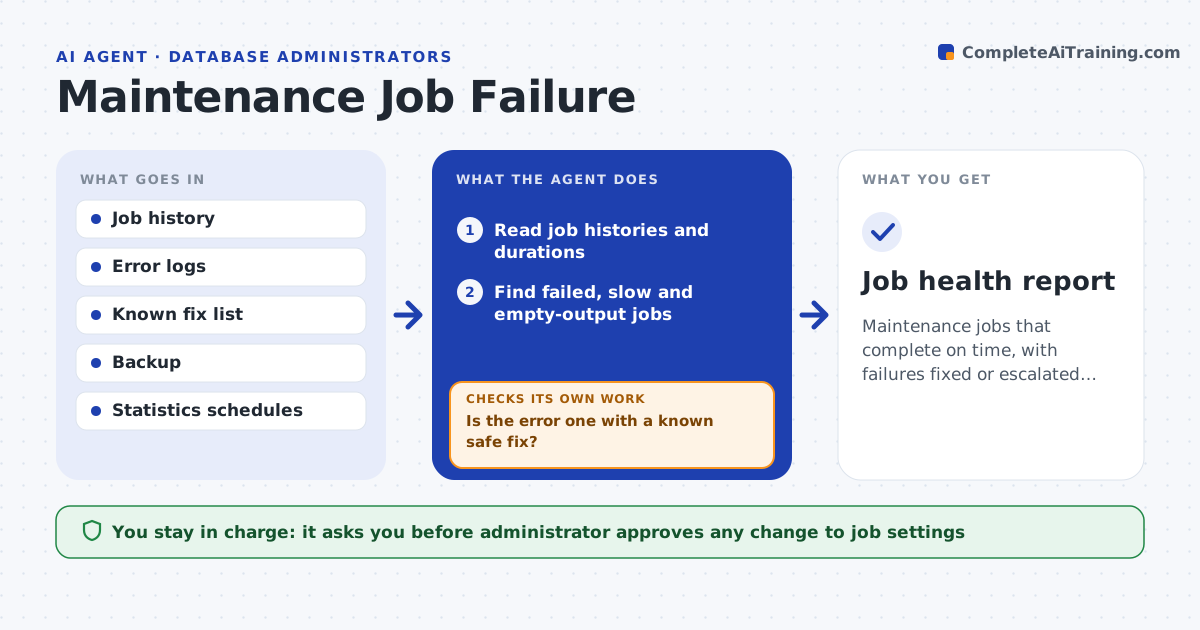
Maintenance jobs that complete on time, with failures fixed or escalated the same day
What it does
Nightly maintenance jobs fail quietly, and statistics and backups go stale. This agent reads job histories each morning and finds jobs that failed or ran much longer than normal. It reads the error details and retries with the known safe fix for that kind of error, such as rerunning after a lock clears. It confirms that the next run succeeds. If the same job fails again, it reports the cause and stops retrying. The administrator approves any change to job settings. Edge case: a backup job succeeded but wrote a file of zero bytes, so the agent treats it as a failure.
How it works
Follow the arrows from top to bottom. The orange dashed arrow is the loop: when a check fails, the agent goes back and tries again.
Read the steps as a list
- Morning job review
- Read job histories and durations
- Find failed, slow and empty-output jobs
- Read the error details for each
- Is the error one with a known safe fix?If not: open a ticket with the evidence and tell the administrator. Back to step 3.
- Apply the documented fix and rerun the job
- Did the rerun succeed and produce valid output?If not: stop retrying and report the cause. Back to step 5.
- Administrator approves any change to job settingsThe agent waits here for your OK.
- Confirm the next scheduled run succeeds
- Job health report
How it decides
A job has failed when it ends in error, runs past its normal time by a set share or produces an output that is empty. A known error gets its documented fix once.
- Treat zero-byte backups as failures
- Retry a known fix once
- Compare runtime with the median of the last 14 runs
- Stop after one failed retry
Make it yours
Every agent is a starting point. You choose these settings for your own situation.
- Slow-run threshold (default: 50% above median)
- Known fix list
- Jobs in scope
- Report time
What keeps you in control
It always asks you first
- Administrator approves any change to job settings
Hard limits
- Never changes job settings without approval
- Never deletes backups
It stops when
- Done: all jobs are healthy and the next run succeeds
- Stop: the same job fails after the documented fix
Set it up
We guide you through the set-up, step by step
Members get the full set-up guide for this agent. No technical skills needed: you copy, paste and upload.
- One set of instructions to paste into your AI, with the clicks for ChatGPT, Claude, Microsoft 365 Copilot, Gemini and Grok
- The agent then walks you through connecting your own data, one source at a time
- A downloadable copy with the flow chart, the rules and the full guide