AI agent for medical records clerks
Medical Records Transfer Assembly Agent
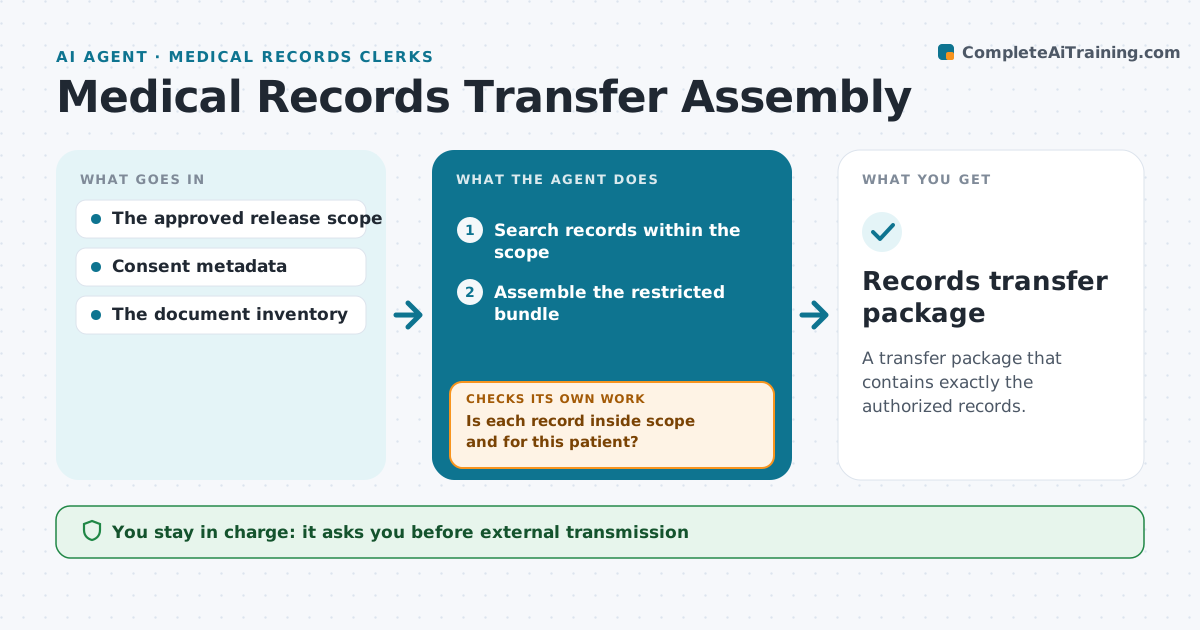
A transfer package that contains exactly the authorized records.
What it does
Authorized medical records transfers sometimes miss requested records or include records outside the approved scope. After a release is approved, this agent searches for records within the exact scope, meaning the approved dates and record types. It checks each result: anything outside the date range or for another patient is excluded. It then checks whether all requested records were found, and creates retrieval tasks for missing records that are permitted. It rechecks when those records arrive. It assembles a restricted review bundle. The records administrator approves transmission, and consent decisions stay with them. Edge case: the search returns records dated after the approved end date, so the agent excludes them.
How it works
Follow the arrows from top to bottom. The orange dashed arrow is the loop: when a check fails, the agent goes back and tries again.
Read the steps as a list
- Release approved
- Search records within the scope
- Is each record inside scope and for this patient?If not: exclude it. Back to step 2.
- Are all requested records found?If not: create a retrieval task. Back to step 2.
- Assemble the restricted bundle
- Records administrator approves transmissionThe agent waits here for your OK.
- Records transfer package
How it decides
It includes only records inside scope and patient identity, and chases missing ones.
- Include only records matching approved dates and record types.
- Exclude anything out of range or for another patient.
- Missing permitted records get a retrieval task.
- Transmission always needs the records administrator's approval.
Make it yours
Every agent is a starting point. You choose these settings for your own situation.
- Record systems to search
- Scope fields to enforce (dates, record types, departments)
- Who handles retrieval tasks
- Who approves transmission
- Bundle format (secure portal or encrypted file)
What keeps you in control
It always asks you first
- External transmission
- Consent determinations
Hard limits
- Never transmits externally.
It stops when
- Done: bundle complete.
Set it up
We guide you through the set-up, step by step
Members get the full set-up guide for this agent. No technical skills needed: you copy, paste and upload.
- One set of instructions to paste into your AI, with the clicks for ChatGPT, Claude, Microsoft 365 Copilot, Gemini and Grok
- The agent then walks you through connecting your own data, one source at a time
- A downloadable copy with the flow chart, the rules and the full guide