AI agent for medical records clerks
Clinic Intake Form Quality Agent
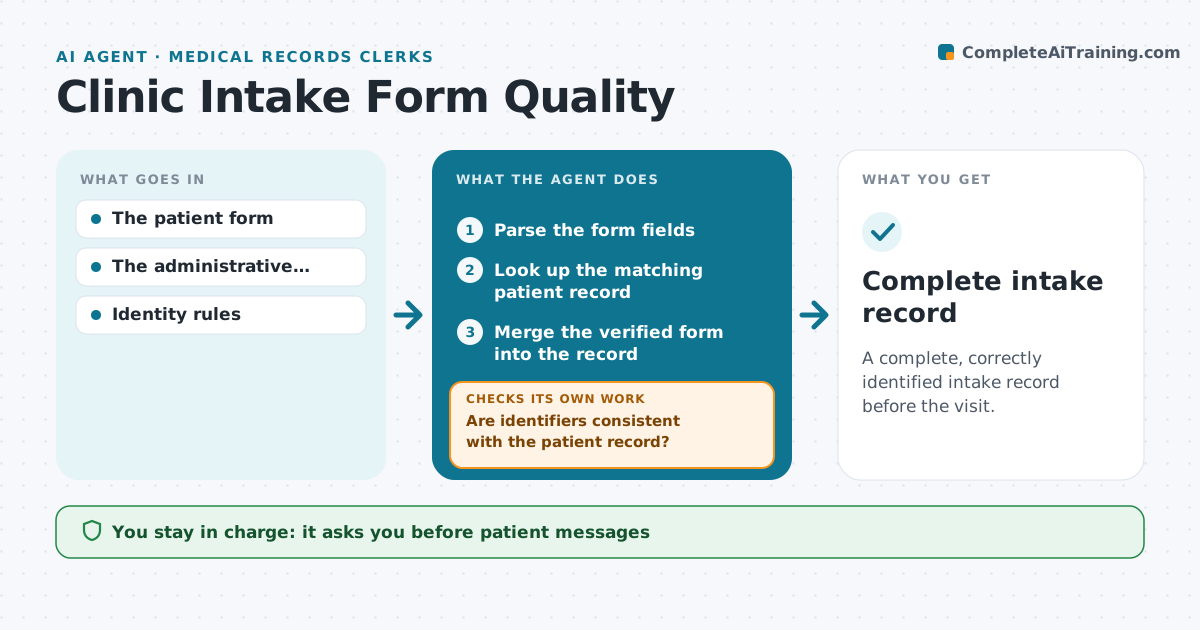
A complete, correctly identified intake record before the visit.
What it does
Patient intake forms often arrive incomplete, which causes repeated manual follow-up. When a form is submitted, this agent reads it and checks identity first: the identifiers must agree with the existing patient record. A conflict stops any merging and alerts staff, even if every other field is filled in. Next it checks the form against the administrative checklist. For missing fields it drafts a clarification that asks only for what is missing. Staff approve sending the message. When the patient resubmits, the agent rechecks both identity and completeness. Clinical interpretation of answers stays with staff. Edge case: a resubmission changes the patient's last name, so the agent stops and asks staff to verify before merging.
How it works
Follow the arrows from top to bottom. The orange dashed arrow is the loop: when a check fails, the agent goes back and tries again.
Read the steps as a list
- Intake form submitted
- Parse the form fields
- Look up the matching patient record
- Are identifiers consistent with the patient record?If not: stop merging and alert staff. Back to step 3.
- Are all required fields complete?If not: draft a targeted clarification. Back to step 2.
- Staff approve sending the messageThe agent waits here for your OK.
- Merge the verified form into the record
- Complete intake record
How it decides
It checks identity first, then completeness, and asks only for what's missing.
- Check identity before completeness.
- Ask only for missing fields.
- Any identifier change on resubmission stops merging until staff verify.
- Clinical answers are never interpreted by the agent.
Make it yours
Every agent is a starting point. You choose these settings for your own situation.
- Required fields per form type
- Identifiers that must match the patient record
- Message channel for clarifications
- Who approves patient messages
- Days before an incomplete form is flagged (default 3)
What keeps you in control
It always asks you first
- Patient messages
- Clinical interpretation
Hard limits
- No clinical interpretation.
It stops when
- Done: complete.
- Blocked: identity conflict.
Set it up
We guide you through the set-up, step by step
Members get the full set-up guide for this agent. No technical skills needed: you copy, paste and upload.
- One set of instructions to paste into your AI, with the clicks for ChatGPT, Claude, Microsoft 365 Copilot, Gemini and Grok
- The agent then walks you through connecting your own data, one source at a time
- A downloadable copy with the flow chart, the rules and the full guide