AI agent for medical coders
Modifier Use Audit Agent
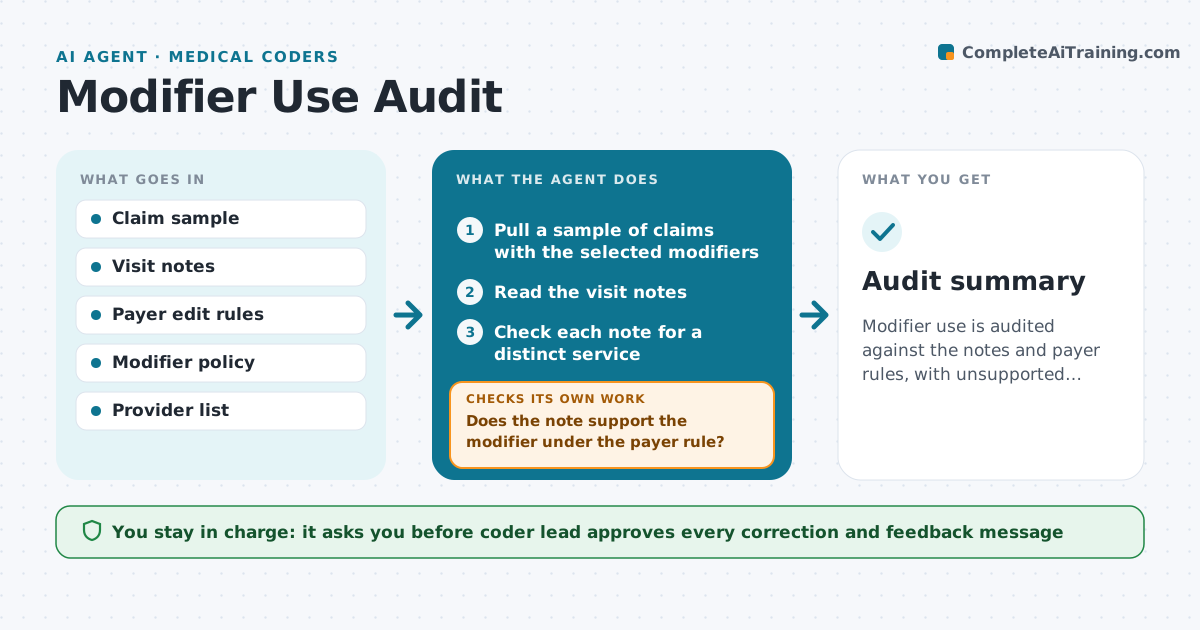
Modifier use is audited against the notes and payer rules, with unsupported claims corrected and provider patterns found.
What it does
Modifiers such as 25 and 59 are used inconsistently, and payers audit them. The agent samples claims that carry the selected modifiers, reads each note to see whether it supports a distinct, separate service, and compares the claim against payer edit rules. If the note does not support the modifier, it marks the claim and checks other claims from the same provider for the same pattern. It then drafts a summary of the findings for the lead. The coder lead approves corrections and any provider feedback. Edge case: a note that describes a separate problem but without a clear time or heading, where the agent asks for clarification.
How it works
Follow the arrows from top to bottom. The orange dashed arrow is the loop: when a check fails, the agent goes back and tries again.
Read the steps as a list
- Monthly audit starts
- Pull a sample of claims with the selected modifiers
- Read the visit notes
- Check each note for a distinct service
- Does the note support the modifier under the payer rule?If not: Mark the claim and note the missing evidence. Back to step 4.
- Pull other claims from the same provider
- Compare the rate of unsupported use
- Is the sample large enough to judge a pattern?If not: Enlarge the sample and rerun. Back to step 4.
- Draft corrections and provider feedback
- Coder lead approves corrections and feedbackThe agent waits here for your OK.
- Audit summary
How it decides
It accepts a modifier only when the note shows a separate and identifiable service, and widens the sample when an unsupported claim is found.
- Sample at least 20 claims per modifier
- Flag providers above a 20% unsupported rate
- Never accept a modifier without a note that supports it
- Check payer-specific rules before judging
Make it yours
Every agent is a starting point. You choose these settings for your own situation.
- Modifiers covered
- Sample size (default 20 per modifier)
- Pattern threshold (default 20%)
- Payers and their rules
What keeps you in control
It always asks you first
- Coder lead approves every correction and feedback message
Hard limits
- Never change a claim without approval
- Do not make clinical judgments
It stops when
- Done: audit summary approved
- Stop: policy for a payer is unclear and compliance must advise
Set it up
We guide you through the set-up, step by step
Members get the full set-up guide for this agent. No technical skills needed: you copy, paste and upload.
- One set of instructions to paste into your AI, with the clicks for ChatGPT, Claude, Microsoft 365 Copilot, Gemini and Grok
- The agent then walks you through connecting your own data, one source at a time
- A downloadable copy with the flow chart, the rules and the full guide