AI agent for fraud analysts
Mule Account and Network Link Analysis Agent
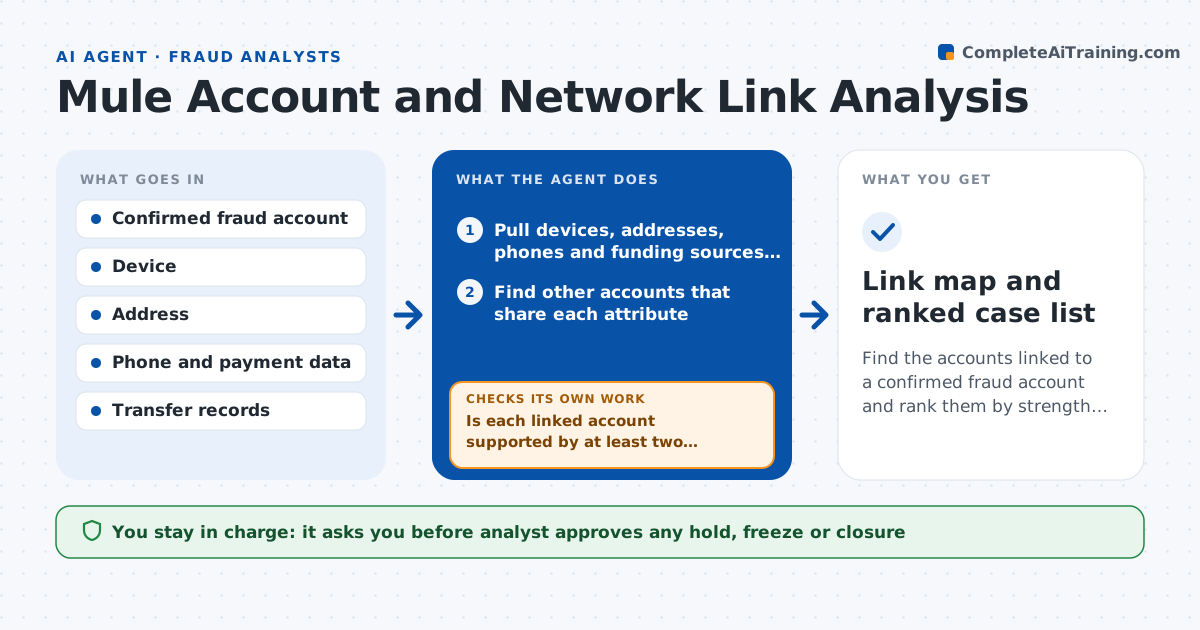
Find the accounts linked to a confirmed fraud account and rank them by strength of evidence.
What it does
Fraud rings use many accounts that look ordinary alone, and reviewing them one at a time misses the connections. This agent starts from a confirmed fraud account and looks for shared devices, addresses, phone numbers, funding sources and transfers. It builds a link map showing how accounts connect, then tests the strength of each link: a shared device used by a family is weak, and a shared device with matching money flows is strong. It drops weak links and extends the map from strong ones. It ends with a draft case list ranked by strength of evidence. The analyst approves any hold on an account.
How it works
Follow the arrows from top to bottom. The orange dashed arrow is the loop: when a check fails, the agent goes back and tries again.
Read the steps as a list
- Confirmed fraud account
- Pull devices, addresses, phones and funding sources for the account
- Find other accounts that share each attribute
- Add transfers in and out to the link map
- Rate each link as weak, medium or strong
- Is each linked account supported by at least two signals?If not: drop weak links or look for a second signal. Back to step 4.
- Extend the map from strong links one more step
- Rank accounts and draft the case list with evidence
- Analyst approves any hold on an accountThe agent waits here for your OK.
- Link map and ranked case list
How it decides
It keeps a link when at least two independent signals support it, and ranks accounts by the number and strength of links.
- Treat shared devices on public networks as weak
- Require two independent signals to keep a link
- Extend the map at most 2 steps from the seed
- Rank an account higher when money flows both ways with the seed
Make it yours
Every agent is a starting point. You choose these settings for your own situation.
- Signals counted as strong
- Maximum map steps (default 2)
- Signals required (default 2)
- Case list format
What keeps you in control
It always asks you first
- Analyst approves any hold, freeze or closure
- Analyst approves referral to law enforcement
Hard limits
- Never holds or closes accounts
- Marks every link with its evidence
It stops when
- Done: case list delivered and reviewed
- Stop: the map grows past a set size, narrow the signals
Set it up
We guide you through the set-up, step by step
Members get the full set-up guide for this agent. No technical skills needed: you copy, paste and upload.
- One set of instructions to paste into your AI, with the clicks for ChatGPT, Claude, Microsoft 365 Copilot, Gemini and Grok
- The agent then walks you through connecting your own data, one source at a time
- A downloadable copy with the flow chart, the rules and the full guide