AI agent for music teachers
Music Competition Repertoire Planner Agent
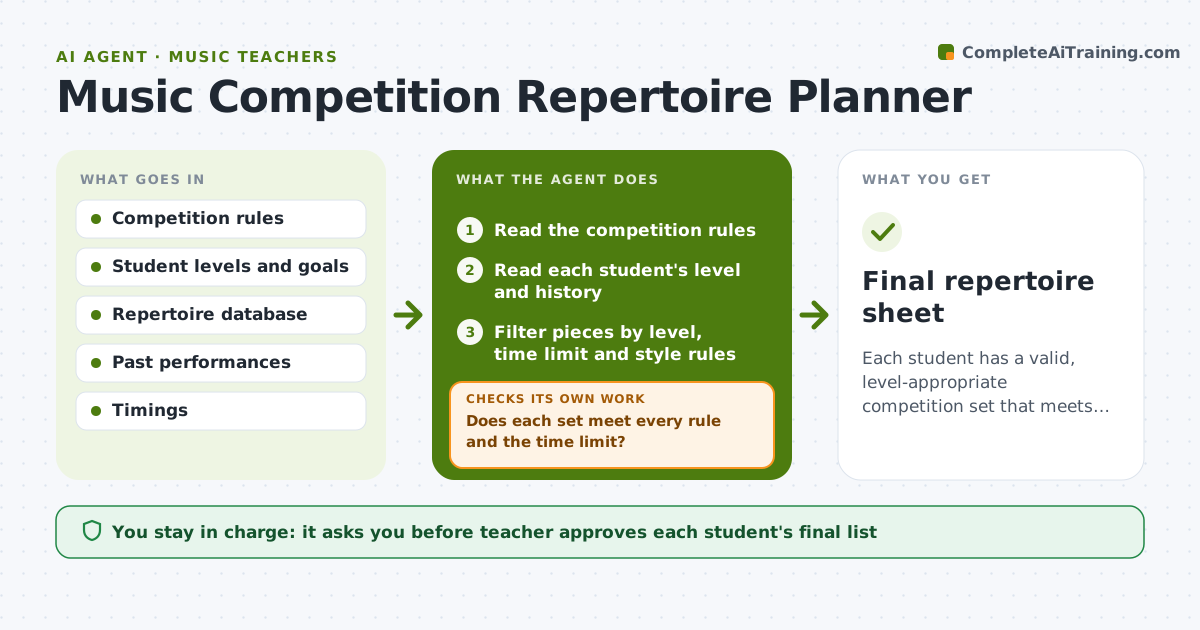
Each student has a valid, level-appropriate competition set that meets every rule, approved by the teacher.
What it does
A competition has rules for time limits, period requirements and age levels, and the teacher has to find pieces that fit each student. The agent reads the competition rules and each student's level, goals and past repertoire. It filters pieces by time limit, required style, difficulty and what the student already played, and proposes complete sets. After each change it rechecks totals and rule conflicts, such as two pieces from the same period or a total over the time limit, and loops until the set is valid. The teacher approves the final list. Edge case: a rule that bans pieces performed at last year's event, so the agent checks the student's history.
How it works
Follow the arrows from top to bottom. The orange dashed arrow is the loop: when a check fails, the agent goes back and tries again.
Read the steps as a list
- Competition and students selected
- Read the competition rules
- Read each student's level and history
- Filter pieces by level, time limit and style rules
- Build sets and total the time
- Does each set meet every rule and the time limit?If not: Replace the piece that breaks the rule and retotal. Back to step 5.
- Check the pieces against the student's past performance list
- Is each set possible to prepare before the date?If not: Swap in an easier or shorter piece. Back to step 5.
- Teacher approves the final list for each studentThe agent waits here for your OK.
- Send the list to students or parents
- Final repertoire sheet
How it decides
It keeps only pieces within the student's level and filters sets that break any rule, then ranks the rest by fit and preparation time.
- Total time must be under the limit with a 30 second margin
- Do not repeat a piece performed at the last event if banned
- Match difficulty to the student's grade
- Weeks needed per piece come from the teacher's estimate
Make it yours
Every agent is a starting point. You choose these settings for your own situation.
- Competition rules and time margin
- Weeks available to prepare
- Difficulty ceiling per student
- Which collections to draw from
What keeps you in control
It always asks you first
- Teacher approves each student's final list
- Teacher approves messages to families
Hard limits
- Never register students itself
- Do not recommend pieces beyond the student's level
It stops when
- Done: all students have approved valid sets
- Stop: the rules are unclear and the teacher must interpret them
Set it up
We guide you through the set-up, step by step
Members get the full set-up guide for this agent. No technical skills needed: you copy, paste and upload.
- One set of instructions to paste into your AI, with the clicks for ChatGPT, Claude, Microsoft 365 Copilot, Gemini and Grok
- The agent then walks you through connecting your own data, one source at a time
- A downloadable copy with the flow chart, the rules and the full guide