AI agent for hr generalists
New Hire Record Completeness Agent
Have every new hire fully set up by day one or know exactly what is missing
What it does
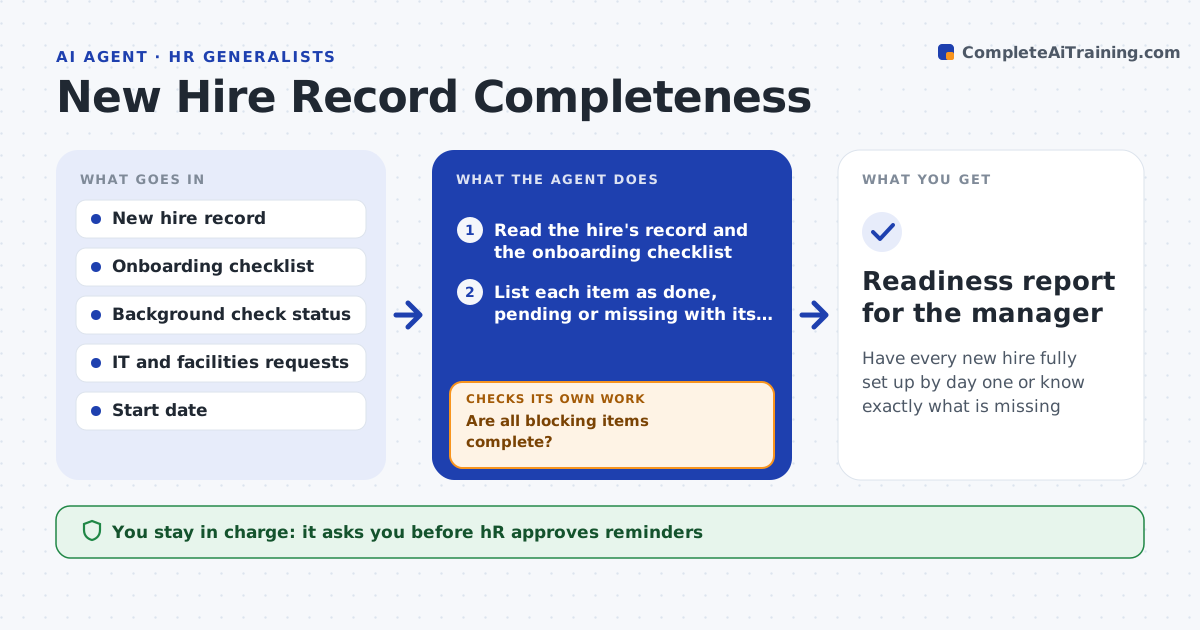
On day one the new hire has no laptop, the contract is unsigned and payroll has no tax form. A week before the start date, this agent checks the hire's record against the onboarding list: signed contract, personal and tax forms, background check, right-to-work documents, IT account and equipment requests, building access. It chases each missing item, by drafting a reminder to the hire, the manager or IT, and rechecks every day. If something is still missing the day before the start, it alerts HR with the impact, such as no laptop. It tracks whether alternatives exist, such as a loaner device. HR approves messages and any start date change. Edge case: a background check is delayed by the provider, so the agent asks HR whether the hire can start with limited access.
How it works
Follow the arrows from top to bottom. The orange dashed arrow is the loop: when a check fails, the agent goes back and tries again.
Read the steps as a list
- Seven days before a start date
- Read the hire's record and the onboarding checklist
- List each item as done, pending or missing with its owner
- Draft reminders for the owners of missing items
- HR approves the remindersThe agent waits here for your OK.
- Send the reminders
- Recheck the record each day
- Are all blocking items complete?If not: chase again with a shorter deadline; the day before start, alert HR with the impact. Back to step 6.
- Suggest options for any item still missing, such as a loaner laptop
- HR approves the options or a start date changeThe agent waits here for your OK.
- Readiness report for the manager
How it decides
It marks items as done, overdue or blocking, chases the overdue ones first and escalates blockers that would stop the hire from working.
- Treat contract, right-to-work, payroll forms and IT account as blocking
- Chase overdue items daily
- Alert HR the day before when any blocking item is open
- Never share personal data in reminders
Make it yours
Every agent is a starting point. You choose these settings for your own situation.
- Days before start (default 7)
- Blocking items list
- Reminder tone
- Escalation rules
- Systems to check
What keeps you in control
It always asks you first
- HR approves reminders
- HR approves any change to the start date or access plan
Hard limits
- Never send messages without HR approval
- Never include sensitive personal data in messages
It stops when
- Done: all blocking items are complete
- Stop: the start date arrives with a blocker and HR takes over
Set it up
We guide you through the set-up, step by step
Members get the full set-up guide for this agent. No technical skills needed: you copy, paste and upload.
- One set of instructions to paste into your AI, with the clicks for ChatGPT, Claude, Microsoft 365 Copilot, Gemini and Grok
- The agent then walks you through connecting your own data, one source at a time
- A downloadable copy with the flow chart, the rules and the full guide