AI agent for food scientists
Nutrition Label Calculation Agent
Accurate, compliant nutrition and allergen labeling for each formula version
What it does
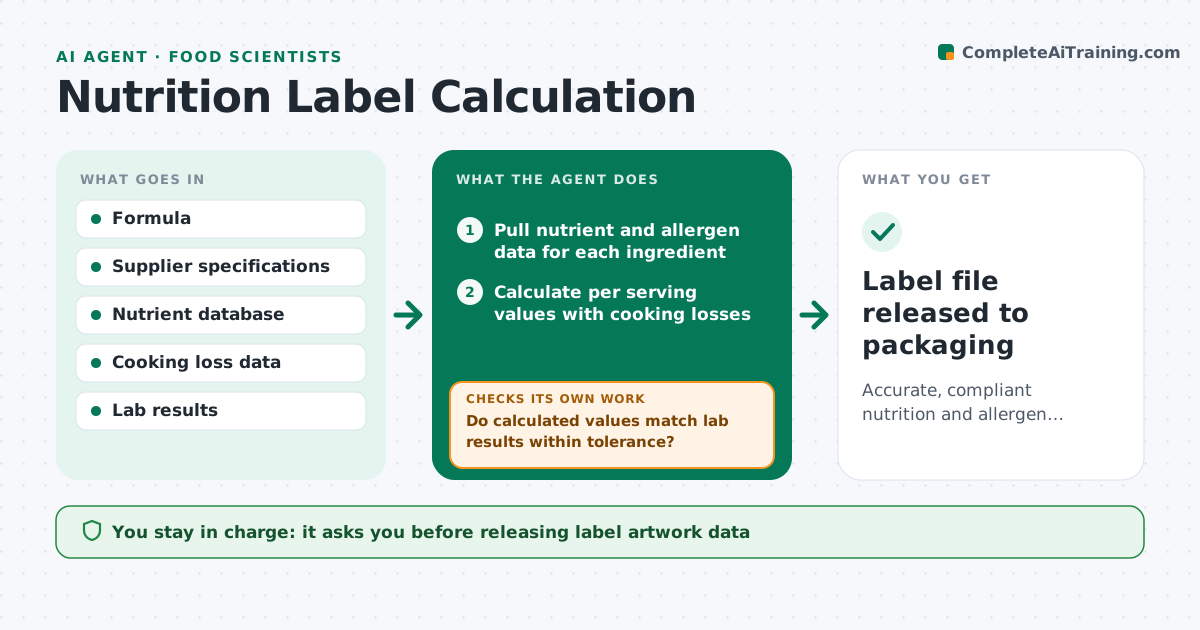
Every recipe change means a new nutrition panel, ingredient list and allergen statement, and a mistake can lead to a recall. When a formula is created or changed, this agent pulls nutrient and allergen data for each ingredient, using supplier specs before database values. It calculates per-serving values, adjusting for moisture lost during cooking. It applies the label rounding rules for your market and builds the ingredient list in weight order, declaring allergens from sub-ingredients too. When lab analysis is available, it compares results. If the difference is above tolerance, it checks ingredient data and loss factors and recalculates. The food scientist and regulatory staff approve the label before it goes to packaging. Edge case: a seasoning blend containing wheat is caught and declared, even though wheat is not a main ingredient.
How it works
Follow the arrows from top to bottom. The orange dashed arrow is the loop: when a check fails, the agent goes back and tries again.
Read the steps as a list
- Formula created or changed
- Pull nutrient and allergen data for each ingredient
- Calculate per serving values with cooking losses
- Apply rounding rules and build ingredient and allergen list
- Compare with lab analysis if available
- Do calculated values match lab results within tolerance?If not: check ingredient data and loss factors, then recalculate. Back to step 2.
- Food scientist and regulatory approve the labelThe agent waits here for your OK.
- Label file released to packaging
How it decides
It uses supplier data first, then databases, applies market rounding rules, and flags differences from lab results above tolerance.
- Use supplier spec values before database values
- Declare allergens from sub-ingredients
- Flag lab differences above tolerance
Make it yours
Every agent is a starting point. You choose these settings for your own situation.
- Market labeling rules
- Lab tolerance (default 20%)
- Data source priority
- Label output format
What keeps you in control
It always asks you first
- Releasing label artwork data
Hard limits
- Never releases labels without approval
- Never guesses allergen status
It stops when
- Done: label approved
- Stop: supplier spec missing for an ingredient; request it
Set it up
We guide you through the set-up, step by step
Members get the full set-up guide for this agent. No technical skills needed: you copy, paste and upload.
- One set of instructions to paste into your AI, with the clicks for ChatGPT, Claude, Microsoft 365 Copilot, Gemini and Grok
- The agent then walks you through connecting your own data, one source at a time
- A downloadable copy with the flow chart, the rules and the full guide