AI agent for office managers
Office Equipment Warranty and Lease Agent
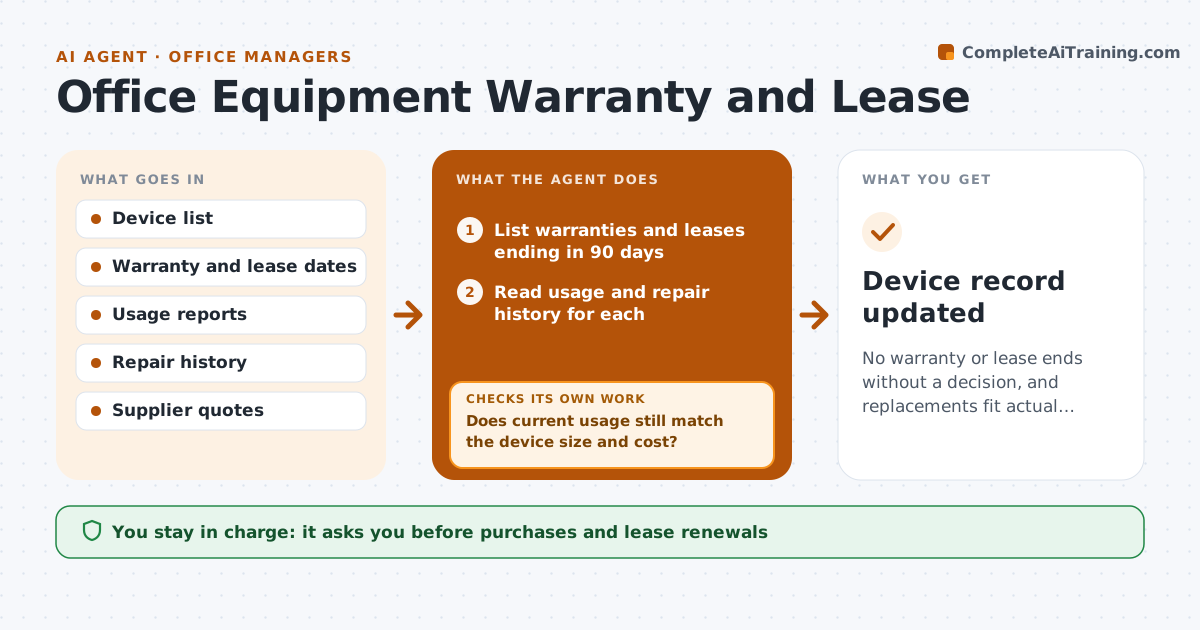
No warranty or lease ends without a decision, and replacements fit actual needs
What it does
Warranties and leases end unnoticed, and repairs cost more than they should. This agent records each device with its warranty, lease and service dates. It scans for upcoming ends and checks recent usage and repair history. It gathers quotes for replace or renew and compares total cost of each option. After a decision, it checks that the new warranty or lease is recorded and the old one closed. The manager approves purchases. Every recommendation shows the cost over the next three years. Edge case: a printer lease ends next month, but monthly print volume dropped by half, so the agent suggests a smaller model.
How it works
Follow the arrows from top to bottom. The orange dashed arrow is the loop: when a check fails, the agent goes back and tries again.
Read the steps as a list
- Weekly scan of device end dates
- List warranties and leases ending in 90 days
- Read usage and repair history for each
- Decide whether to renew, replace or retire
- Does current usage still match the device size and cost?If not: recheck the usage period and consider a smaller or larger option. Back to step 3.
- Request quotes from suppliers
- Compare total cost of each option
- Manager approves the purchaseThe agent waits here for your OK.
- Is the new warranty or lease recorded and the old one closed?If not: update the device record and chase the supplier paperwork. Back to step 7.
- Device record updated
How it decides
The agent compares total cost of renewing, replacing and doing nothing, using current usage and repair costs.
- Look 90 days ahead
- Suggest retire when repairs exceed 50 percent of replacement cost
- Get at least 2 quotes over $1,000
- Right-size when usage is under 50 percent
Make it yours
Every agent is a starting point. You choose these settings for your own situation.
- Look-ahead days (default 90)
- Quote threshold
- Right-sizing rule
- Device types covered
What keeps you in control
It always asks you first
- Purchases and lease renewals
Hard limits
- Never sign or order
- Never delete device records
It stops when
- Done: purchase or renewal recorded
- Stop: device list is missing
Set it up
We guide you through the set-up, step by step
Members get the full set-up guide for this agent. No technical skills needed: you copy, paste and upload.
- One set of instructions to paste into your AI, with the clicks for ChatGPT, Claude, Microsoft 365 Copilot, Gemini and Grok
- The agent then walks you through connecting your own data, one source at a time
- A downloadable copy with the flow chart, the rules and the full guide