AI agent for customer onboarding specialists
Onboarding-to-Success Handoff Agent
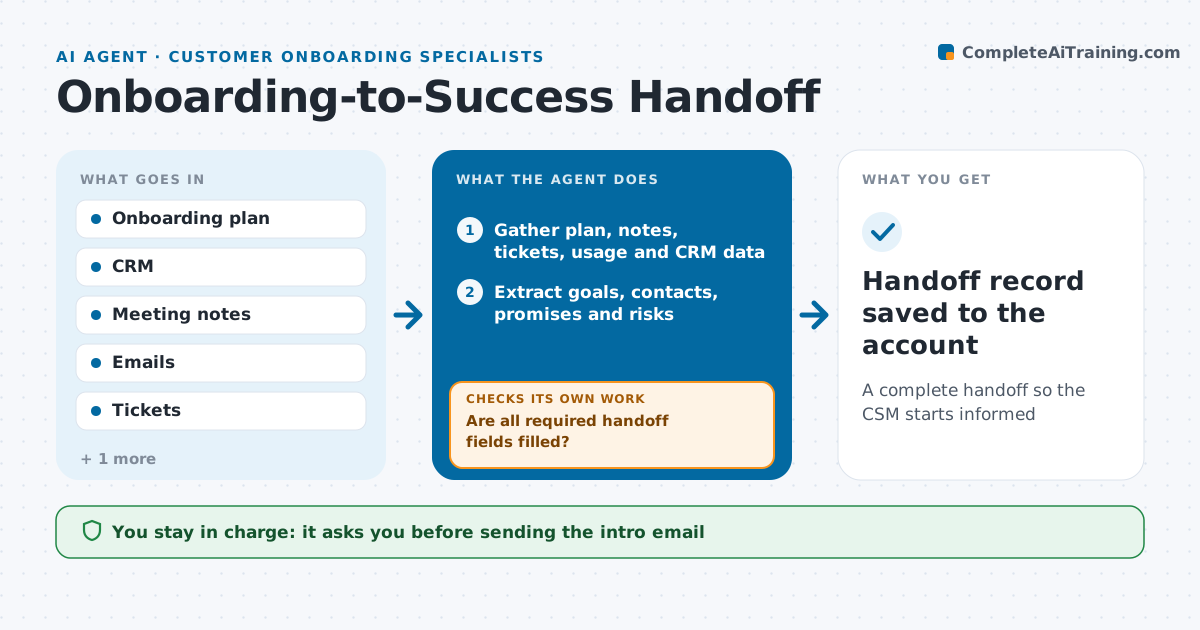
A complete handoff so the CSM starts informed
What it does
When onboarding ends, promises and context often get lost between the onboarding specialist and the customer success manager. As onboarding nears its end, this agent compiles a handoff record: goals and whether each was reached, key contacts and roles, adoption numbers, open issues, promises made during sales and onboarding, and risks. It reads meeting notes, emails and tickets to find promises. It checks the record against the onboarding plan and the CRM. If anything is missing, such as no executive sponsor recorded, it asks the specialist and checks again. It drafts the handoff meeting agenda and a customer-facing introduction email. Both the specialist and the CSM approve before the customer is told. Edge case: a promise of a feature still on the roadmap is highlighted as a renewal risk.
How it works
Follow the arrows from top to bottom. The orange dashed arrow is the loop: when a check fails, the agent goes back and tries again.
Read the steps as a list
- Onboarding nearing end
- Gather plan, notes, tickets, usage and CRM data
- Extract goals, contacts, promises and risks
- Mark roadmap promises as renewal risks
- Are all required handoff fields filled?If not: ask the specialist for the missing items and update the record. Back to step 3.
- Draft handoff record, meeting agenda and intro email
- Does every open issue and promise appear in the agenda?If not: add the missing items to the agenda. Back to step 6.
- Specialist and CSM approve the handoffThe agent waits here for your OK.
- Handoff record saved to the account
How it decides
It requires goals, contacts, adoption, open issues and promises to be filled before the handoff is ready.
- Roadmap promises are flagged as renewal risks
- No handoff without an executive sponsor recorded
- Open issues carry their owner and date
Make it yours
Every agent is a starting point. You choose these settings for your own situation.
- Required handoff fields
- Timing before close
- Agenda template
- Who approves
What keeps you in control
It always asks you first
- Sending the intro email
- Marking onboarding closed
Hard limits
- Never sends emails without approval
- Never changes account ownership
It stops when
- Done: handoff complete
- Stop: onboarding extended
Set it up
We guide you through the set-up, step by step
Members get the full set-up guide for this agent. No technical skills needed: you copy, paste and upload.
- One set of instructions to paste into your AI, with the clicks for ChatGPT, Claude, Microsoft 365 Copilot, Gemini and Grok
- The agent then walks you through connecting your own data, one source at a time
- A downloadable copy with the flow chart, the rules and the full guide