AI agent for therapists
Outcome Measure Progress Tracking Agent
Every client's progress reviewed before each session, with non-improvement and risk items flagged
What it does
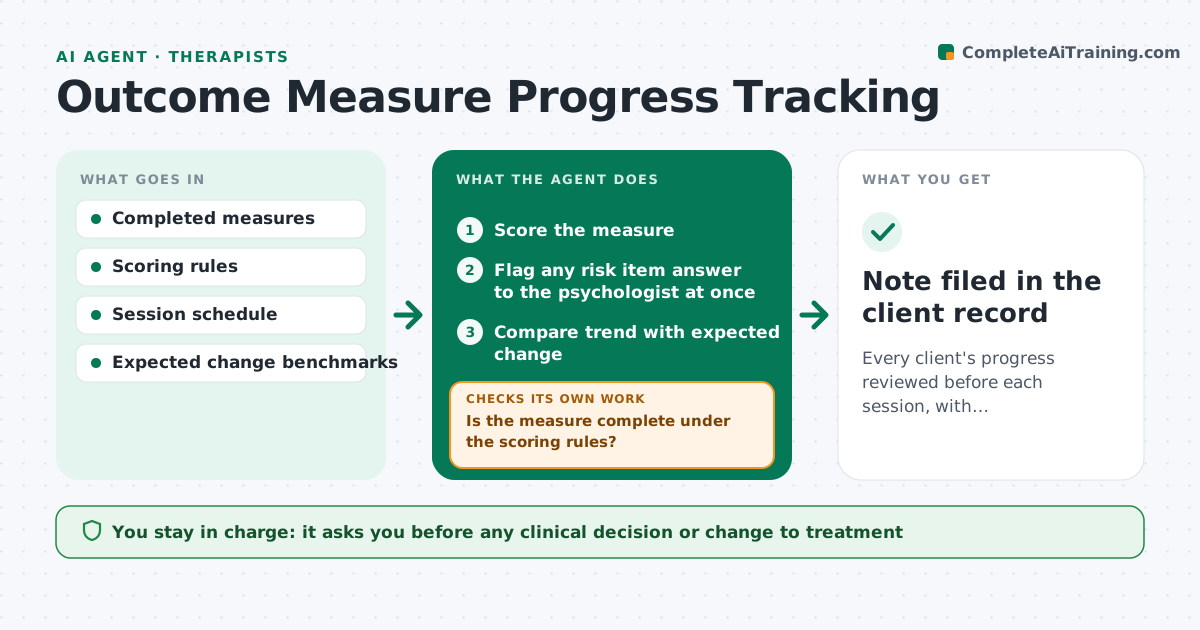
Many psychologists ask clients to complete short measures, such as depression or anxiety scales, before sessions, but trends are hard to see across weeks. When a client completes a measure, this agent scores it and checks that it is complete under the scoring rules. Measures with too many skipped items are marked incomplete, and the client is asked to finish before the session. Any answer on a risk item is flagged to the psychologist at once, outside the normal summary. The agent then adds the score to the client's trend chart and compares it with expected change for that point in treatment. Clients not improving or getting worse are flagged. It prepares a short pre-session note with the chart. The psychologist interprets the scores and decides what to do clinically. Edge case: a measure with skipped items is scored only if the rules allow it.
How it works
Follow the arrows from top to bottom. The orange dashed arrow is the loop: when a check fails, the agent goes back and tries again.
Read the steps as a list
- Client completes a measure
- Score the measure
- Is the measure complete under the scoring rules?If not: mark incomplete and ask the client to finish it before the session. Back to step 2.
- Flag any risk item answer to the psychologist at once
- Compare trend with expected change
- Prepare pre-session note with chart
- Psychologist reviews and decides on clinical actionThe agent waits here for your OK.
- Note filed in the client record
How it decides
It flags clients whose change is below the expected range for their session number, and flags any risk item answer immediately.
- Flag risk item answers immediately
- Flag change below the expected range
- Never score measures with too many missing items
Make it yours
Every agent is a starting point. You choose these settings for your own situation.
- Measures used
- Expected change benchmarks
- How risk alerts are delivered
- Days before session to prepare notes
What keeps you in control
It always asks you first
- Any clinical decision or change to treatment
Hard limits
- Never interprets scores clinically or contacts clients about risk
- Keeps all data inside the practice system
It stops when
- Done: pre-session note filed
- Stop: measure not completed; tell the psychologist
Set it up
We guide you through the set-up, step by step
Members get the full set-up guide for this agent. No technical skills needed: you copy, paste and upload.
- One set of instructions to paste into your AI, with the clicks for ChatGPT, Claude, Microsoft 365 Copilot, Gemini and Grok
- The agent then walks you through connecting your own data, one source at a time
- A downloadable copy with the flow chart, the rules and the full guide