AI agent for medical coders
Overpayment Identification and Refund Agent
Every overpayment is confirmed, tracked against its deadline and returned with an approved explanation.
What it does
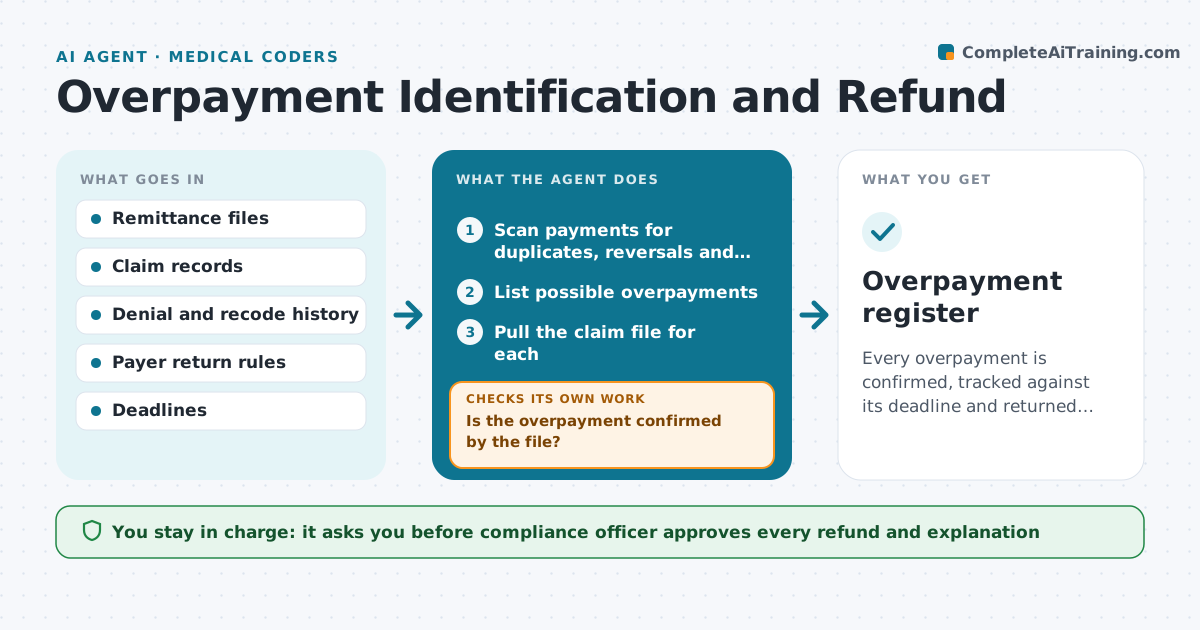
Payments received in error must be found and returned within legal windows, but they hide in remittances. The agent scans payment files for duplicate payments, payments after a denial was reversed, and services that were later recoded, and starts a clock for each case. It verifies each one against the claim file, then drafts the refund request and a plain explanation. It rechecks that the case is not already adjusted, and if it was, it removes the case from the list. It tells the officer how many days remain in each legal window and puts the closest deadlines first. It never repays anything itself. The compliance officer approves any refund. Edge case: an apparent duplicate that is really two separate services on the same day.
How it works
Follow the arrows from top to bottom. The orange dashed arrow is the loop: when a check fails, the agent goes back and tries again.
Read the steps as a list
- Remittance batch received
- Scan payments for duplicates, reversals and recodes
- List possible overpayments
- Pull the claim file for each
- Is the overpayment confirmed by the file?If not: Close the case as valid and note why. Back to step 4.
- Start a deadline clock for each confirmed case
- Check whether the amount has already been adjusted
- Is the balance still owed to the payer?If not: Update the case and remove it from the refund list. Back to step 4.
- Draft the refund request and explanation
- Compliance officer approves any refundThe agent waits here for your OK.
- Overpayment register
How it decides
It flags a payment as a possible overpayment when it exceeds the allowed amount or repeats a paid service, and confirms with the claim file before any refund.
- Start the clock on the date of identification
- Alert at 30 days before the legal deadline
- Check same day services before calling a duplicate
- Refund only the confirmed amount
Make it yours
Every agent is a starting point. You choose these settings for your own situation.
- Deadline alert days (default 30)
- Payers and their rules
- Types of overpayment to scan
- Dollar level for review
What keeps you in control
It always asks you first
- Compliance officer approves every refund and explanation
Hard limits
- Never issue a refund itself
- Do not keep disputed funds unrecorded
It stops when
- Done: refund approved and recorded
- Stop: legal window may be missed and the officer must decide
Set it up
We guide you through the set-up, step by step
Members get the full set-up guide for this agent. No technical skills needed: you copy, paste and upload.
- One set of instructions to paste into your AI, with the clicks for ChatGPT, Claude, Microsoft 365 Copilot, Gemini and Grok
- The agent then walks you through connecting your own data, one source at a time
- A downloadable copy with the flow chart, the rules and the full guide