AI agent for sports coachs
Parent Concern Log and Response Agent
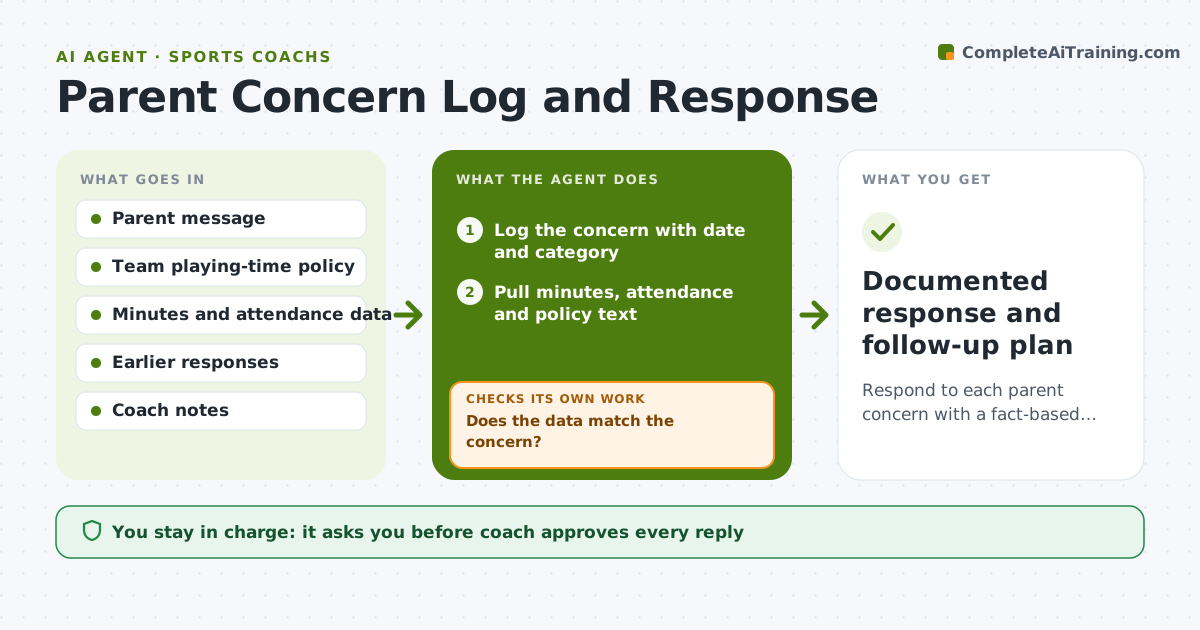
Respond to each parent concern with a fact-based, consistent and documented answer
What it does
A parent texts after the game that their daughter did not play enough. The coach answers from memory. This agent logs each concern with a date and category. It matches the concern against the team's written playing-time policy and against the actual data: minutes played, attendance and practice effort. It then drafts talking points with facts. If the data does not match the concern, for example the player played 40 percent and the policy sets 33, it flags that and shows both figures. If the data does match, it suggests an acknowledgment and next step. It checks that the draft is consistent with earlier answers to other parents. The coach approves the reply and any meeting invitation. Edge case: a concern about safety is routed straight to the coach.
How it works
Follow the arrows from top to bottom. The orange dashed arrow is the loop: when a check fails, the agent goes back and tries again.
Read the steps as a list
- Parent concern received
- Log the concern with date and category
- Pull minutes, attendance and policy text
- Does the data match the concern?If not: Recheck the data for missing games, then flag the mismatch to the coach. Back to step 3.
- Compare with earlier responses for consistency
- Draft talking points and a reply
- Is the reply consistent with the policy and prior answers?If not: Revise the wording and facts, then recheck. Back to step 6.
- Coach approves the reply and any meeting invitationThe agent waits here for your OK.
- Log the outcome and any follow-up date
- Documented response and follow-up plan
How it decides
It compares the concern with the policy and the record. If the record supports the concern, it proposes a fix; if not, it presents the facts kindly.
- Treat any safety or abuse concern as urgent and send it to the coach unaltered
- Show facts with dates, never opinions about other players
- Offer a meeting when the second concern on the same topic arrives
- Use the same policy language for every family
Make it yours
Every agent is a starting point. You choose these settings for your own situation.
- Playing-time policy text (default the team's written policy)
- Meeting offer rule (default after the second concern)
- Reply tone (default calm and brief)
- Data fields used (default minutes, attendance)
What keeps you in control
It always asks you first
- Coach approves every reply
- Coach approves meeting invitations
Hard limits
- Never send a reply without coach approval
- Never criticize other players or families
- Keep logs private to coaching staff
It stops when
- Done: Reply sent by the coach and logged
- Stop: Concern involves safety or misconduct, so hand to the coach and the club
Set it up
We guide you through the set-up, step by step
Members get the full set-up guide for this agent. No technical skills needed: you copy, paste and upload.
- One set of instructions to paste into your AI, with the clicks for ChatGPT, Claude, Microsoft 365 Copilot, Gemini and Grok
- The agent then walks you through connecting your own data, one source at a time
- A downloadable copy with the flow chart, the rules and the full guide