AI agent for clinical research coordinators
Participant Retention and Visit Window Agent
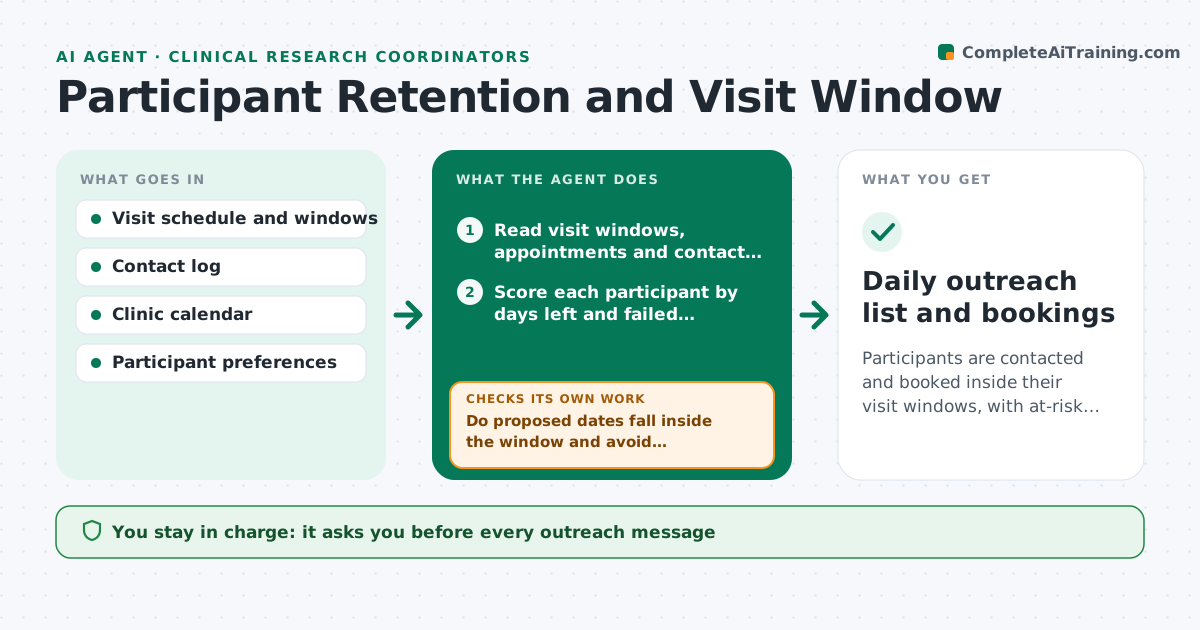
Participants are contacted and booked inside their visit windows, with at-risk cases caught early
What it does
Long studies lose participants because follow-up is late or a visit window closes before anyone notices. This agent reads each participant's visit schedule, window dates and contact history. It identifies those at risk, such as a window closing within 10 days with no appointment, or two failed contact attempts. It drafts a reminder and offers scheduling options that fit the window, the clinic calendar and the participant's stated preferences. It checks proposed dates against other windows and room availability. After a reply, it reschedules or tries another channel. The coordinator approves every message. Edge case: a participant works nights, so the agent proposes late afternoon slots even though the clinic prefers mornings.
How it works
Follow the arrows from top to bottom. The orange dashed arrow is the loop: when a check fails, the agent goes back and tries again.
Read the steps as a list
- Daily window scan
- Read visit windows, appointments and contact history
- Score each participant by days left and failed contacts
- Check clinic calendar for open slots
- Draft a reminder with two scheduling options
- Do proposed dates fall inside the window and avoid conflicts?If not: pick other slots or request a window extension review. Back to step 4.
- Coordinator approves outreachThe agent waits here for your OK.
- Log replies and bookings
- Did the participant confirm within 3 days?If not: try the next channel, then flag the participant for a coordinator call. Back to step 3.
- Update the at-risk list
- Daily outreach list and bookings
How it decides
Risk rises as the window closes and as contact attempts fail. Dates must fall inside the window and have a free slot.
- Flag a participant when fewer than 10 days remain in the window
- Try a second channel after 2 days without reply
- Flag after 3 failed attempts for a coordinator call
- Never offer a date outside the protocol window
Make it yours
Every agent is a starting point. You choose these settings for your own situation.
- Days-left warning level (default 10)
- Contact channels and order
- Preferred time slots
- Failed attempts before a call (default 3)
What keeps you in control
It always asks you first
- Every outreach message
- Any request to extend a window
Hard limits
- Never contacts a participant without approval
- Never offers dates outside the window
It stops when
- Done: visit booked or participant reviewed
- Stop: participant withdraws or asks not to be contacted
Set it up
We guide you through the set-up, step by step
Members get the full set-up guide for this agent. No technical skills needed: you copy, paste and upload.
- One set of instructions to paste into your AI, with the clicks for ChatGPT, Claude, Microsoft 365 Copilot, Gemini and Grok
- The agent then walks you through connecting your own data, one source at a time
- A downloadable copy with the flow chart, the rules and the full guide