AI agent for channel partner managers
Partner Certification Expiry Agent
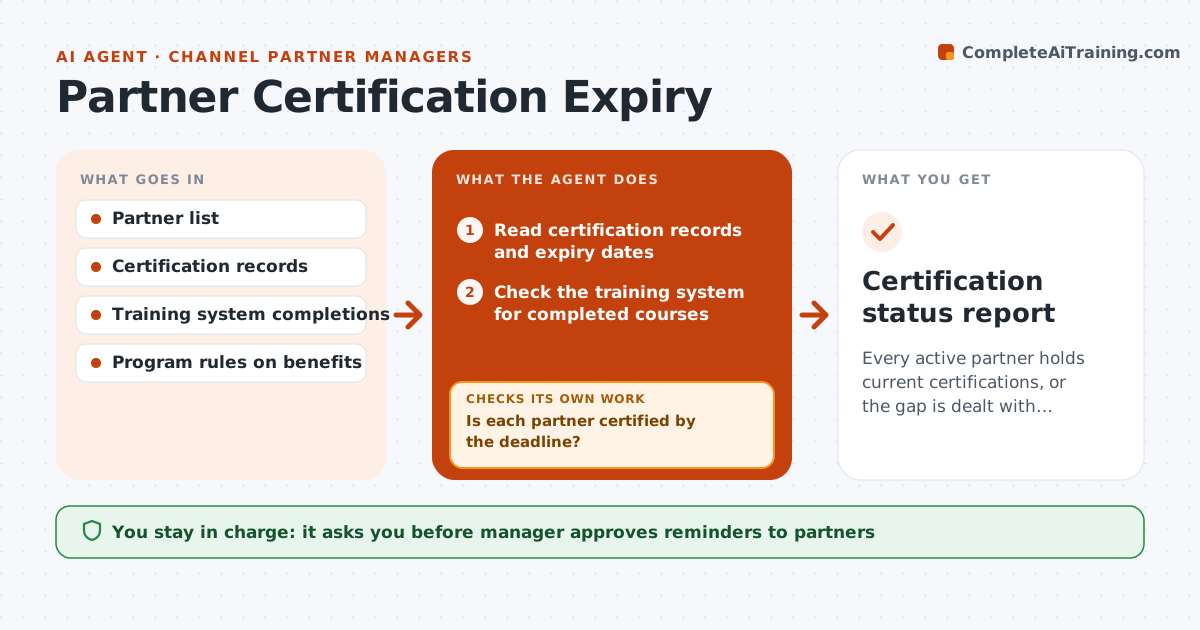
Every active partner holds current certifications, or the gap is dealt with deliberately
What it does
Partners that are no longer certified keep selling and supporting the product, often with out-of-date knowledge. This agent lists each partner's certifications and expiry dates every month and checks the training system for who has completed renewal. It drafts reminder messages to the partner contact at 90, 60 and 30 days before expiry, and checks completion after each. Partners who miss the deadline are flagged with the benefit that depends on certification, such as listing, discounts or lead flow. It prepares the manager's note on each case. The manager approves any loss of benefits or status. Edge case: the trainee finished the course but the system did not update, so the agent asks for the certificate.
How it works
Follow the arrows from top to bottom. The orange dashed arrow is the loop: when a check fails, the agent goes back and tries again.
Read the steps as a list
- Monthly review begins
- Read certification records and expiry dates
- Check the training system for completed courses
- List partners expiring within 90 days
- Draft reminder messages for those not started
- Manager approves remindersThe agent waits here for your OK.
- Send reminders and log them
- Is each partner certified by the deadline?If not: send a final reminder with a proof request and flag them to the manager. Back to step 3.
- Draft a note on each partner still uncertified and the benefit at stake
- Manager approves any loss of benefits or statusThe agent waits here for your OK.
- Certification status report
How it decides
A partner is at risk at 90 days before expiry with no activity. They are flagged at deadline if the training system shows no completion and no certificate is provided.
- Send reminders at 90, 60 and 30 days
- Ask for a certificate when the system shows no completion
- Flag a partner the day after expiry
- Link the flag to the program rule on benefits
Make it yours
Every agent is a starting point. You choose these settings for your own situation.
- Reminder schedule (default 90, 60, 30 days)
- Which certifications to track
- Who receives the reminders
- Benefit rules
What keeps you in control
It always asks you first
- Manager approves reminders to partners
- Manager approves any loss of benefits or status
Hard limits
- Never remove benefits without approval
- Do not share one partner's status with another
- Keep a log of every reminder
It stops when
- Done: all partners certified or decisions made
- Stop: partner disputes the finding and the manager takes over
Set it up
We guide you through the set-up, step by step
Members get the full set-up guide for this agent. No technical skills needed: you copy, paste and upload.
- One set of instructions to paste into your AI, with the clicks for ChatGPT, Claude, Microsoft 365 Copilot, Gemini and Grok
- The agent then walks you through connecting your own data, one source at a time
- A downloadable copy with the flow chart, the rules and the full guide