AI agent for vp of sales
Reseller and Channel Sales Report Reconciliation Agent
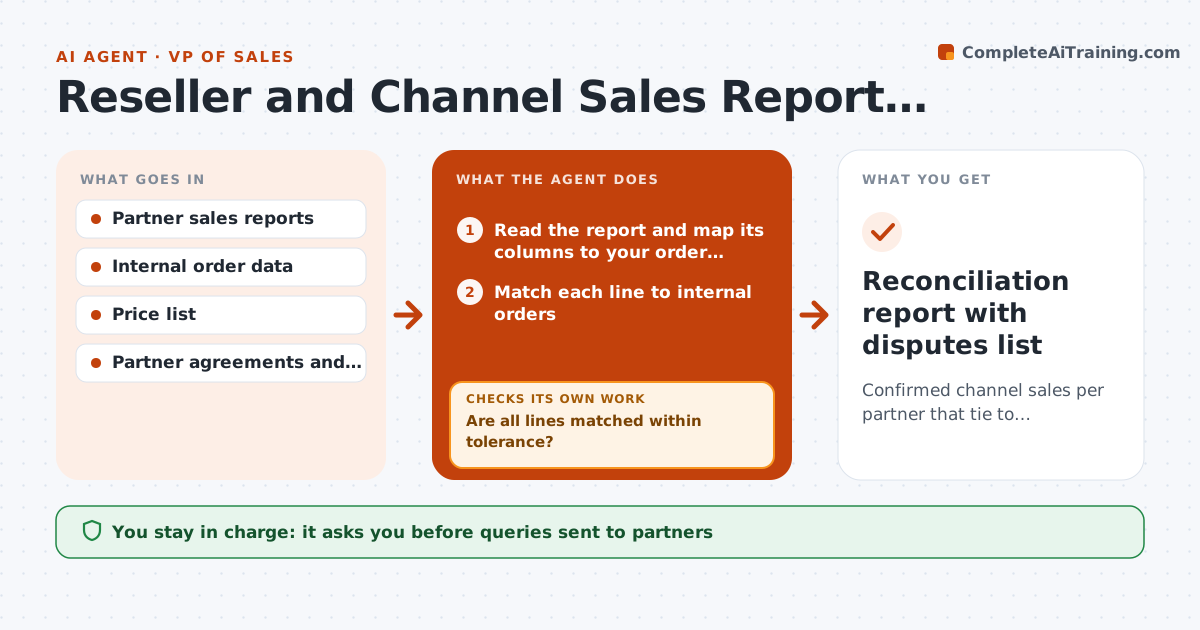
Confirmed channel sales per partner that tie to internal records, with every difference explained or disputed.
What it does
Resellers send monthly sales reports in their own formats, and the numbers never match your orders. This agent loads each partner report, matches every line to your orders by order number, product and amount, and lists differences such as missing lines, wrong quantities and price mismatches. It sends a query for each unresolved line to the partner contact as a draft, waits for replies and rechecks the match each time. When everything is explained, it totals confirmed sales per partner and sets them against targets and rebate tiers. You approve any dispute or credit. Edge case: sales that cross a month boundary are matched by ship date and noted, so they are not counted twice.
How it works
Follow the arrows from top to bottom. The orange dashed arrow is the loop: when a check fails, the agent goes back and tries again.
Read the steps as a list
- Partner report received
- Read the report and map its columns to your order fields
- Match each line to internal orders
- Are all lines matched within tolerance?If not: try looser matches such as date window and product aliases, then list what is left. Back to step 3.
- Classify the leftover differences
- Draft a query to the partner for each unresolved line
- VP approves queries sent to the partnerThe agent waits here for your OK.
- Read the partner replies and rematch
- Are remaining differences below the dispute threshold?If not: draft a follow-up query or escalate to the partner manager. Back to step 8.
- Total confirmed sales and compare to target and rebate tier
- Reconciliation report with disputes list
How it decides
A line is matched when order, product, quantity and amount agree within tolerance. Remaining differences are classed as missing, extra or price variance.
- Amount difference under 1 percent: accept and note it
- Report line with no matching order: ask the partner for proof
- Partner reports fewer units than shipped: query before rebate calculation
- Total variance over the dispute threshold: prepare a dispute for the VP
Make it yours
Every agent is a starting point. You choose these settings for your own situation.
- Matching tolerance (default 1 percent)
- Dispute threshold in dollars
- Partner report formats
- Query wording and language
- Rebate tier rules
What keeps you in control
It always asks you first
- Queries sent to partners
- Any dispute or credit
- Rebate payments
Hard limits
- Never pay a rebate or credit without approval
- Never send a partner another partner's data
It stops when
- Done: all lines matched or logged as disputes
- Stop: partner does not reply after two queries
Set it up
We guide you through the set-up, step by step
Members get the full set-up guide for this agent. No technical skills needed: you copy, paste and upload.
- One set of instructions to paste into your AI, with the clicks for ChatGPT, Claude, Microsoft 365 Copilot, Gemini and Grok
- The agent then walks you through connecting your own data, one source at a time
- A downloadable copy with the flow chart, the rules and the full guide