AI agent for channel partner managers
Partner Onboarding Milestone Agent
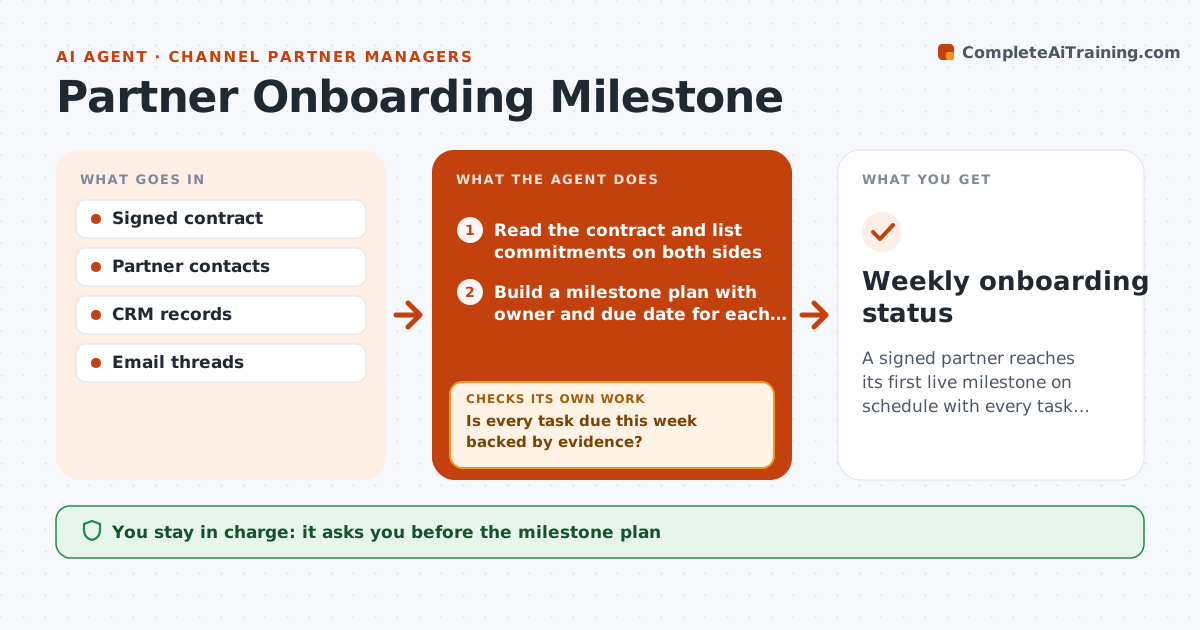
A signed partner reaches its first live milestone on schedule with every task owned and tracked.
What it does
A partner signs, everyone celebrates, and then nothing happens for six weeks because nobody owns the first steps. This agent starts when the contract is signed. It reads the contract for commitments such as training, listing, integration and first deal targets, and builds a milestone plan with an owner and date on each side. Every week it checks email and the CRM for evidence that each task moved. Overdue steps are flagged, and it drafts a nudge to the right owner at your company or the partner. It rechecks after each reply and updates the plan. You approve every message that goes to the partner. Edge case: if a task is blocked by the partner's own approval process, it sets a longer date rather than nagging.
How it works
Follow the arrows from top to bottom. The orange dashed arrow is the loop: when a check fails, the agent goes back and tries again.
Read the steps as a list
- Contract signed
- Read the contract and list commitments on both sides
- Build a milestone plan with owner and due date for each task
- VP approves the plan and ownersThe agent waits here for your OK.
- Each week scan email and CRM for evidence on each task
- Is every task due this week backed by evidence?If not: mark the task overdue and gather more context from the thread. Back to step 5.
- Draft a nudge to the task owner with the exact ask and date
- VP approves messages to the partnerThe agent waits here for your OK.
- Did the owner respond and the task move?If not: escalate to the partner sponsor or your VP after the second missed date. Back to step 5.
- Update plan and dates, note blockers
- Weekly onboarding status
How it decides
It marks a task done only with evidence such as an email, a ticket or a CRM entry. Otherwise the task stays open and is chased by owner and age.
- Task overdue by 3 days: friendly nudge to the owner
- Overdue by 10 days: escalate to the sponsor on that side
- Task needs partner approval cycle: extend date by that cycle length and note it
- All milestones done: close onboarding and hand over to account management
Make it yours
Every agent is a starting point. You choose these settings for your own situation.
- Milestone template by partner type
- Days before a nudge and an escalation (default 3 and 10)
- Tone for partner messages
- Systems to scan for evidence
- Handover owner after onboarding
What keeps you in control
It always asks you first
- The milestone plan
- Every message to the partner
- Marking onboarding complete
Hard limits
- Never send a message to the partner without approval
- Never mark a task done without evidence
It stops when
- Done: all milestones met and handed over
- Stop: partner pauses the relationship, VP decides
Set it up
We guide you through the set-up, step by step
Members get the full set-up guide for this agent. No technical skills needed: you copy, paste and upload.
- One set of instructions to paste into your AI, with the clicks for ChatGPT, Claude, Microsoft 365 Copilot, Gemini and Grok
- The agent then walks you through connecting your own data, one source at a time
- A downloadable copy with the flow chart, the rules and the full guide