AI agent for channel partner managers
Partner Co-Marketing Campaign Tracker Agent
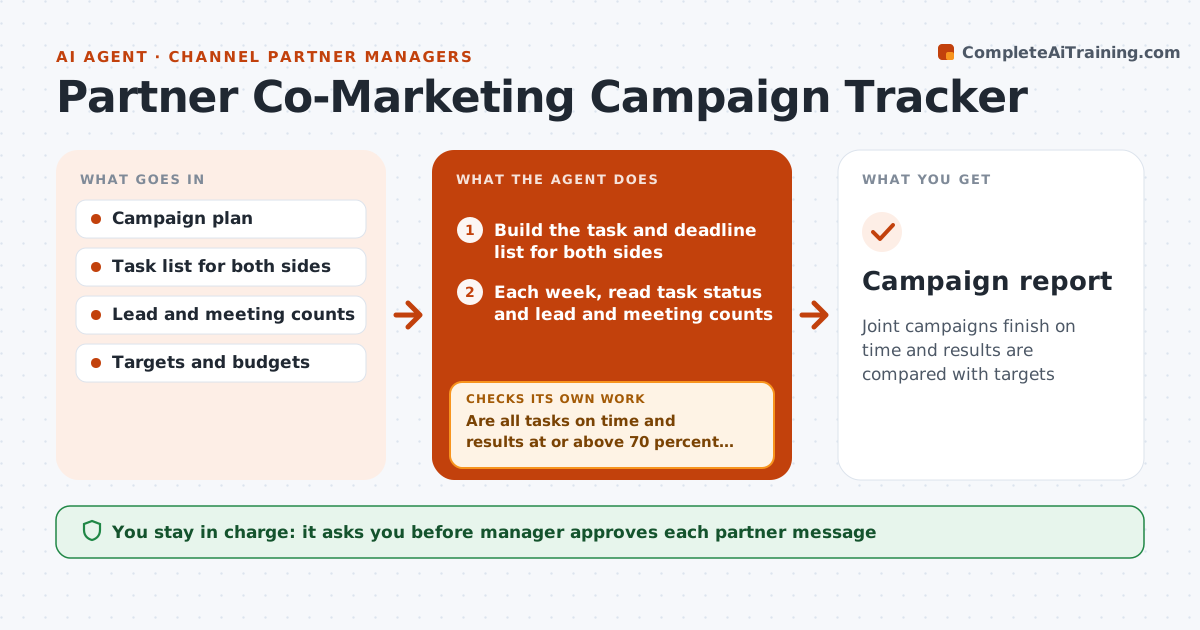
Joint campaigns finish on time and results are compared with targets
What it does
A joint campaign with a partner has many parts: emails, landing pages, events, speakers and lists. Either side can slip, and no one notices until the campaign date. This agent tracks every task, asset and deadline on both sides, and compares weekly leads and meetings against the campaign targets. It flags what is behind schedule and what the shortfall means for results. It drafts a nudge to the partner for their tasks and rechecks after the next send. When the campaign ends, it builds a report of results compared with targets and cost. The manager approves partner messages and the end report. Edge case: the partner's list was smaller than agreed, so the agent resets the lead target.
How it works
Follow the arrows from top to bottom. The orange dashed arrow is the loop: when a check fails, the agent goes back and tries again.
Read the steps as a list
- Joint campaign approved
- Build the task and deadline list for both sides
- Each week, read task status and lead and meeting counts
- Compare tasks and results with plan and targets
- Are all tasks on time and results at or above 70 percent of target?If not: list what is behind and its effect on results. Back to step 3.
- Draft a nudge to the partner for their open tasks
- Manager approves partner messagesThe agent waits here for your OK.
- Send and log; recheck after the next send
- Did the partner catch up and did results improve?If not: revise the nudge or propose a change to the plan. Back to step 4.
- Manager approves the end-of-campaign reportThe agent waits here for your OK.
- Campaign report
How it decides
A task is behind when it is past due or will miss a dependent date. A campaign is behind plan when weekly leads are under 70 percent of target.
- Mark a task behind when it is past due
- Mark results behind below 70 percent of the weekly target
- Reset targets when the agreed inputs change, with a note
- Compare cost per lead with other campaigns
Make it yours
Every agent is a starting point. You choose these settings for your own situation.
- Behind threshold (default 70% of target)
- Check day
- Task list template
- Report format
What keeps you in control
It always asks you first
- Manager approves each partner message
- Manager approves the final report
Hard limits
- Never message the partner without approval
- Do not alter the other side's tasks
- Show data sources for every figure
It stops when
- Done: campaign ends and the report is approved
- Stop: partner or manager cancels the campaign
Set it up
We guide you through the set-up, step by step
Members get the full set-up guide for this agent. No technical skills needed: you copy, paste and upload.
- One set of instructions to paste into your AI, with the clicks for ChatGPT, Claude, Microsoft 365 Copilot, Gemini and Grok
- The agent then walks you through connecting your own data, one source at a time
- A downloadable copy with the flow chart, the rules and the full guide