AI agent for channel partner managers
Partner Escalation and Issue Tracker Agent
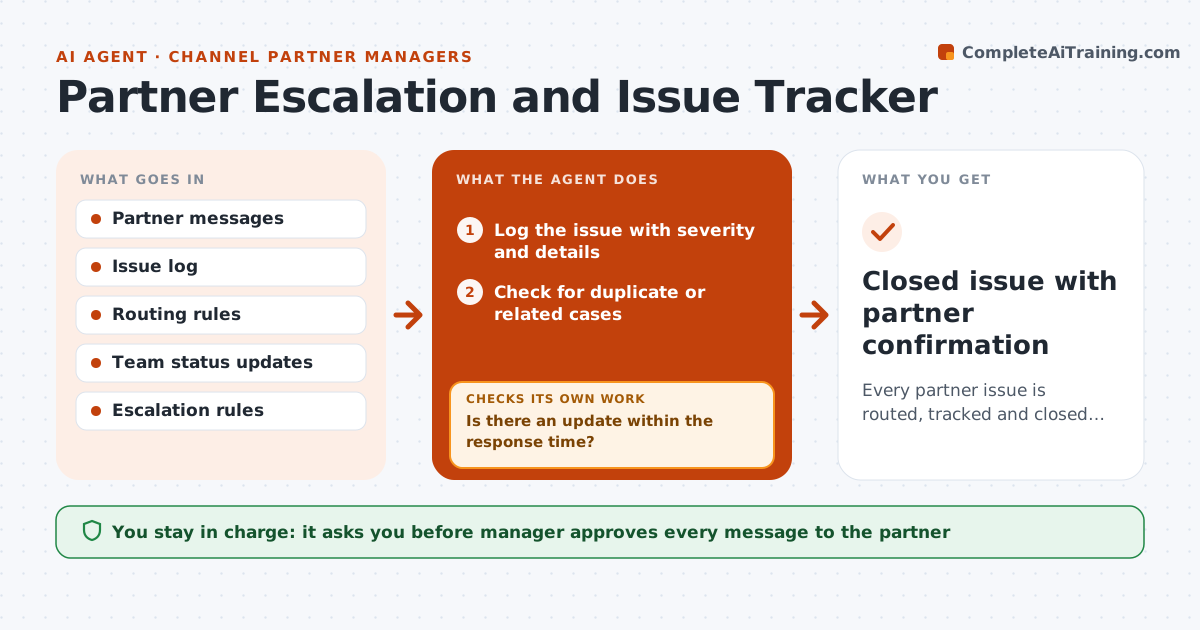
Every partner issue is routed, tracked and closed with the partner's confirmation
What it does
A partner reports a bug, a billing issue or a missing feature, and the message goes to three teams and none of them answer. This agent logs each issue with the partner, severity and details and routes it to the right team: support, product or sales. It tracks status, and checks whether the partner confirms the fix. If an issue is unresolved after the set time, it escalates up the chain and drafts a status message to the partner. It checks that status messages match the internal record before sending. The manager approves messages to the partner. Edge case: the partner reports the same problem twice through two channels, so the agent merges the cases.
How it works
Follow the arrows from top to bottom. The orange dashed arrow is the loop: when a check fails, the agent goes back and tries again.
Read the steps as a list
- Partner raises an issue
- Log the issue with severity and details
- Check for duplicate or related cases
- Route it to support, product or sales
- Track the status updates from the owner
- Is there an update within the response time?If not: escalate to the next level and note the delay. Back to step 3.
- Draft a status message to the partner
- Does the message match the internal record?If not: correct it before approval. Back to step 6.
- Manager approves messages to the partnerThe agent waits here for your OK.
- Ask the partner to confirm the fix
- Closed issue with partner confirmation
How it decides
Routing follows the issue type and severity. An issue escalates when it passes its response time with no update.
- Respond within 1 day for high severity, 3 days for others
- Merge cases about the same problem
- Escalate when a response time is missed
- Close only on partner confirmation or after two reminders
Make it yours
Every agent is a starting point. You choose these settings for your own situation.
- Severity levels and times
- Routing rules
- Escalation chain
- Message tone
What keeps you in control
It always asks you first
- Manager approves every message to the partner
Hard limits
- Never message the partner without approval
- Do not share other partners' issues
- Keep the log complete
It stops when
- Done: partner confirms the issue is fixed
- Stop: issue becomes a contract dispute for the manager
Set it up
We guide you through the set-up, step by step
Members get the full set-up guide for this agent. No technical skills needed: you copy, paste and upload.
- One set of instructions to paste into your AI, with the clicks for ChatGPT, Claude, Microsoft 365 Copilot, Gemini and Grok
- The agent then walks you through connecting your own data, one source at a time
- A downloadable copy with the flow chart, the rules and the full guide