AI agent for channel partner managers
Partner Price Floor Compliance Agent
Check partner prices against the policy, record violations with evidence and track notices to resolution
What it does
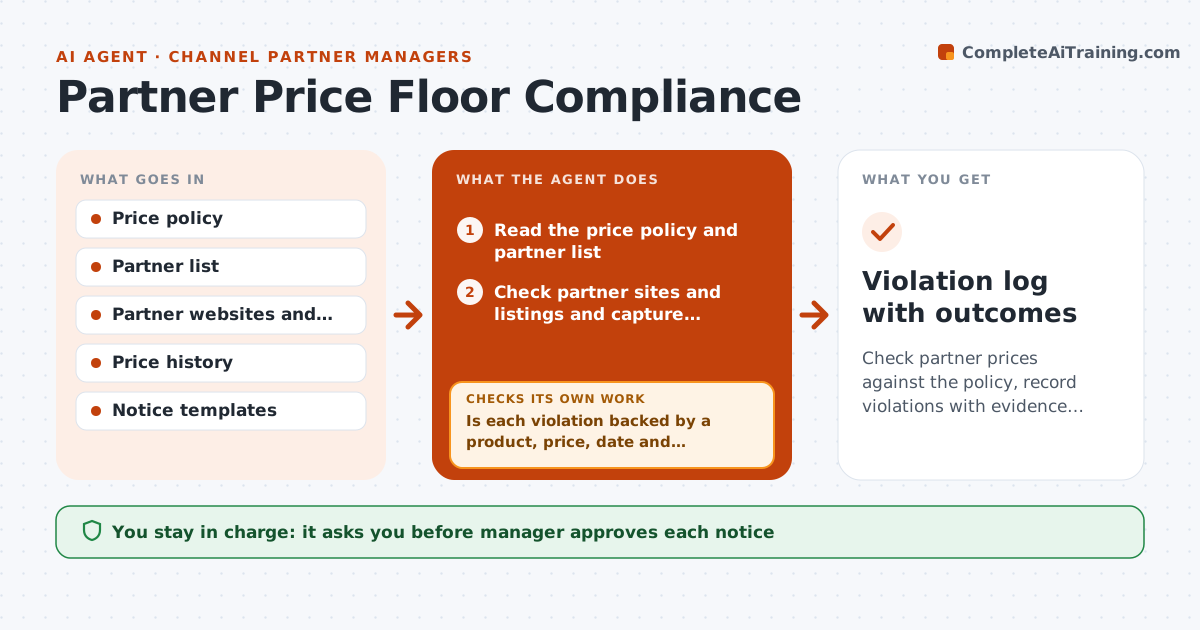
Partners that advertise below minimum prices hurt others. Each week the agent checks partner websites and marketplace listings for each product in the price policy. When a price falls below the minimum, it records the partner, product, price and date and keeps a screenshot as evidence. It drafts a notice that cites the policy and gives a grace period. After the period, it rechecks the listing and reports whether the price was fixed. If not, it drafts the next step, such as a second notice or a penalty review. The manager approves each notice and any penalty. Edge case: a partner shows a lower price that is a valid promotion allowed in the policy, so the agent skips it.
How it works
Follow the arrows from top to bottom. The orange dashed arrow is the loop: when a check fails, the agent goes back and tries again.
Read the steps as a list
- Weekly price check
- Read the price policy and partner list
- Check partner sites and listings and capture screenshots
- Is each violation backed by a product, price, date and screenshot?If not: Recapture or drop the item. Back to step 3.
- Check the policy for allowed promotions and exceptions
- Draft a notice with the grace period
- Manager approves each noticeThe agent waits here for your OK.
- Recheck the listing
- Has the price been corrected?If not: Draft the second notice or penalty review. Back to step 6.
- Manager approves any penaltyThe agent waits here for your OK.
- Violation log with outcomes
How it decides
A violation is recorded only with evidence of the product, price and date; recheck follows the grace period.
- Record a violation only below the minimum without an allowed promotion
- Use a grace period of 7 days
- Send a second notice before any penalty
- Keep screenshots for all cases
Make it yours
Every agent is a starting point. You choose these settings for your own situation.
- Grace period (default 7 days)
- Products checked
- Allowed promotion rules
- Check frequency
What keeps you in control
It always asks you first
- Manager approves each notice
- Manager approves any penalty or account action
Hard limits
- Never send a notice or penalty without approval
- Never record a violation without evidence
It stops when
- Done: prices are compliant or the case is escalated
- Stop: policy terms are disputed and legal must review
Set it up
We guide you through the set-up, step by step
Members get the full set-up guide for this agent. No technical skills needed: you copy, paste and upload.
- One set of instructions to paste into your AI, with the clicks for ChatGPT, Claude, Microsoft 365 Copilot, Gemini and Grok
- The agent then walks you through connecting your own data, one source at a time
- A downloadable copy with the flow chart, the rules and the full guide