AI agent for channel partner managers
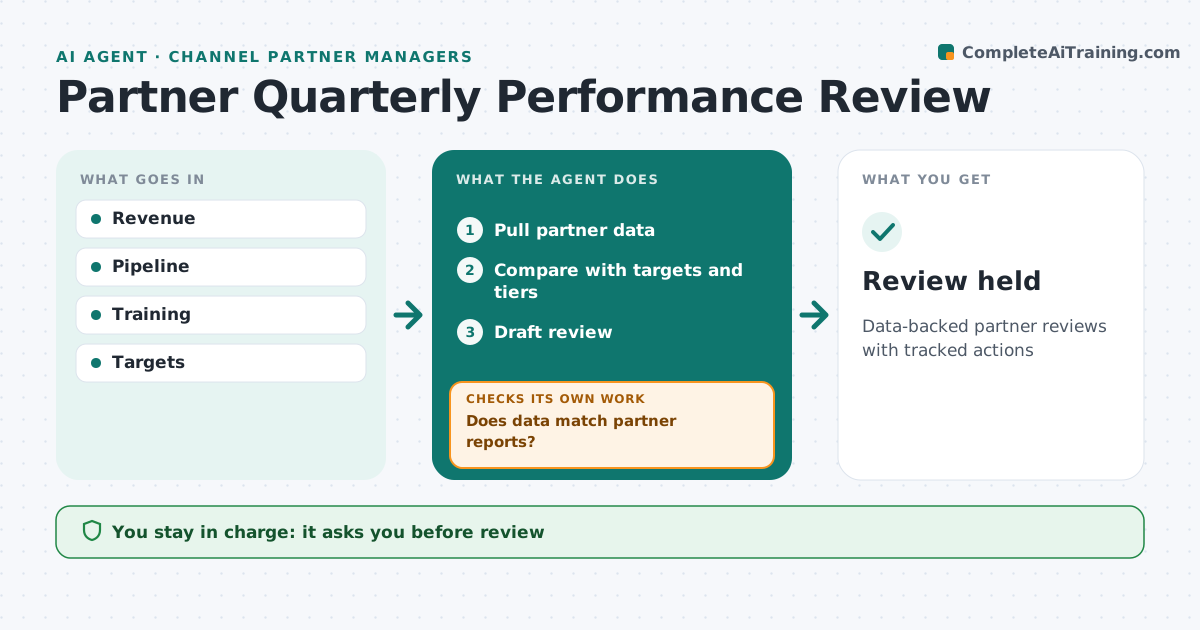
Partner Quarterly Performance Review Agent
Data-backed partner reviews with tracked actions
What it does
Each quarter partner managers review partner results, and gathering the data across systems takes days. When the quarter ends, this agent pulls revenue, pipeline, training and deal registration data for each partner. It first checks that its figures match the partner's own reports. Differences over 5 percent are investigated and fixed before going further. It then compares results with targets and tier requirements and drafts a review with wins, gaps and suggested actions. Last quarter's actions are listed as done or open, so the review starts with follow-through. Tier changes are only suggested when a partner has missed or beaten the tier for two quarters. The partner manager approves the review and any tier change before it is shared. Edge case: when a partner has merged with another, the agent combines both records before comparing with targets.
How it works
Follow the arrows from top to bottom. The orange dashed arrow is the loop: when a check fails, the agent goes back and tries again.
Read the steps as a list
- Quarter ends
- Pull partner data
- Does data match partner reports?If not: investigate differences. Back to step 2.
- Compare with targets and tiers
- Draft review
- Partner manager approvesThe agent waits here for your OK.
- Review held
How it decides
It compares results with targets and tiers.
- Tier changes need two quarters
- Actions tracked
- Differences over 5% investigated
Make it yours
Every agent is a starting point. You choose these settings for your own situation.
- Targets
- Tiers
- Template
- Threshold
What keeps you in control
It always asks you first
- Review
- Tier changes
Hard limits
- No commitments
- Data protected
It stops when
- Done: review
- Stop: partner exits
Set it up
We guide you through the set-up, step by step
Members get the full set-up guide for this agent. No technical skills needed: you copy, paste and upload.
- One set of instructions to paste into your AI, with the clicks for ChatGPT, Claude, Microsoft 365 Copilot, Gemini and Grok
- The agent then walks you through connecting your own data, one source at a time
- A downloadable copy with the flow chart, the rules and the full guide