AI agent for channel partner managers
Partner Territory Overlap Review Agent
Map partner territories, find overlap, test boundary changes against past deals and propose a fair split
What it does
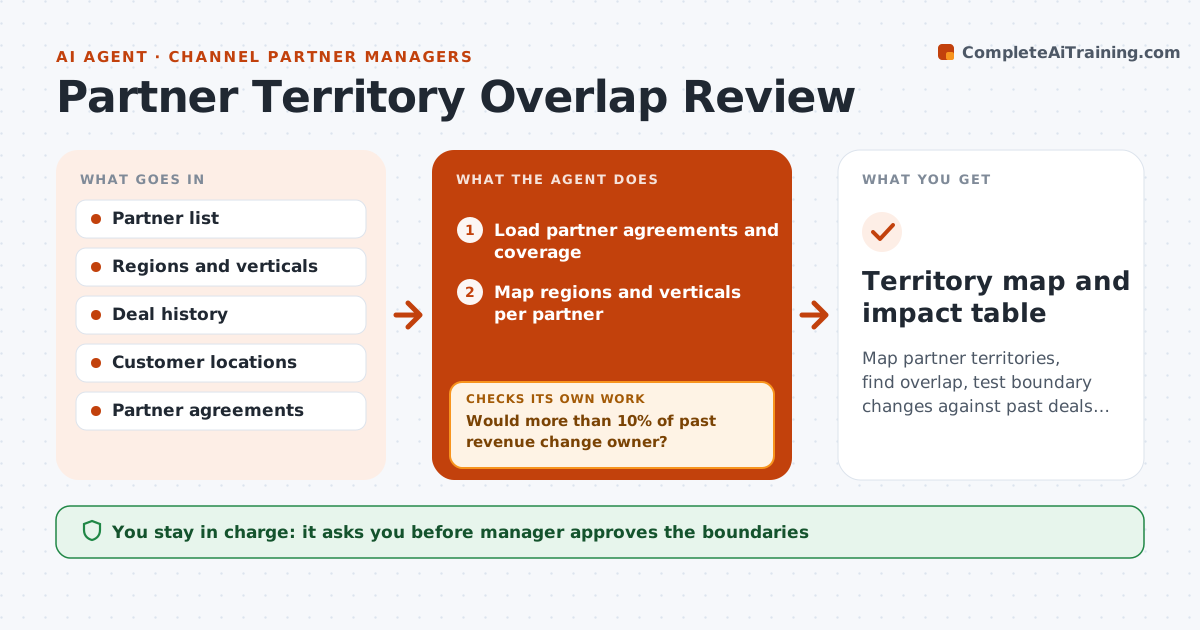
Overlapping territories cause arguments and lost deals. The agent maps each partner to its regions and verticals and finds where two or more partners overlap. It compares the overlaps with past deal data to see which partner won where and why. It proposes new boundaries, such as a split by vertical or a named account list. It then tests each change against past deals, asking how many deals would have changed owner and what the revenue impact would be. If the impact is too large, it adjusts the proposal. The manager approves the final boundaries. Edge case: two partners both serve hospitals, and the agent proposes a split by size rather than region.
How it works
Follow the arrows from top to bottom. The orange dashed arrow is the loop: when a check fails, the agent goes back and tries again.
Read the steps as a list
- Review begins
- Load partner agreements and coverage
- Map regions and verticals per partner
- List overlaps and compare with deal history
- Propose new boundaries
- Replay past deals against the new boundaries
- Would more than 10% of past revenue change owner?If not: Adjust the boundaries and replay. Back to step 5.
- Is the revenue split fair by past performance?If not: Rebalance the lines and replay. Back to step 5.
- Draft the change summary for each partner
- Manager approves boundaries and partner messagesThe agent waits here for your OK.
- Territory map and impact table
How it decides
Overlaps are judged against deal history; a boundary stays only if past deals would not have been cut unfairly.
- Keep named accounts with their current partner for 12 months
- Replay at least 2 years of deals
- Limit revenue moved to 10% per partner
- Prefer vertical splits when regions overlap
Make it yours
Every agent is a starting point. You choose these settings for your own situation.
- Revenue move limit (default 10%)
- Deal history length (default 2 years)
- Split rules allowed
- Review dates
What keeps you in control
It always asks you first
- Manager approves the boundaries
- Manager approves messages to partners
Hard limits
- Never change boundaries without approval
- Never share one partner's revenue with another
It stops when
- Done: approved map with an impact table
- Stop: agreements conflict and legal must review
Set it up
We guide you through the set-up, step by step
Members get the full set-up guide for this agent. No technical skills needed: you copy, paste and upload.
- One set of instructions to paste into your AI, with the clicks for ChatGPT, Claude, Microsoft 365 Copilot, Gemini and Grok
- The agent then walks you through connecting your own data, one source at a time
- A downloadable copy with the flow chart, the rules and the full guide