AI agent for hospital administrators
Patient Safety Event Follow-Up Agent
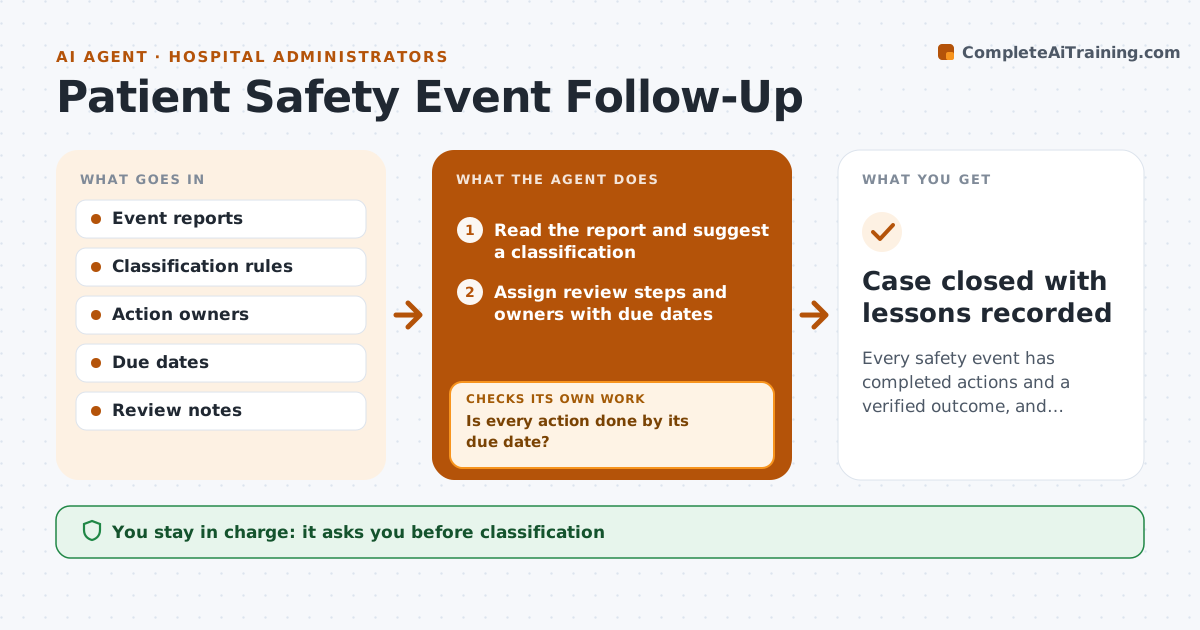
Every safety event has completed actions and a verified outcome, and repeat events are caught
What it does
Safety event reports are filed, but follow-up actions and lessons often stall. This agent tracks each reported event from the first report. It assigns the review steps, such as a unit review and a manager sign-off, and checks that each action is done by its due date. Open items escalate as they age. It also reads later reports to find repeat events of the same type, place or process, and links them to the earlier case. If actions did not stop a repeat, it reopens the case. The administrator approves classification, closure and any external report. Edge case: two reports from different wards describe the same medication event, so the agent merges them after confirmation.
How it works
Follow the arrows from top to bottom. The orange dashed arrow is the loop: when a check fails, the agent goes back and tries again.
Read the steps as a list
- A new event report is filed
- Read the report and suggest a classification
- Administrator approves the classificationThe agent waits here for your OK.
- Assign review steps and owners with due dates
- Track action completion daily
- Is every action done by its due date?If not: remind the owner, then escalate by age to the unit lead and the administrator. Back to step 5.
- Scan new reports for repeats of the same type or place
- Is there a repeat event after the actions?If not: reopen the case, link the events and propose stronger actions. Back to step 3.
- Administrator approves closure and any external reportThe agent waits here for your OK.
- Case closed with lessons recorded
How it decides
An event is closed only when each action is done and no repeat has been found in the follow-up window. Open items escalate by age.
- Escalate items 7 days overdue to the unit lead
- Escalate items 14 days overdue to the administrator
- Link events with the same type and location within 90 days
- Never close a case with an open action
Make it yours
Every agent is a starting point. You choose these settings for your own situation.
- Escalation days (default 7 and 14)
- Repeat window (default 90 days)
- Classification list
- Who owns each action type
What keeps you in control
It always asks you first
- Classification
- Closure
- External reports
Hard limits
- Never share patient details outside the system
- Never close a case without approval
It stops when
- Done: actions complete and follow-up window clear
- Stop: report is withdrawn by the reporter
Set it up
We guide you through the set-up, step by step
Members get the full set-up guide for this agent. No technical skills needed: you copy, paste and upload.
- One set of instructions to paste into your AI, with the clicks for ChatGPT, Claude, Microsoft 365 Copilot, Gemini and Grok
- The agent then walks you through connecting your own data, one source at a time
- A downloadable copy with the flow chart, the rules and the full guide