AI agent for hospital administrators
Staff Credential Expiry Agent
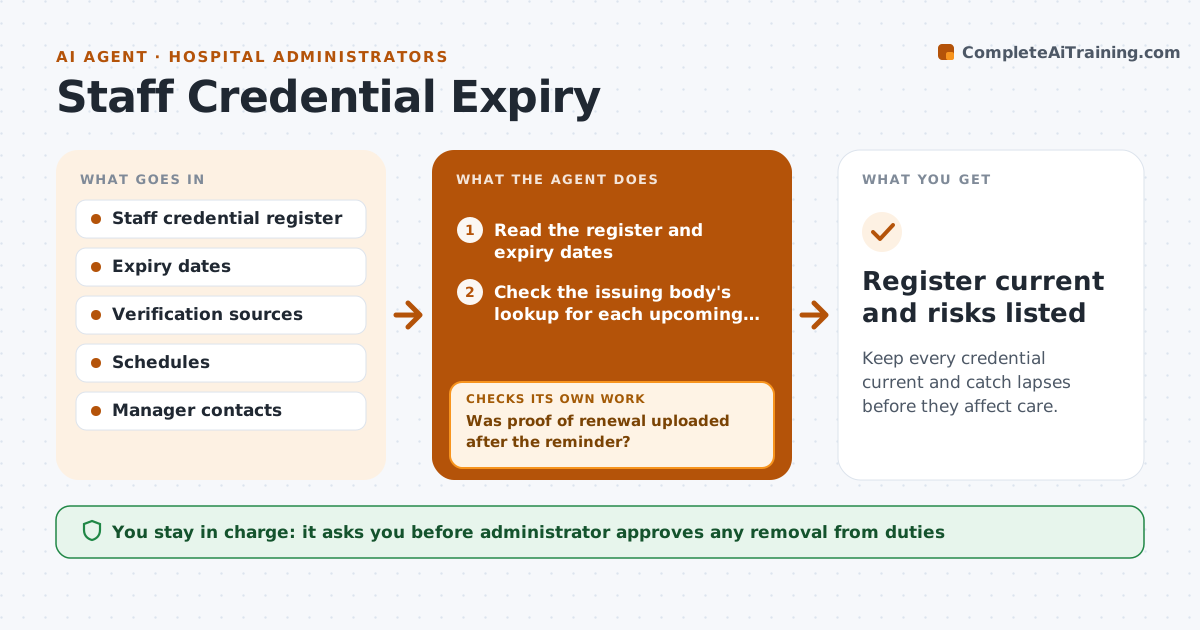
Keep every credential current and catch lapses before they affect care.
What it does
A nurse or physician working with a lapsed license is a risk to patients and to the hospital. This agent keeps a record of every license and certification. It checks each one against the issuing body's lookup, sends renewal requests well before the date, and follows up if proof is not uploaded. It escalates overdue ones to the manager and flags schedule risks, such as a shift that depends on a person whose certificate expires. After each reminder it checks whether proof was uploaded and escalates when it was not. The administrator approves any removal from duties. Edge case: a credential that is expired in the register but renewed on the lookup is updated after the proof is checked.
How it works
Follow the arrows from top to bottom. The orange dashed arrow is the loop: when a check fails, the agent goes back and tries again.
Read the steps as a list
- Daily credential check
- Read the register and expiry dates
- Check the issuing body's lookup for each upcoming expiry
- List credentials due in 90, 60, 30 and 14 days
- Send renewal requests to staff
- Was proof of renewal uploaded after the reminder?If not: Send a firmer reminder and notify the manager. Back to step 4.
- Check the schedule for shifts at risk
- Is any expired credential still on the schedule?If not: Draft a removal recommendation for the administrator. Back to step 6.
- Administrator approves any removal from dutiesThe agent waits here for your OK.
- Register current and risks listed
How it decides
It sends reminders on a fixed schedule and escalates on silence; it treats a credential as valid only when a source or proof confirms it.
- Remind at 90, 60, 30 and 14 days
- Treat a credential as lapsed on its expiry date unless proof exists
- Escalate to the manager after two missed reminders
- Flag schedule risk 14 days ahead
Make it yours
Every agent is a starting point. You choose these settings for your own situation.
- Reminder schedule (default 90, 60, 30, 14 days)
- Escalation point
- Credential types tracked
- Who receives alerts
What keeps you in control
It always asks you first
- Administrator approves any removal from duties
Hard limits
- Never remove anyone from duty without the administrator
- Never accept proof without checking the source
It stops when
- Done: credentials are current or the person is off duty
- Stop: a lookup shows a restriction and the administrator is called at once
Set it up
We guide you through the set-up, step by step
Members get the full set-up guide for this agent. No technical skills needed: you copy, paste and upload.
- One set of instructions to paste into your AI, with the clicks for ChatGPT, Claude, Microsoft 365 Copilot, Gemini and Grok
- The agent then walks you through connecting your own data, one source at a time
- A downloadable copy with the flow chart, the rules and the full guide