AI agent for fashion designers
Pattern Revision Version Control Agent
The factory holds the same pattern version the designer approved, with every change logged
What it does
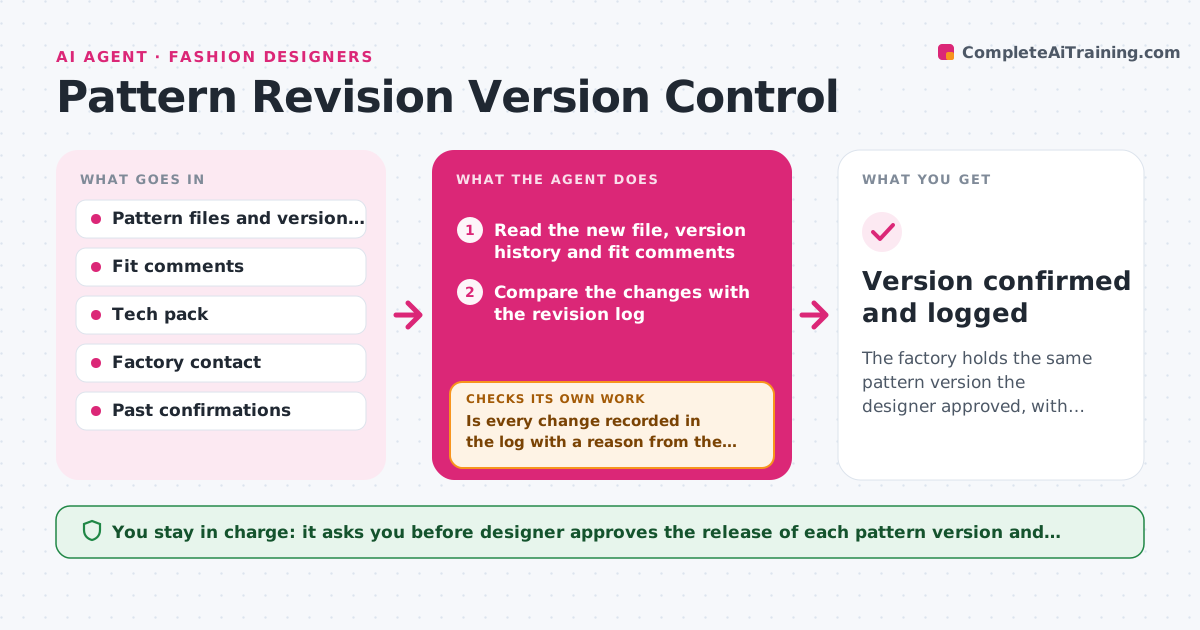
A pattern maker adjusts the sleeve after a fit session, the designer approves it by email, and the factory cuts from last month's file. This agent watches the pattern folder and the tech pack. When a pattern file is updated, it compares the version with the fit comments, flags changes that are not recorded in the revision log, and checks that the tech pack points to the new file. It then asks the factory contact to confirm which file they hold, and rechecks the confirmation against the current version number. If the factory file differs, it loops back and requests confirmation again. The designer approves what is released. Edge case: a file renamed 'final_final' without a version number is matched by modified date and flagged for the designer.
How it works
Follow the arrows from top to bottom. The orange dashed arrow is the loop: when a check fails, the agent goes back and tries again.
Read the steps as a list
- Pattern file updated
- Read the new file, version history and fit comments
- Compare the changes with the revision log
- Is every change recorded in the log with a reason from the fit comments?If not: Ask the designer or pattern maker to explain the change, then compare again. Back to step 2.
- Check the tech pack reference to the pattern version
- Draft a confirmation request to the factory with the version number
- Designer approves the release and the message to the factoryThe agent waits here for your OK.
- Read the factory reply and note the version they report
- Does the factory's version match the approved version?If not: Draft a follow-up asking them to replace the file and confirm again. Back to step 6.
- Version confirmed and logged
How it decides
It treats the pattern file with the latest approved version number as the source of truth and flags any unlogged change, tech pack mismatch or factory confirmation that names an older version.
- Never release a file whose changes are not in the revision log
- A factory reply without a version number counts as unconfirmed
- Match unnamed files by modified date and flag them
- Remind the factory 1 business day after a missing reply
Make it yours
Every agent is a starting point. You choose these settings for your own situation.
- Naming rule for versions
- Factory contacts and reply deadline
- Fields required in the revision log
- Folder to watch
- Reminder timing
What keeps you in control
It always asks you first
- Designer approves the release of each pattern version and every message to the factory
Hard limits
- Never overwrite pattern files
- Never tell a factory to cut without the designer's approval
It stops when
- Done: Factory confirms the approved version and the log is complete
- Stop: The factory has already cut from an older file, so the agent alerts the designer immediately
Set it up
We guide you through the set-up, step by step
Members get the full set-up guide for this agent. No technical skills needed: you copy, paste and upload.
- One set of instructions to paste into your AI, with the clicks for ChatGPT, Claude, Microsoft 365 Copilot, Gemini and Grok
- The agent then walks you through connecting your own data, one source at a time
- A downloadable copy with the flow chart, the rules and the full guide