AI agent for fashion designers
Size Grade and Measurement Audit Agent
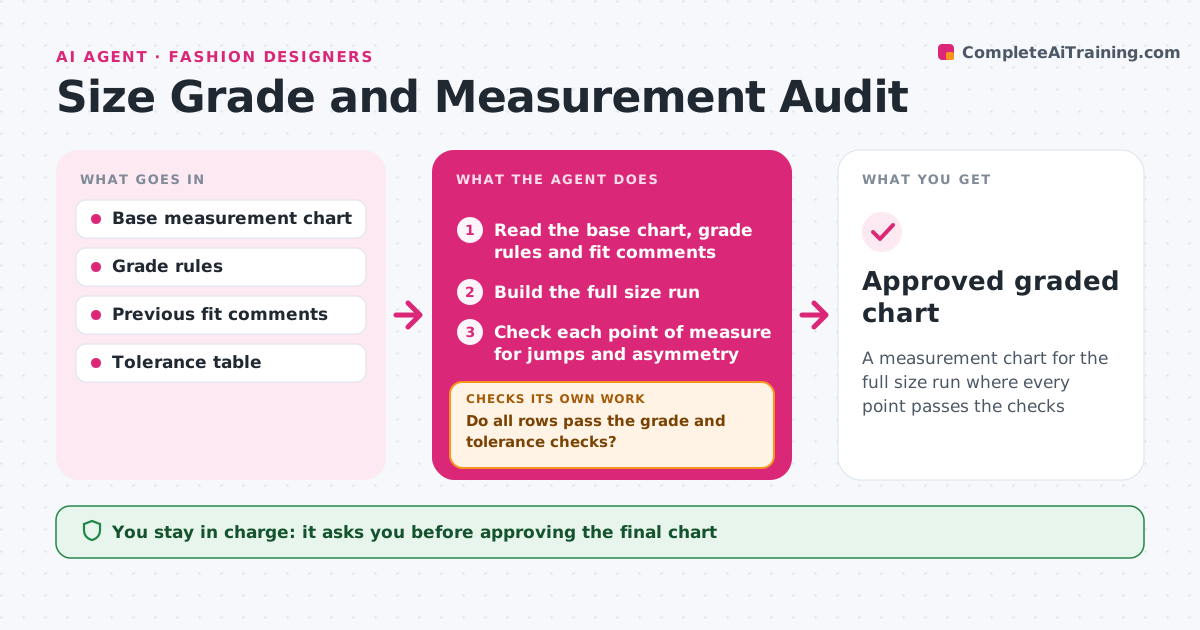
A measurement chart for the full size run where every point passes the checks
What it does
Graded measurements contain errors that are found only when fit samples come back wrong. This agent reads the base measurement chart and the grade rules, then builds the full size run. It checks each point of measure for impossible jumps, such as a sleeve that shrinks between sizes, and for asymmetry between left and right values. It also compares the chart with the last fit comments to make sure earlier fixes were carried through. Rows that fail are corrected using the grade rules and the whole run is recalculated, since one change shifts neighbors. It loops until all rows pass. The pattern maker approves the final chart. Edge case: a deliberate non-linear grade, such as a wider chest jump in the larger sizes, is allowed when it is written in the rules.
How it works
Follow the arrows from top to bottom. The orange dashed arrow is the loop: when a check fails, the agent goes back and tries again.
Read the steps as a list
- Base size approved
- Read the base chart, grade rules and fit comments
- Build the full size run
- Check each point of measure for jumps and asymmetry
- Do all rows pass the grade and tolerance checks?If not: correct the failing rows with the grade rule and recalculate the run. Back to step 4.
- Compare the chart with previous fit comments
- Are all earlier fit fixes carried through?If not: apply the missing fix and recheck the whole run. Back to step 3.
- Pattern maker approves the final chartThe agent waits here for your OK.
- Approved graded chart
How it decides
A row fails when a measurement is not increasing across sizes, differs from the rule by more than the tolerance, or conflicts with a fit comment.
- Flag a point that decreases from one size to the next
- Flag a deviation from the rule above the tolerance of 0.25 in
- Flag a left-right difference above 0.125 in
- Allow a non-linear grade only if written in the rules
Make it yours
Every agent is a starting point. You choose these settings for your own situation.
- Tolerance per point of measure (default 0.25 in)
- Asymmetry limit
- Size range
- Unit of measure
What keeps you in control
It always asks you first
- Approving the final chart
- Changing the grade rules
Hard limits
- Never alters the base size measurements
- Never sends a chart to the factory
It stops when
- Done: every row passes and the pattern maker approved
- Stop: the grade rules are missing or conflict
Set it up
We guide you through the set-up, step by step
Members get the full set-up guide for this agent. No technical skills needed: you copy, paste and upload.
- One set of instructions to paste into your AI, with the clicks for ChatGPT, Claude, Microsoft 365 Copilot, Gemini and Grok
- The agent then walks you through connecting your own data, one source at a time
- A downloadable copy with the flow chart, the rules and the full guide