AI agent for dental hygienists
Periodontal Chart Trend Agent
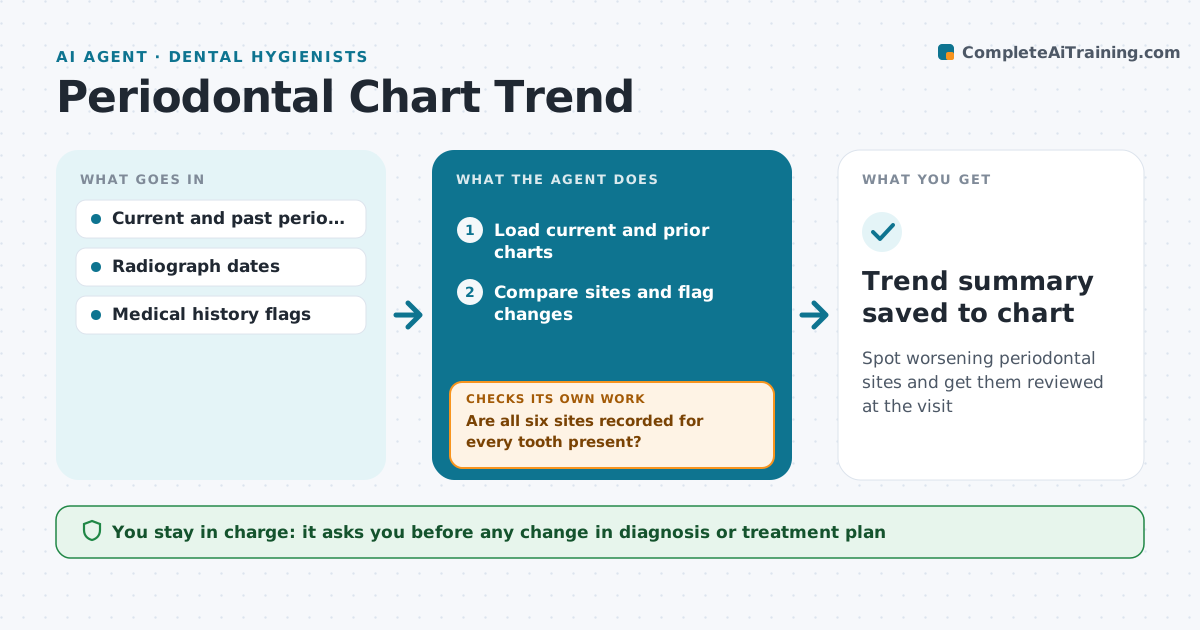
Spot worsening periodontal sites and get them reviewed at the visit
What it does
Periodontal charts hold six readings per tooth, and comparing them across visits by eye is slow. When a perio chart is saved, this agent loads the current and prior charts. It first checks that all six sites are recorded for every tooth present and asks the hygienist to complete any missing readings. It then compares sites and flags pocket depth increases of 2 mm or more, more bleeding and attachment loss, summarized by tooth and quadrant. Diabetes or smoking raise the priority. A single big jump on one reading is treated as a possible charting error and sent for remeasurement before it is reported. It drafts a note for the hygienist and talking points for the patient, and flags cases for the dentist's review. The dentist decides the diagnosis. Edge case: a one-site outlier is remeasured before being reported.
How it works
Follow the arrows from top to bottom. The orange dashed arrow is the loop: when a check fails, the agent goes back and tries again.
Read the steps as a list
- Perio chart saved
- Load current and prior charts
- Are all six sites recorded for every tooth present?If not: ask the hygienist to complete missing readings. Back to step 2.
- Compare sites and flag changes
- Is each large change confirmed and not a single outlier?If not: ask the hygienist to remeasure the site. Back to step 4.
- Draft note and patient talking points
- Dentist reviews flagged casesThe agent waits here for your OK.
- Trend summary saved to chart
How it decides
It compares site by site. Increases of 2 mm or more, new bleeding, or new furcation are flagged; isolated outliers are marked for remeasure.
- Depth increase of 2 mm or more is significant
- Diabetes or smoking flags raise the priority
- Single outlier readings are remeasured before reporting
Make it yours
Every agent is a starting point. You choose these settings for your own situation.
- Depth change threshold
- Risk factors to weigh
- Note format
- Which cases need dentist review
What keeps you in control
It always asks you first
- Any change in diagnosis or treatment plan
Hard limits
- No diagnosis is written without the dentist
- Charts are never edited by the agent
It stops when
- Done: summary approved
- Stop: no prior chart exists, save as baseline
Set it up
We guide you through the set-up, step by step
Members get the full set-up guide for this agent. No technical skills needed: you copy, paste and upload.
- One set of instructions to paste into your AI, with the clicks for ChatGPT, Claude, Microsoft 365 Copilot, Gemini and Grok
- The agent then walks you through connecting your own data, one source at a time
- A downloadable copy with the flow chart, the rules and the full guide