AI agent for dentists
Medical Alert and Premedication Check Agent
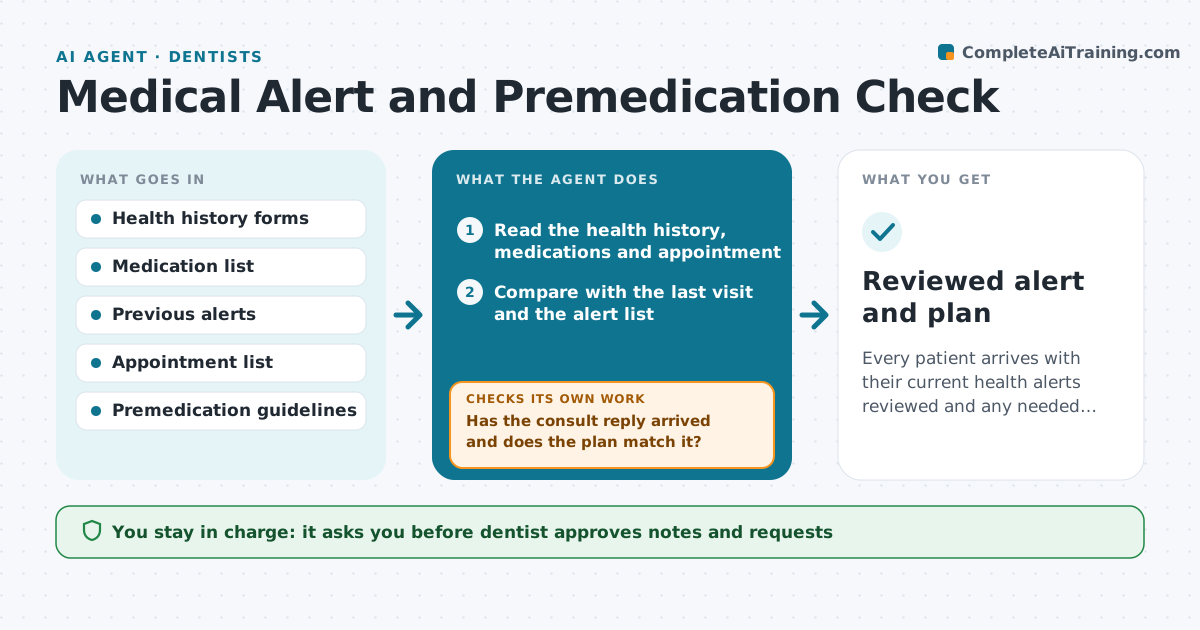
Every patient arrives with their current health alerts reviewed and any needed premedication or consult settled.
What it does
A changed medical history, a new heart valve or a new blood thinner can change how a patient should be treated, and the change is often missed in a rush. Before each visit the agent reads the health history and current medicines, compares them with the last visit and with the alert list, and looks for conditions that need premedication or a consult, such as a joint replacement or heart condition. It drafts a note to the dentist with the finding and, if needed, a consult request to the patient's physician. After a reply it rechecks that the plan is updated. The dentist approves every note and request. Edge case: if the patient is on an anticoagulant and needs surgery, the agent flags it for the dentist the day before, not at the chair.
How it works
Follow the arrows from top to bottom. The orange dashed arrow is the loop: when a check fails, the agent goes back and tries again.
Read the steps as a list
- Two days before the appointment
- Read the health history, medications and appointment
- Compare with the last visit and the alert list
- Match changes to premedication and consult guidelines
- Draft a note to the dentist and a consult request if needed
- Dentist approves the note and requestThe agent waits here for your OK.
- Send the request to the physician and update the chart alert
- Check for the reply before the visit
- Has the consult reply arrived and does the plan match it?If not: Send a reminder, call task and ask the dentist whether to reschedule. Back to step 3.
- Update the alert list and the visit note
- Reviewed alert and plan
How it decides
It flags changes since the last visit and matches the conditions to guidelines for premedication or consult.
- Any new medicine or condition triggers a note
- Joint replacement and heart conditions need guideline review
- No reply by the day before means a call task
- Unresolved consults hold invasive treatment
Make it yours
Every agent is a starting point. You choose these settings for your own situation.
- Lead time before the visit
- Conditions to check
- Guideline source
- Who is notified
- Call task rule
What keeps you in control
It always asks you first
- Dentist approves notes and requests
- Dentist approves any change to the treatment plan
Hard limits
- Never decide treatment or prescribe
- Never send without dentist approval
- Never use outdated guidelines
It stops when
- Done: all alerts reviewed and consults settled before the visit
- Stop: the patient cancels
Set it up
We guide you through the set-up, step by step
Members get the full set-up guide for this agent. No technical skills needed: you copy, paste and upload.
- One set of instructions to paste into your AI, with the clicks for ChatGPT, Claude, Microsoft 365 Copilot, Gemini and Grok
- The agent then walks you through connecting your own data, one source at a time
- A downloadable copy with the flow chart, the rules and the full guide