AI agent for photographers
Photo Shoot Weather and Light Fallback Agent
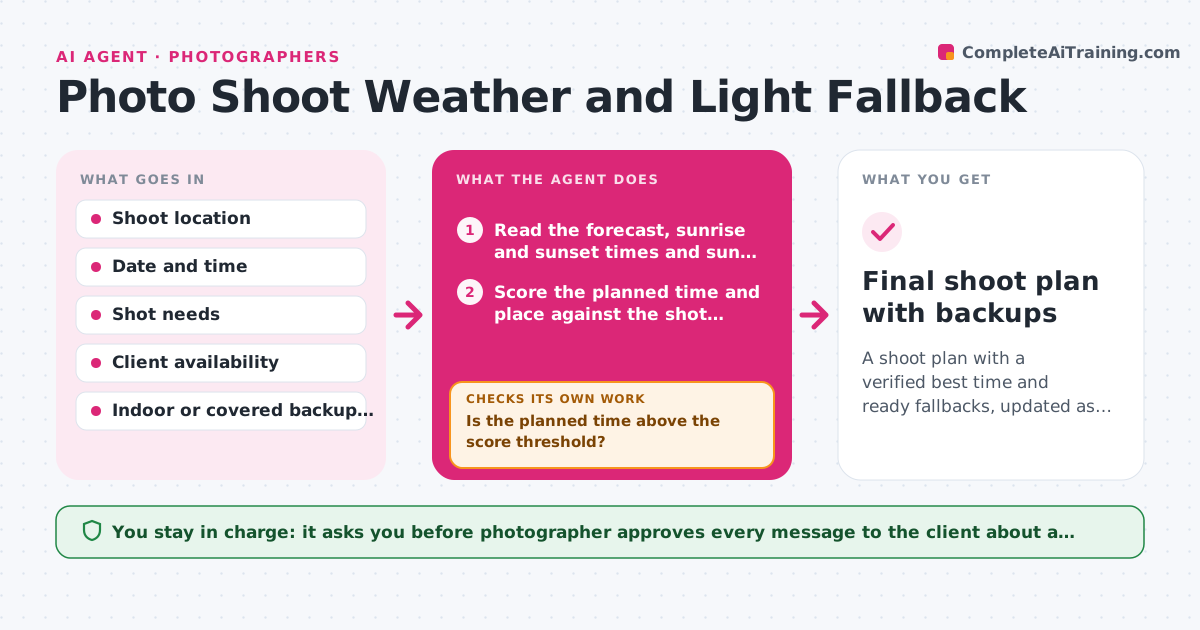
A shoot plan with a verified best time and ready fallbacks, updated as the forecast changes
What it does
A wedding portrait session is booked for a hillside at 6 pm, and the forecast changes the day before. In the days before a shoot, this agent reads forecasts and sun position for the location, scores the plan against what the shot needs, such as soft golden light, no rain and low wind, and prepares fallback times and spots with the reason for each. It rechecks the forecast every day, and more often in the final 24 hours, and updates the plan when the score falls. When the main plan fails the check, it moves to the best fallback and compares it again with the client's availability. The photographer approves any reschedule message. Edge case: a forecast with a 30 percent chance of rain but a clear window at golden hour is kept, not canceled.
How it works
Follow the arrows from top to bottom. The orange dashed arrow is the loop: when a check fails, the agent goes back and tries again.
Read the steps as a list
- Shoot is 5 days away
- Read the forecast, sunrise and sunset times and sun position
- Score the planned time and place against the shot needs
- Prepare fallback times and spots with scores
- Is the planned time above the score threshold?If not: Switch to the best fallback and score it again with the client's availability. Back to step 2.
- Photographer approves any reschedule or location messageThe agent waits here for your OK.
- Read the forecast again the next day and in the last 24 hours
- Has the forecast changed enough to drop the plan below the threshold?If not: Keep the plan and note the change in the log. Back to step 2.
- Make the final go or move call recommendation
- Final shoot plan with backups
How it decides
It scores each time and place on rain chance, cloud cover, wind and sun angle against the shot needs, and switches when the plan's score falls below the threshold.
- Switch when the plan's score falls below 6 out of 10
- Treat more than 40 percent rain chance during the shoot window as a risk
- Keep a plan with a clear window at golden hour even if rain is likely earlier
- Check at least twice on the day before
Make it yours
Every agent is a starting point. You choose these settings for your own situation.
- Score threshold (default 6 out of 10)
- Light and weather requirements by shoot type
- Fallback locations
- Check timing
- Forecast source
What keeps you in control
It always asks you first
- Photographer approves every message to the client about a change
Hard limits
- Never message the client without approval
- Never decide safety questions such as lightning or wind, which stay with the photographer
It stops when
- Done: A plan above the threshold is confirmed or the shoot is moved with the client's agreement
- Stop: No fallback fits the client's availability, so the agent asks the photographer to decide
Set it up
We guide you through the set-up, step by step
Members get the full set-up guide for this agent. No technical skills needed: you copy, paste and upload.
- One set of instructions to paste into your AI, with the clicks for ChatGPT, Claude, Microsoft 365 Copilot, Gemini and Grok
- The agent then walks you through connecting your own data, one source at a time
- A downloadable copy with the flow chart, the rules and the full guide