AI agent for warehouse managers
Pick Error Root Cause Agent
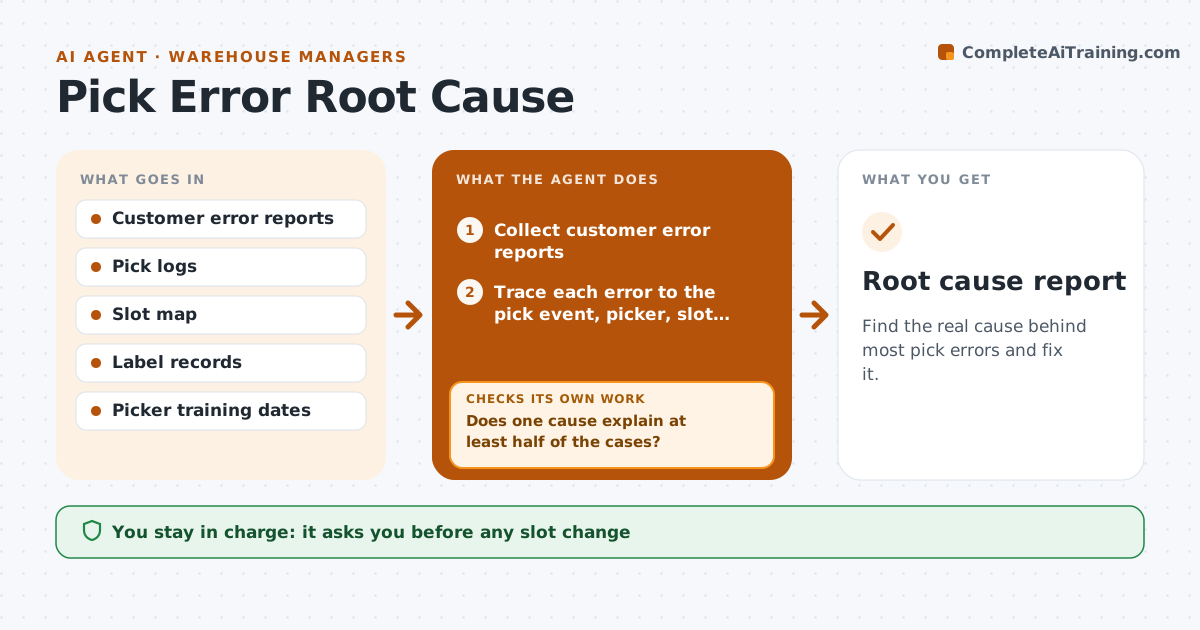
Find the real cause behind most pick errors and fix it.
What it does
Customers report wrong items and shortages every week. The team retrains pickers and the errors return. Each week this agent collects the reports and traces each back to the pick event, picker, slot and label. It groups likely causes: similar SKUs next to each other, a faded slot label, a new picker. It tests whether a suspected cause explains most of the cases. If not, it tries another. Then it drafts fixes such as relabeling a slot or separating two SKUs, for the manager to approve. Edge case: if errors cluster around one picker's first week, the cause is training, not slotting.
How it works
Follow the arrows from top to bottom. The orange dashed arrow is the loop: when a check fails, the agent goes back and tries again.
Read the steps as a list
- Weekly pick error review begins
- Collect customer error reports
- Trace each error to the pick event, picker, slot and label
- Group errors by likely cause
- Does one cause explain at least half of the cases?If not: Test the next likely cause and rerun the grouping. Back to step 4.
- Draft fixes for the confirmed cause
- Manager approves the fixesThe agent waits here for your OK.
- Track the error rate for the same SKUs and slots
- Did the error rate fall by at least a third?If not: Look for a second cause in the remaining cases. Back to step 4.
- Root cause report
How it decides
Tests each suspected cause against the full set of errors and accepts one that explains at least 50% of cases.
- Cause needs 50% of cases to be confirmed
- Similar SKUs adjacent in slots are checked first
- Errors in a picker's first 30 days point to training
- A fix is judged after 3 weeks
Make it yours
Every agent is a starting point. You choose these settings for your own situation.
- Share needed to confirm a cause (default 50%)
- Weeks to judge a fix (default 3)
- Report sources
- Error types
- New picker window (default 30 days)
What keeps you in control
It always asks you first
- Any slot change
- Any relabeling or retraining plan
- Any change in picking method
Hard limits
- Never discipline a picker
- Never change a slot itself
It stops when
- Done: error rate falls and holds
- Stop: cause outside the warehouse
- Stop: data not available
Set it up
We guide you through the set-up, step by step
Members get the full set-up guide for this agent. No technical skills needed: you copy, paste and upload.
- One set of instructions to paste into your AI, with the clicks for ChatGPT, Claude, Microsoft 365 Copilot, Gemini and Grok
- The agent then walks you through connecting your own data, one source at a time
- A downloadable copy with the flow chart, the rules and the full guide