AI agent for fundraisers
Planned Giving Prospect Agent
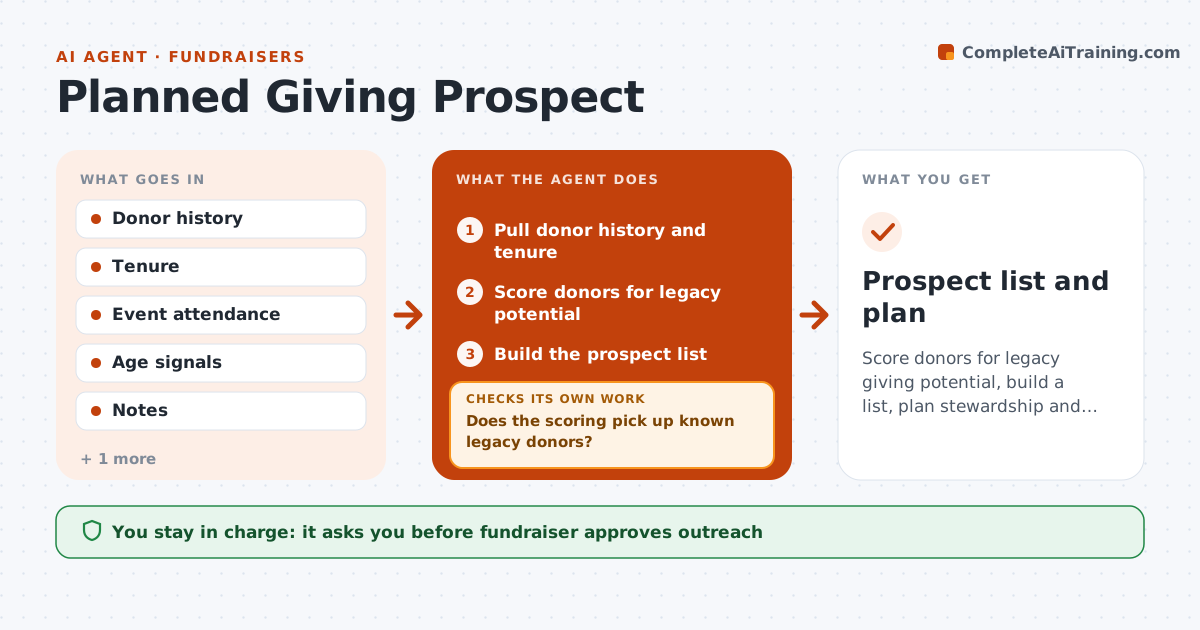
Score donors for legacy giving potential, build a list, plan stewardship and learn from responses
What it does
Legacy prospects are rarely identified and contacted. Each quarter the agent scores donors by giving history, years of support, event attendance and age signals. It checks the scoring against donors who already left a gift, to see if the pattern holds. It builds a list of the best prospects and drafts a stewardship plan for each, such as a thank-you call, an invitation or a short note. It tracks responses and updates the scores from the results. The fundraiser approves every outreach. Edge case: a donor has given for 25 years in small amounts, and the agent ranks them above a recent larger donor.
How it works
Follow the arrows from top to bottom. The orange dashed arrow is the loop: when a check fails, the agent goes back and tries again.
Read the steps as a list
- Quarter begins
- Pull donor history and tenure
- Score donors for legacy potential
- Does the scoring pick up known legacy donors?If not: Adjust weights and rescore. Back to step 3.
- Build the prospect list
- Draft a stewardship plan for each prospect
- Fundraiser approves outreachThe agent waits here for your OK.
- Track responses and meetings
- Update the scores with outcomes
- Did responses improve over the last quarter?If not: Revise the weights and the plan. Back to step 3.
- Prospect list and plan
How it decides
Scores come from giving patterns and tenure; they are checked against known legacy donors and updated from outcomes.
- Weigh years of giving above amount
- Require 5 years of giving or 10 gifts
- Check scoring against known legacy donors
- Respect do-not-contact flags
Make it yours
Every agent is a starting point. You choose these settings for your own situation.
- Minimum giving years (default 5)
- Number on the list
- Age signal handling
- Outreach types
What keeps you in control
It always asks you first
- Fundraiser approves outreach
- Fundraiser approves any gift conversation
Hard limits
- Never use sensitive data beyond policy
- Never contact a donor without approval
It stops when
- Done: prospects contacted and results logged
- Stop: the donor asks not to be contacted
Set it up
We guide you through the set-up, step by step
Members get the full set-up guide for this agent. No technical skills needed: you copy, paste and upload.
- One set of instructions to paste into your AI, with the clicks for ChatGPT, Claude, Microsoft 365 Copilot, Gemini and Grok
- The agent then walks you through connecting your own data, one source at a time
- A downloadable copy with the flow chart, the rules and the full guide