AI agent for grant managers
Funder Report Evidence Collection Agent
Collect complete, checked evidence for the report in time to write and submit it.
What it does
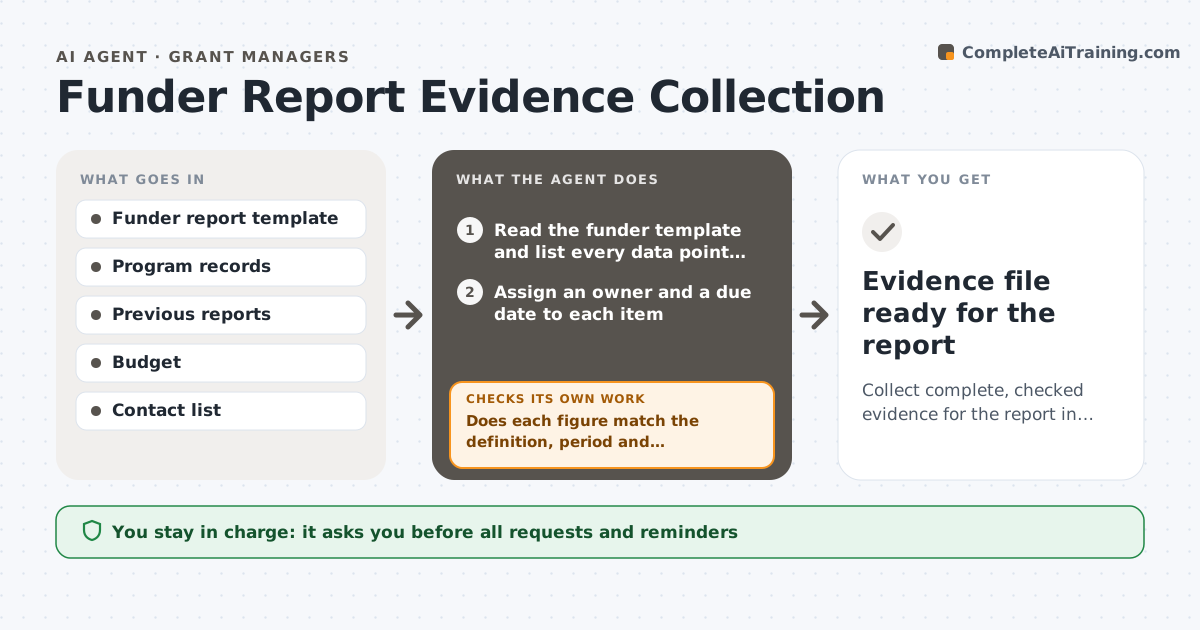
A funder report asks for outputs, outcomes, finances and stories from many people, and the grant writer spends weeks chasing numbers that arrive late and do not add up. This agent starts with the funder's reporting template and lists every data point and story needed, with the owner for each. It sends approved requests with the exact definition and period, tracks replies, and checks returned numbers against records such as the database, last report and budget. If a number does not match, it asks the owner or flags the difference. It chases gaps on a schedule, and after all data are in it rechecks totals and consistency across the report. It never sends or submits. The grant writer approves messages and the final report. Edge case: a figure that includes a different period is returned for correction.
How it works
Follow the arrows from top to bottom. The orange dashed arrow is the loop: when a check fails, the agent goes back and tries again.
Read the steps as a list
- Report deadline set
- Read the funder template and list every data point and story
- Assign an owner and a due date to each item
- Draft requests with definitions and periods
- Grant writer approves the requestsThe agent waits here for your OK.
- Collect replies and compare with records
- Does each figure match the definition, period and records?If not: ask the owner to correct it or explain the difference. Back to step 6.
- Are all items in by the chase date?If not: draft a reminder and escalate overdue items to the grant writer. Back to step 4.
- Recheck totals and consistency across the report
- Grant writer approves the final data setThe agent waits here for your OK.
- Evidence file ready for the report
How it decides
It accepts a figure only when it matches the requested definition and period and agrees with the records within the allowed difference. It chases on a fixed schedule before the deadline.
- Accept a figure only if the definition and period match
- Query a figure that differs from records by more than 5%
- Chase items 14, 7 and 3 days before the deadline
- Check totals across sections for consistency
Make it yours
Every agent is a starting point. You choose these settings for your own situation.
- Chase days before the deadline
- Allowed difference (default 5%)
- Owners per item
- Request tone
- Records used for checks
What keeps you in control
It always asks you first
- All requests and reminders
- The final data set
Hard limits
- Never send messages or submit the report
- Never alter a figure without the owner's answer
It stops when
- Done: all items in and checked
- Stop: key data cannot be obtained before the deadline
Set it up
We guide you through the set-up, step by step
Members get the full set-up guide for this agent. No technical skills needed: you copy, paste and upload.
- One set of instructions to paste into your AI, with the clicks for ChatGPT, Claude, Microsoft 365 Copilot, Gemini and Grok
- The agent then walks you through connecting your own data, one source at a time
- A downloadable copy with the flow chart, the rules and the full guide