AI agent for landscape architects
Plant Schedule Verification Agent
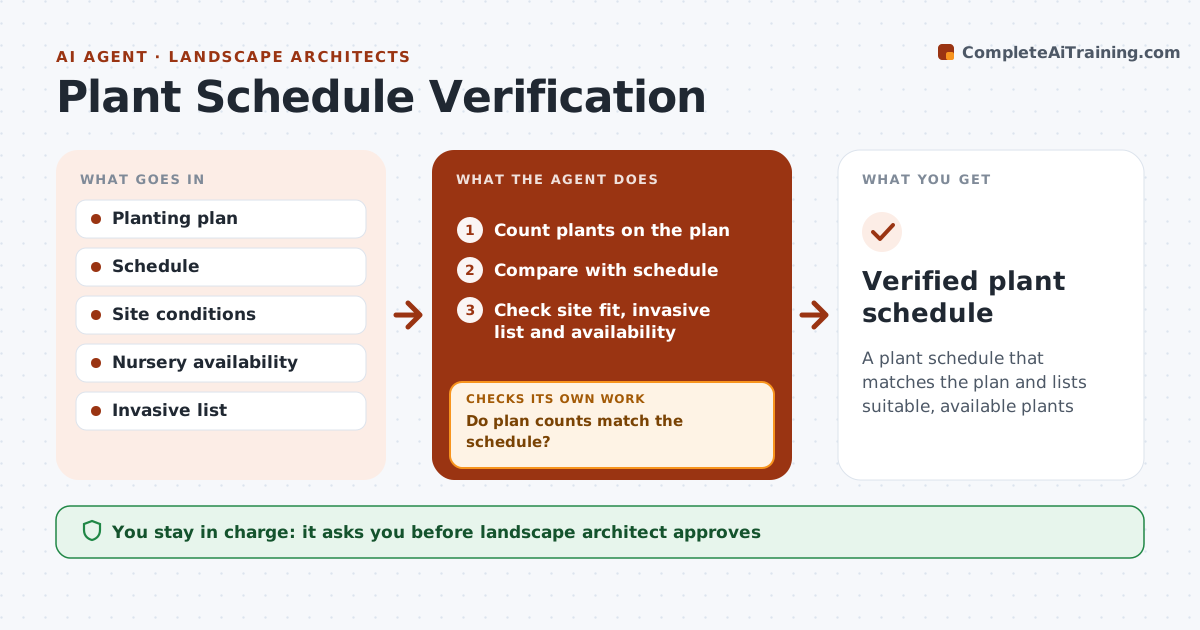
A plant schedule that matches the plan and lists suitable, available plants
What it does
A planting plan's schedule must match the symbols on the plan and specify plants that suit the site and can be bought. This agent counts plants on the plan by symbol and compares counts with the schedule. It checks each species against the hardiness zone, sun, soil and the local invasive list, and queries nursery availability. If counts are off, it fixes them. If a plant is unsuitable, invasive or unavailable, it suggests substitutes with similar form and size and checks again. Plants on the invasive list are always flagged. It then prepares the verified schedule for review. The landscape architect approves. Edge case: a substitute must keep the design's mature height and spread, not just the color.
How it works
Follow the arrows from top to bottom. The orange dashed arrow is the loop: when a check fails, the agent goes back and tries again.
Read the steps as a list
- Plan issue approaching
- Count plants on the plan
- Compare with schedule
- Do plan counts match the schedule?If not: fix the schedule counts and recount. Back to step 2.
- Check site fit, invasive list and availability
- Are all plants suitable, non-invasive and available?If not: suggest substitutes with similar form and recheck. Back to step 5.
- Prepare the verified schedule with substitutions marked
- Landscape architect approvesThe agent waits here for your OK.
- Verified plant schedule
How it decides
Counts must match. Plants must suit the zone and conditions, and be available.
- Counts must match
- Invasive species flagged
- Substitutes keep form and size
Make it yours
Every agent is a starting point. You choose these settings for your own situation.
- Zone and site data
- Nurseries
- Invasive list
- Substitution rules
What keeps you in control
It always asks you first
- Landscape architect approves
Hard limits
- Never orders plants
- Never changes design without approval
It stops when
- Done: schedule verified
- Stop: site data missing
Set it up
We guide you through the set-up, step by step
Members get the full set-up guide for this agent. No technical skills needed: you copy, paste and upload.
- One set of instructions to paste into your AI, with the clicks for ChatGPT, Claude, Microsoft 365 Copilot, Gemini and Grok
- The agent then walks you through connecting your own data, one source at a time
- A downloadable copy with the flow chart, the rules and the full guide