AI agent for landscape architects
Planting Plan Climate Fit Agent
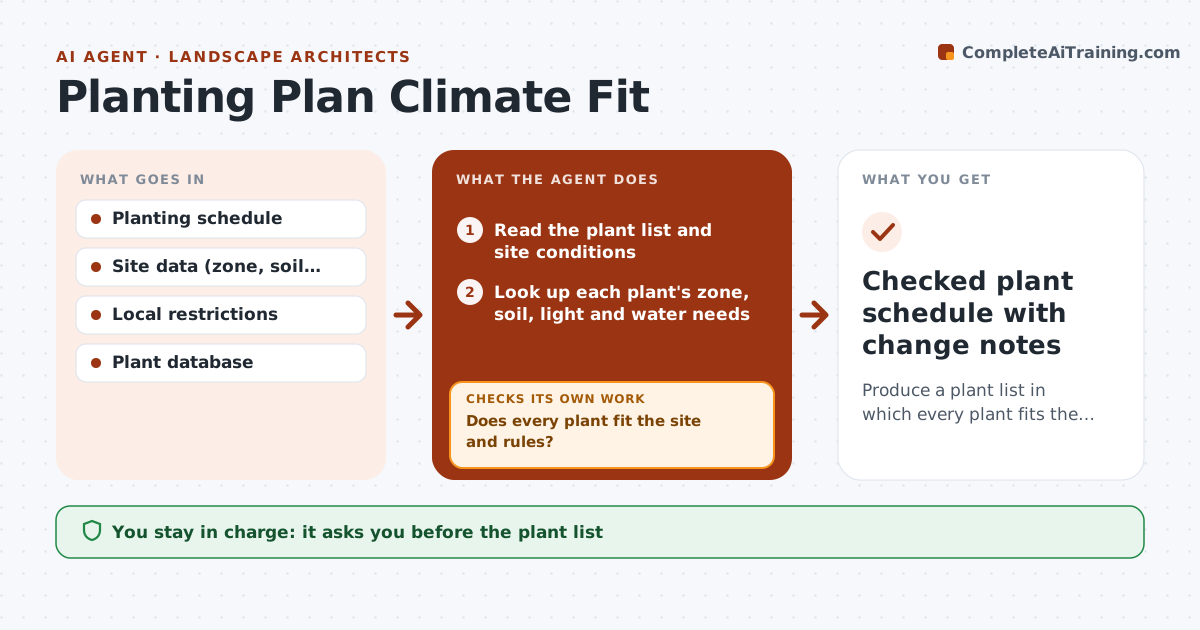
Produce a plant list in which every plant fits the site and the rules.
What it does
A plant list can look right on paper and fail in the ground because of hardiness, water need, soil or light. This agent reads the planting schedule and the site data and checks each plant against the climate zone, soil type, light, water supply and any restrictions, such as native-only rules or invasive lists. It flags poor fits and proposes alternatives with similar form, size and color. After the list is revised, it checks every plant again and the mix as a whole, such as having too many plants with the same water need. You approve the plant list. Edge case: a maple is listed for a hot, dry western exposure, and the agent proposes two tougher trees of similar height.
How it works
Follow the arrows from top to bottom. The orange dashed arrow is the loop: when a check fails, the agent goes back and tries again.
Read the steps as a list
- Planting schedule is drafted
- Read the plant list and site conditions
- Look up each plant's zone, soil, light and water needs
- Compare each plant with the site and local restrictions
- Does every plant fit the site and rules?If not: List each plant that fails and the reason. Back to step 4.
- Find alternatives with similar form, size and color
- Replace the failing plants in a working list
- Recheck the revised list and the water mix
- Does the whole list now pass?If not: Return to the failing plants and search for other alternatives. Back to step 4.
- Landscape architect approves the plant listThe agent waits here for your OK.
- Checked plant schedule with change notes
How it decides
It checks every plant against each site factor and swaps those that fail with the closest match in form and size from an allowed list.
- Hardiness zone must cover the site, with a one zone margin for borderline (default)
- Invasive or restricted species are removed
- Water zones must stay within the irrigation plan
- Keep the size and form of the original design where possible
Make it yours
Every agent is a starting point. You choose these settings for your own situation.
- Hardiness margin
- Native-only rule on or off
- Restricted species list
- Water zones
- Plant database
What keeps you in control
It always asks you first
- The plant list
Hard limits
- Never replaces the design intent
- Never uses restricted species
- Shows its reasons for each swap
It stops when
- Done: all plants fit and the mix passes
- Stop: no allowed alternative exists; architect revises the design
Set it up
We guide you through the set-up, step by step
Members get the full set-up guide for this agent. No technical skills needed: you copy, paste and upload.
- One set of instructions to paste into your AI, with the clicks for ChatGPT, Claude, Microsoft 365 Copilot, Gemini and Grok
- The agent then walks you through connecting your own data, one source at a time
- A downloadable copy with the flow chart, the rules and the full guide