AI agent for community moderators
Platform Policy Change Impact Agent
A community rule set that is consistent with the latest platform policies, with changes reviewed before publication
What it does
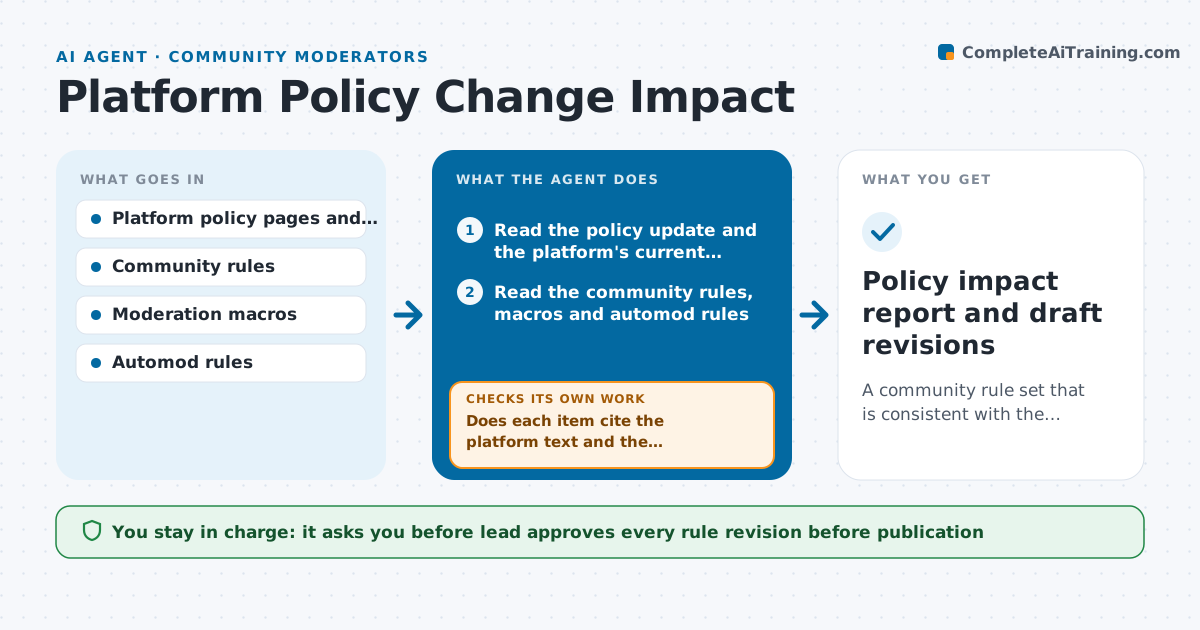
A platform updates its policy on AI-generated images and impersonation, and weeks later the community rules still say something different, so a moderator enforces a rule the platform no longer supports. This agent reads platform policy updates, terms and developer notices from the sources the lead lists, compares them with the community's rules page and moderation macros, and lists conflicts, gaps and outdated references. It drafts revisions in the community's style and rechecks the whole rule set for new conflicts, since one change often affects several rules. It also lists affected macros, auto-moderation rules and member-facing pages. The lead approves publication. Edge case: a platform rule that applies only to advertisers is noted but not added to community rules.
How it works
Follow the arrows from top to bottom. The orange dashed arrow is the loop: when a check fails, the agent goes back and tries again.
Read the steps as a list
- Platform policy update detected
- Read the policy update and the platform's current terms
- Read the community rules, macros and automod rules
- List conflicts, gaps and outdated references
- Does each item cite the platform text and the community rule it affects?If not: Reread both texts and correct or drop the item. Back to step 3.
- Draft revised rule wording and macro updates
- Recheck the full rule set for new conflicts
- Does the revised rule set have no new conflicts with the platform or itself?If not: Adjust the draft and recheck the full set. Back to step 6.
- Lead approves publicationThe agent waits here for your OK.
- Policy impact report and draft revisions
How it decides
It flags a conflict when a community rule permits something the platform prohibits or the reverse, and a gap when the platform requires something the rules do not mention.
- Quote the platform text for every conflict
- Platform rules override community rules
- Skip items that apply only to other roles such as advertisers, but note them
- Recheck all rules after each change
Make it yours
Every agent is a starting point. You choose these settings for your own situation.
- Platforms and sources to watch
- Check frequency (default monthly)
- Rule style and tone
- Macros and rules to include
- Who approves
What keeps you in control
It always asks you first
- Lead approves every rule revision before publication
Hard limits
- Never publish rules itself
- Never claim a policy meaning that the text does not state
It stops when
- Done: The revised rule set is consistent and approved
- Stop: The platform text is ambiguous, so the agent lists the questions for the lead to raise with the platform
Set it up
We guide you through the set-up, step by step
Members get the full set-up guide for this agent. No technical skills needed: you copy, paste and upload.
- One set of instructions to paste into your AI, with the clicks for ChatGPT, Claude, Microsoft 365 Copilot, Gemini and Grok
- The agent then walks you through connecting your own data, one source at a time
- A downloadable copy with the flow chart, the rules and the full guide