AI agent for insurance data analysts
Policy Renewal Retention Forecast Agent
Accurate renewal forecasts and at-risk lists
What it does
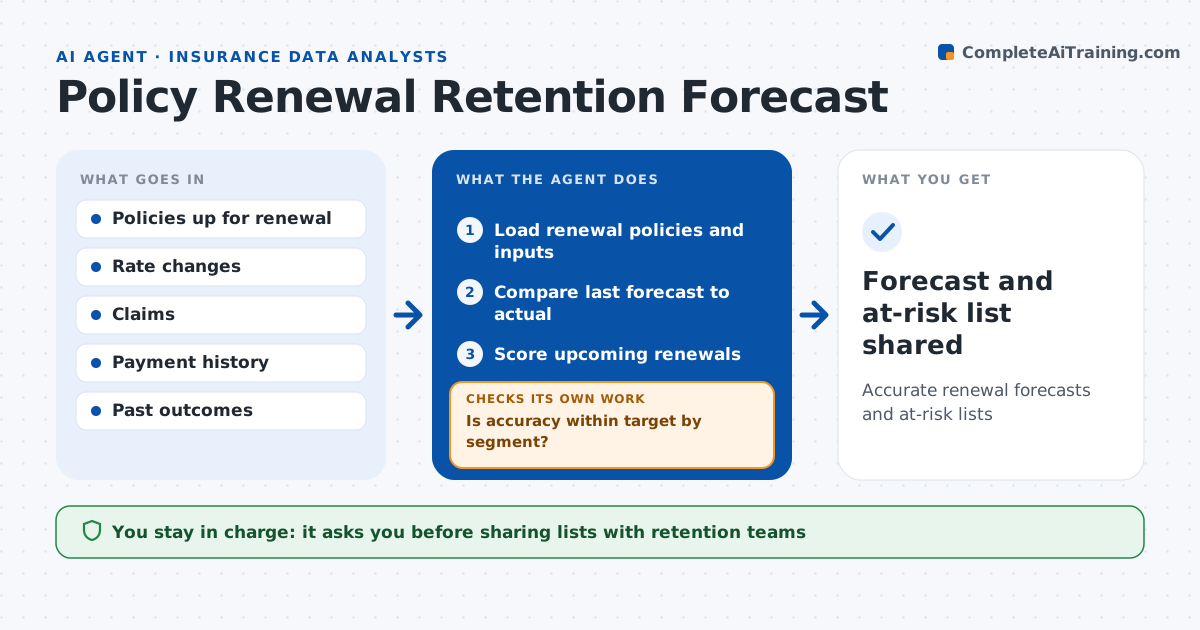
Retention teams need to know which valuable policies are likely to lapse before renewal, while there is still time to act. Each month this agent forecasts renewals using the renewal model, with inputs such as rate change, tenure, claims and payment history. A rate increase over 10 percent counts as a high-risk input. It first compares last month's forecast with actual renewals and checks accuracy by segment. If any segment falls below 90 percent, it looks for the cause, such as a new competitor price or a changed input, adjusts or retrains, and reruns before trusting the new forecast. It then lists at-risk policies with premium above the set amount. The analyst approves the forecast and every list shared with retention teams. Edge case: a state rate increase just took effect, so the agent adds it as an input before forecasting.
How it works
Follow the arrows from top to bottom. The orange dashed arrow is the loop: when a check fails, the agent goes back and tries again.
Read the steps as a list
- Monthly forecast
- Load renewal policies and inputs
- Compare last forecast to actual
- Is accuracy within target by segment?If not: find the cause, adjust or retrain, and reload. Back to step 2.
- Score upcoming renewals
- List high-value at-risk policies
- Analyst approves forecast and listThe agent waits here for your OK.
- Forecast and at-risk list shared
How it decides
It scores each policy's renewal chance and checks the model against actual outcomes by segment.
- Accuracy below 90% in a segment: investigate
- Rate change over 10%: high risk input
- Premium over set amount and low score: add to list
Make it yours
Every agent is a starting point. You choose these settings for your own situation.
- Accuracy target
- Segments
- List size
- Model refresh rules
What keeps you in control
It always asks you first
- Sharing lists with retention teams
Hard limits
- Never changes prices
- Never contacts customers
It stops when
- Done: forecast shared
- Stop: data late
Set it up
We guide you through the set-up, step by step
Members get the full set-up guide for this agent. No technical skills needed: you copy, paste and upload.
- One set of instructions to paste into your AI, with the clicks for ChatGPT, Claude, Microsoft 365 Copilot, Gemini and Grok
- The agent then walks you through connecting your own data, one source at a time
- A downloadable copy with the flow chart, the rules and the full guide