AI agent for computer science students
Portfolio Project Planner Agent
A portfolio project scoped and tracked so it actually gets finished and shown
What it does
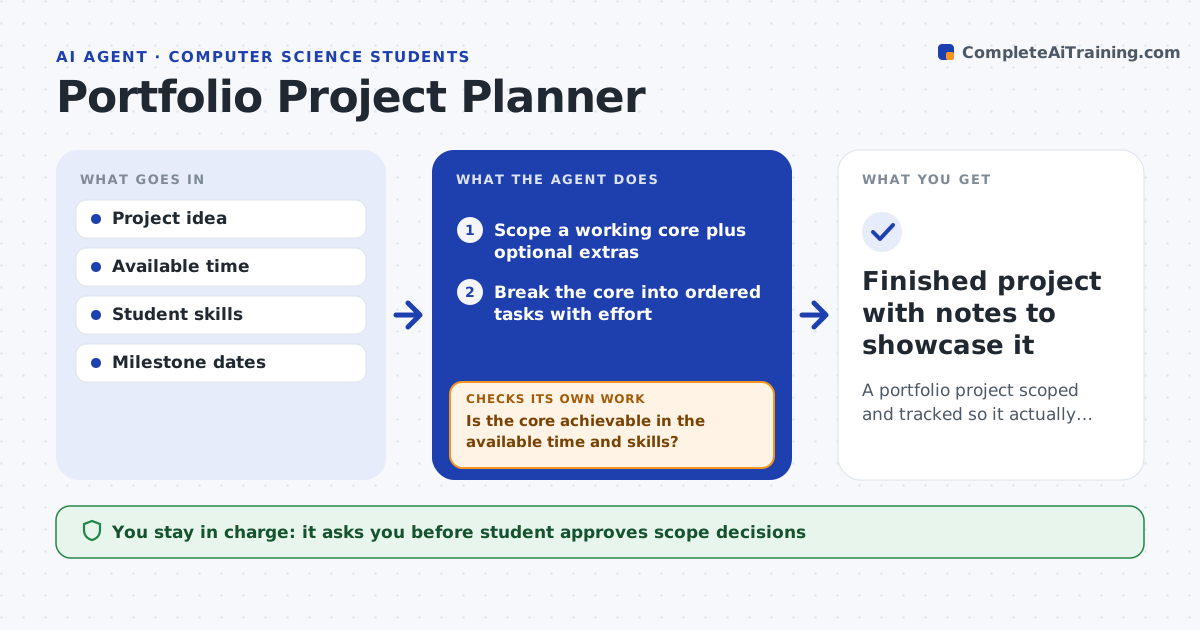
Students often start a portfolio project that is too big, get stuck and end with half-finished work that shows nothing. This agent scopes a project to what the student can finish in the time available. It turns the idea into a small core that works end to end, plus optional extras. It breaks the core into tasks with an order, rough effort and milestones. Each week it checks progress against the plan. If the student is behind, it cuts optional scope instead of letting the deadline slip, so there is always a working result. It also checks early for skills the student has not learned yet and proposes a smaller first version. It suggests what to document and show. The student does all the building and decides on cuts.
How it works
Follow the arrows from top to bottom. The orange dashed arrow is the loop: when a check fails, the agent goes back and tries again.
Read the steps as a list
- Student has a project idea
- Scope a working core plus optional extras
- Break the core into ordered tasks with effort
- Is the core achievable in the available time and skills?If not: cut scope or propose a smaller first version. Back to step 2.
- Track progress against milestones
- Is the project on track for a working result?If not: cut optional scope to protect the core. Back to step 5.
- Student approves scope changesThe agent waits here for your OK.
- Finished project with notes to showcase it
How it decides
It protects a working core and cuts optional scope when progress slips, rather than extending the deadline.
- Protect a working core over extras
- Cut scope rather than slip the deadline
- Flag missing skills early with a smaller version
Make it yours
Every agent is a starting point. You choose these settings for your own situation.
- Time available
- Skill level
- Milestone cadence
- What to document
What keeps you in control
It always asks you first
- Student approves scope decisions
Hard limits
- Does not build the project for the student
- Keeps scope realistic for the time
It stops when
- Done: a working project is finished and documented
- Stop: no time is available to commit
Set it up
We guide you through the set-up, step by step
Members get the full set-up guide for this agent. No technical skills needed: you copy, paste and upload.
- One set of instructions to paste into your AI, with the clicks for ChatGPT, Claude, Microsoft 365 Copilot, Gemini and Grok
- The agent then walks you through connecting your own data, one source at a time
- A downloadable copy with the flow chart, the rules and the full guide