AI agent for traders
Position Reconciliation Agent
Internal positions equal the broker's by the market open, or every break has a documented cause and owner
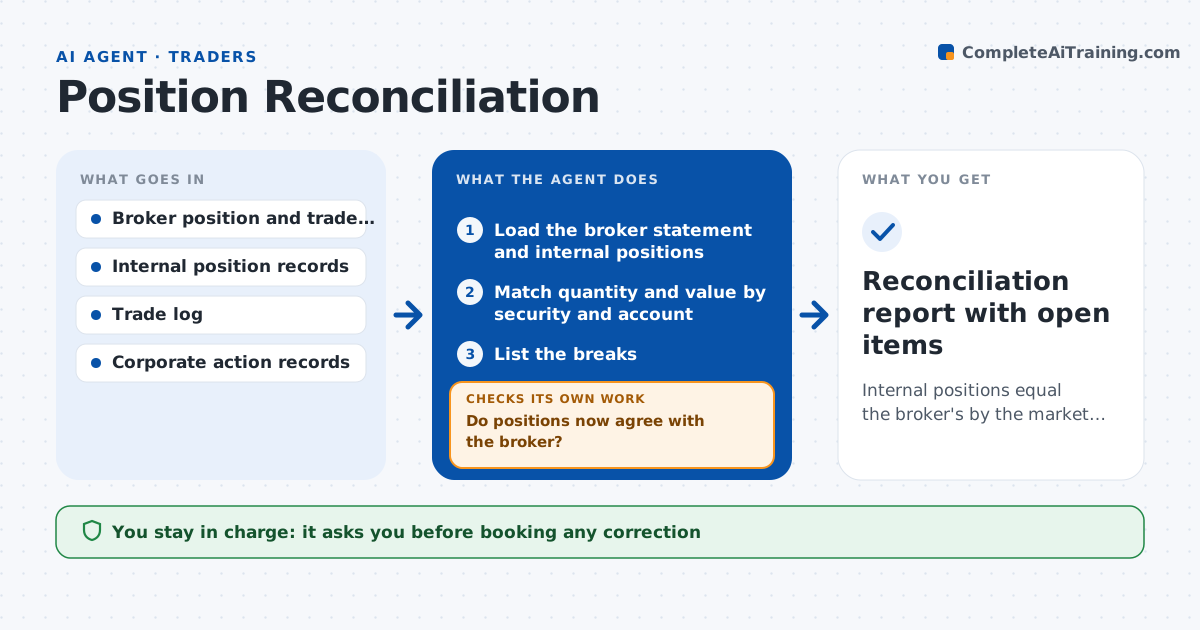
What it does
Each morning the trading desk's records should match the broker's statement, but breaks appear. A trade is booked twice, a corporate action is missed, a settlement date is wrong or a fill is not recorded. Traders find out when an order is rejected. This agent compares broker statements with internal positions every morning, security by security. For each break it looks at the trade log, corporate action records and settlement dates, and proposes the cause and a correction. After each correction it reruns the comparison until the books agree. If a break stays unexplained, it asks the broker or operations for detail. Operations approves any correction booked. Edge case: a trade done late yesterday shows on the broker's side but settles tomorrow, so the agent marks it as timing and not an error.
How it works
Follow the arrows from top to bottom. The orange dashed arrow is the loop: when a check fails, the agent goes back and tries again.
Read the steps as a list
- Broker statements arrive in the morning
- Load the broker statement and internal positions
- Match quantity and value by security and account
- List the breaks
- Search the trade log, corporate actions and settlement dates for each break
- Classify each break and propose a correction with evidence
- Operations approves each correction before bookingThe agent waits here for your OK.
- Apply the approved corrections to the internal record
- Do positions now agree with the broker?If not: rematch, find the remaining breaks and repeat the search. Back to step 3.
- Are all remaining breaks explained as timing or assigned to an owner?If not: request detail from the broker or operations and wait. Back to step 5.
- Reconciliation report with open items
How it decides
It matches by security and account, classifies each break as a timing, corporate action, booking or unknown difference, and proposes a correction only for causes it can evidence.
- Treat quantity differences of zero as agreed and value differences under $1
- Classify a trade not yet settled as timing
- Escalate any break over $10,000 the same morning
- Do not book a correction without evidence
Make it yours
Every agent is a starting point. You choose these settings for your own situation.
- Value tolerance (default $1)
- Escalation amount (default $10,000)
- Accounts covered
- Report time
What keeps you in control
It always asks you first
- Booking any correction
Hard limits
- Never books corrections itself
- Never hides unresolved breaks
- Keeps the broker statement unchanged
It stops when
- Done: positions agree or breaks are explained
- Stop: broker statement not received
Set it up
We guide you through the set-up, step by step
Members get the full set-up guide for this agent. No technical skills needed: you copy, paste and upload.
- One set of instructions to paste into your AI, with the clicks for ChatGPT, Claude, Microsoft 365 Copilot, Gemini and Grok
- The agent then walks you through connecting your own data, one source at a time
- A downloadable copy with the flow chart, the rules and the full guide