AI agent for quantity surveyors
Post-Bid Estimate Learning Agent
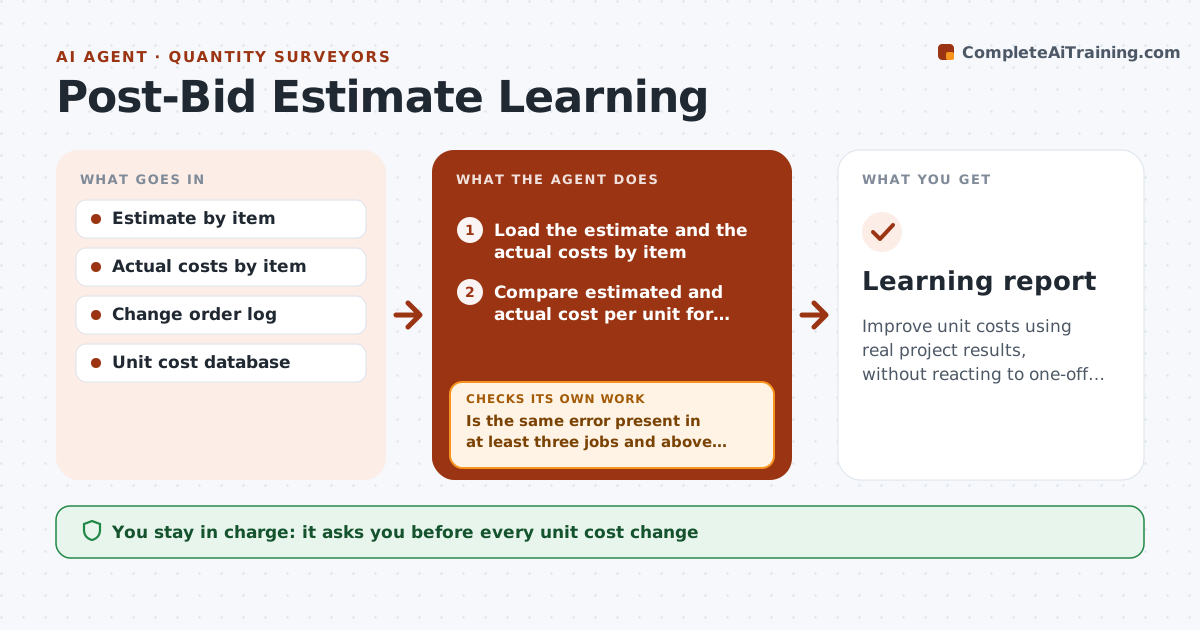
Improve unit costs using real project results, without reacting to one-off events.
What it does
After a project is done, the actual costs rarely return to the estimating database. This agent compares estimated and actual costs per item for each closed project, such as concrete per cubic yard or drywall per square foot. It finds items that were consistently under or over, and checks whether the sample is large enough to trust. It also looks at the reasons, for example a change in scope, and leaves those out. It proposes updates to unit costs with the evidence. You approve database changes. Edge case: one job shows rebar 40% over, but it is the only job with a rush order, and the agent does not change the rate.
How it works
Follow the arrows from top to bottom. The orange dashed arrow is the loop: when a check fails, the agent goes back and tries again.
Read the steps as a list
- Project cost close is complete
- Load the estimate and the actual costs by item
- Compare estimated and actual cost per unit for each item
- Remove items affected by change orders or rush orders
- Is the same error present in at least three jobs and above the threshold?If not: Record the item as watch only and do not change it. Back to step 4.
- Calculate a proposed unit cost from the sample
- Test the new cost against the last five jobs
- Does the new unit cost reduce the average error?If not: Adjust the proposal or mark the item watch only. Back to step 4.
- Estimator approves the database changesThe agent waits here for your OK.
- Update the unit cost draft
- Learning report
How it decides
It proposes an update only when three or more jobs show the same direction of error beyond the threshold and the causes are not one-offs.
- Minimum 3 jobs per item (default)
- Errors under 5% are ignored (default)
- Change order work is excluded
- The new cost must reduce error on past jobs
Make it yours
Every agent is a starting point. You choose these settings for your own situation.
- Minimum jobs (default 3)
- Error threshold (default 5%)
- Items tracked
- Number of past jobs to test
- Cost database location
What keeps you in control
It always asks you first
- Every unit cost change
Hard limits
- Never changes the database without approval
- Excludes one-off causes
- Shows sample sizes
It stops when
- Done: report and approved changes
- Stop: too few jobs; items stay on the watch list
Set it up
We guide you through the set-up, step by step
Members get the full set-up guide for this agent. No technical skills needed: you copy, paste and upload.
- One set of instructions to paste into your AI, with the clicks for ChatGPT, Claude, Microsoft 365 Copilot, Gemini and Grok
- The agent then walks you through connecting your own data, one source at a time
- A downloadable copy with the flow chart, the rules and the full guide