AI agent for midwifes
Postpartum Check-in Agent
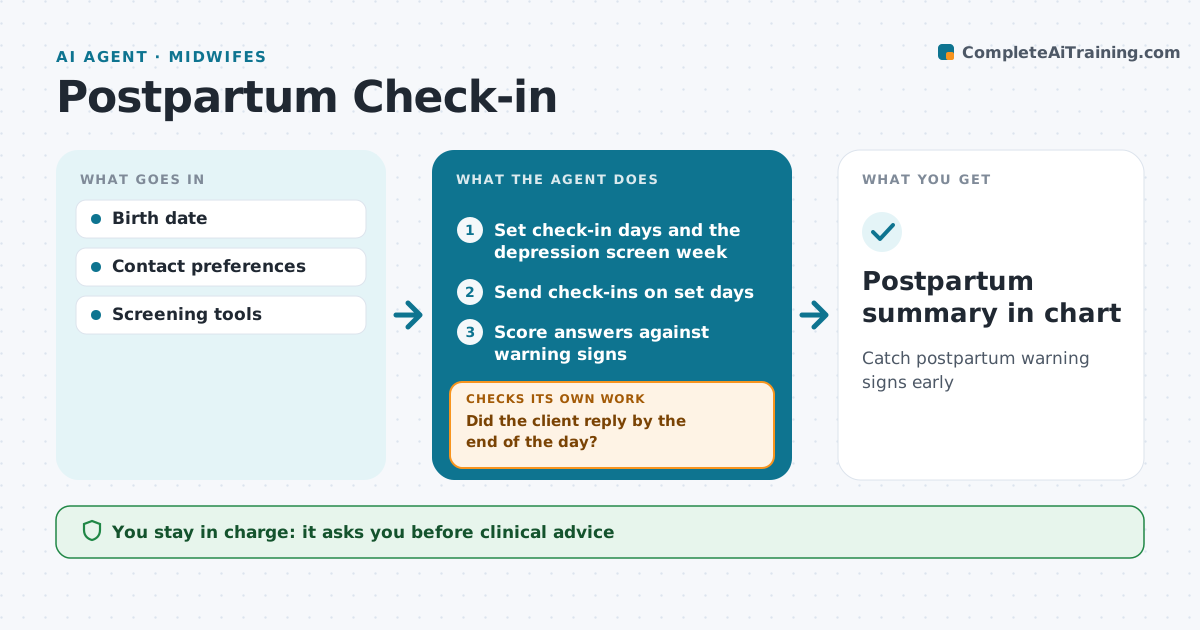
Catch postpartum warning signs early
What it does
The weeks after birth bring risks like heavy bleeding, infection, high blood pressure and depression, and clients may not know what is worth reporting. This agent sends short check-ins on set days about bleeding, fever, headache, pain, sleep and mood, and sends a depression screen at the set week. It scores the answers. If answers fall outside normal, it alerts the midwife right away with the details. If the client does not reply by the end of the day, it sends a reminder and adds her to the midwife's call list. Before each visit, it prepares a summary of answers. It checks that every flagged client was contacted. Clinical advice stays with the midwife. Edge case: any answer about thoughts of self-harm alerts the midwife at once and shows crisis contacts to the client.
How it works
Follow the arrows from top to bottom. The orange dashed arrow is the loop: when a check fails, the agent goes back and tries again.
Read the steps as a list
- Birth recorded
- Set check-in days and the depression screen week
- Send check-ins on set days
- Did the client reply by the end of the day?If not: send a reminder and add the client to the midwife's call list. Back to step 3.
- Score answers against warning signs
- Are answers within normal?If not: alert the midwife right away with the answers. Back to step 5.
- Midwife contacts the client and records the planThe agent waits here for your OK.
- Prepare a summary before the postpartum visit
- Postpartum summary in chart
How it decides
Warning answers trigger alerts. Screen scores above cutoffs flag.
- Depression screen above 12 flags
- Headache with high blood pressure flags
- Self-harm answers alert at once
Make it yours
Every agent is a starting point. You choose these settings for your own situation.
- Check-in schedule
- Screen cutoffs
- Alert channel
- Questions
What keeps you in control
It always asks you first
- Clinical advice
Hard limits
- Crisis answers always reach a person
It stops when
- Done: 6 weeks
- Stop: client opts out
Set it up
We guide you through the set-up, step by step
Members get the full set-up guide for this agent. No technical skills needed: you copy, paste and upload.
- One set of instructions to paste into your AI, with the clicks for ChatGPT, Claude, Microsoft 365 Copilot, Gemini and Grok
- The agent then walks you through connecting your own data, one source at a time
- A downloadable copy with the flow chart, the rules and the full guide