AI agent for midwifes
Postpartum Home Visit Route Planner Agent
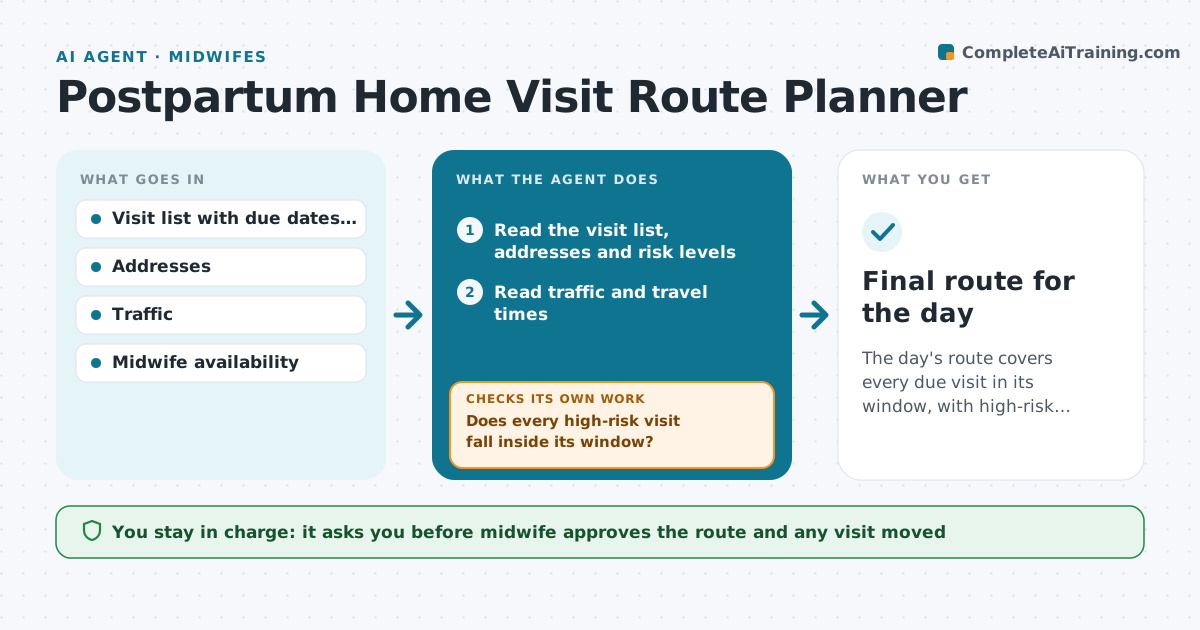
The day's route covers every due visit in its window, with high-risk families seen first.
What it does
Postpartum visits scatter across a region, due dates shift and urgent calls appear in the middle of the day. Each morning the agent builds the route from visit due dates, the risk level of each family and traffic, then adjusts when an urgent visit is added. After every change it checks that every high-risk visit still falls inside its window and reorders if not. It also checks that the midwife has time for breaks and travel. The midwife approves the final route. Edge case: an urgent call that pushes a high-risk visit past its window, so the agent proposes a phone check first.
How it works
Follow the arrows from top to bottom. The orange dashed arrow is the loop: when a check fails, the agent goes back and tries again.
Read the steps as a list
- Morning route planning
- Read the visit list, addresses and risk levels
- Read traffic and travel times
- Order visits by risk, window and distance
- Does every high-risk visit fall inside its window?If not: Reorder or propose a phone check. Back to step 4.
- Add breaks and travel time
- Midwife approves the routeThe agent waits here for your OK.
- Share the route with the midwife
- Update when an urgent visit is added
- Do all visits still fit their windows after the change?If not: Reorder and move a low-risk visit to the next day. Back to step 4.
- Final route for the day
How it decides
It orders visits by risk first, then window, then travel time, and rechecks windows after every change.
- Risk level decides the order first
- Visit windows can move by at most one day for low risk
- Include a 30 minute break after 4 visits
- Propose a phone check when a visit cannot fit
Make it yours
Every agent is a starting point. You choose these settings for your own situation.
- Visit windows by risk level
- Break rules
- Travel mode
- Message wording for rescheduling
What keeps you in control
It always asks you first
- Midwife approves the route and any visit moved
Hard limits
- Never contact families without approval
- Do not change clinical risk levels
It stops when
- Done: route approved and all windows covered
- Stop: two high-risk visits cannot both be reached and the midwife decides
Set it up
We guide you through the set-up, step by step
Members get the full set-up guide for this agent. No technical skills needed: you copy, paste and upload.
- One set of instructions to paste into your AI, with the clicks for ChatGPT, Claude, Microsoft 365 Copilot, Gemini and Grok
- The agent then walks you through connecting your own data, one source at a time
- A downloadable copy with the flow chart, the rules and the full guide