AI agent for traders
Pre-Trade Risk and Sizing Agent
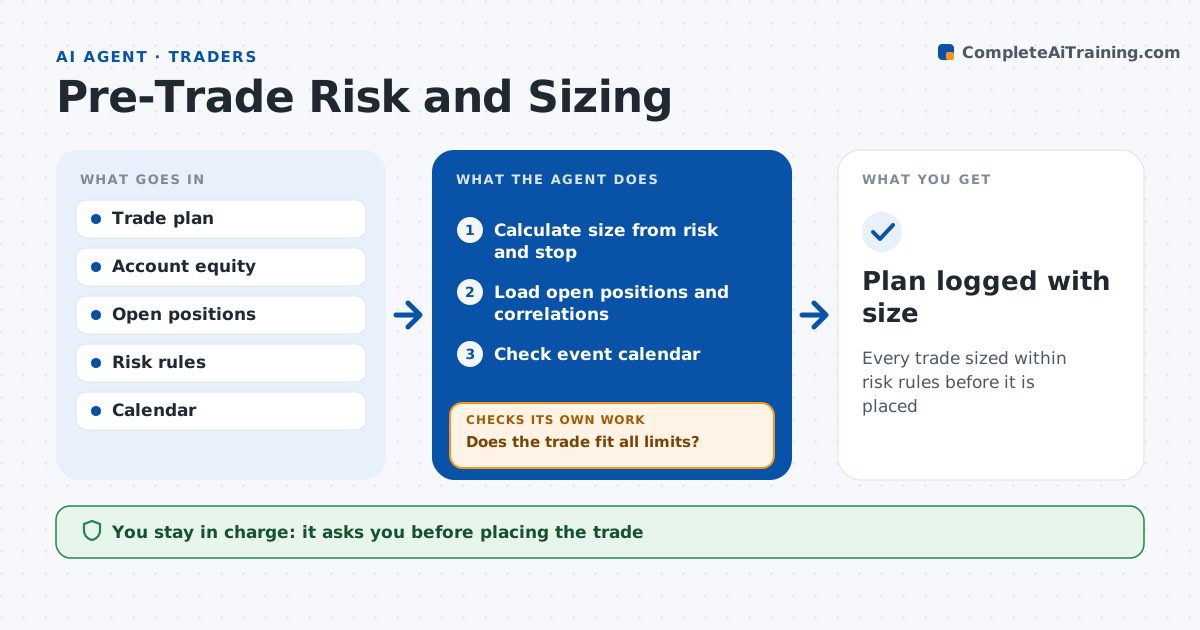
Every trade sized within risk rules before it is placed
What it does
Traders who size positions by feel can stack too much risk in one theme without noticing. Before a trade, the trader states the idea, entry, stop and target. This agent calculates position size from the account risk per trade, the stop distance and volatility. It loads open positions and correlations and checks the new trade against limits such as total open risk, sector exposure and the daily loss limit. Positions with correlation above 0.7 count as one exposure. If the trade breaks a limit, it reduces size or suggests another plan and rechecks. It also checks the economic calendar for events before the target. The trader decides and places the trade. Edge case: the new trade is in a stock highly correlated with an open position, so the agent combines them.
How it works
Follow the arrows from top to bottom. The orange dashed arrow is the loop: when a check fails, the agent goes back and tries again.
Read the steps as a list
- Trader enters plan
- Calculate size from risk and stop
- Load open positions and correlations
- Does the trade fit all limits?If not: cut size or flag the conflict and recalculate. Back to step 2.
- Check event calendar
- Trader decides and places the tradeThe agent waits here for your OK.
- Plan logged with size
How it decides
It sizes by fixed risk per trade and reduces size until all portfolio limits are met.
- Risk per trade 1% of equity by default
- Correlation above 0.7: count as one exposure
- Major event before target: note
Make it yours
Every agent is a starting point. You choose these settings for your own situation.
- Risk per trade
- Total open risk limit
- Correlation threshold
- Events to check
What keeps you in control
It always asks you first
- Placing the trade
Hard limits
- Never places orders
- Never overrides a hit loss limit
It stops when
- Done: plan logged
- Stop: daily loss limit hit
Set it up
We guide you through the set-up, step by step
Members get the full set-up guide for this agent. No technical skills needed: you copy, paste and upload.
- One set of instructions to paste into your AI, with the clicks for ChatGPT, Claude, Microsoft 365 Copilot, Gemini and Grok
- The agent then walks you through connecting your own data, one source at a time
- A downloadable copy with the flow chart, the rules and the full guide