AI agent for quantity surveyors
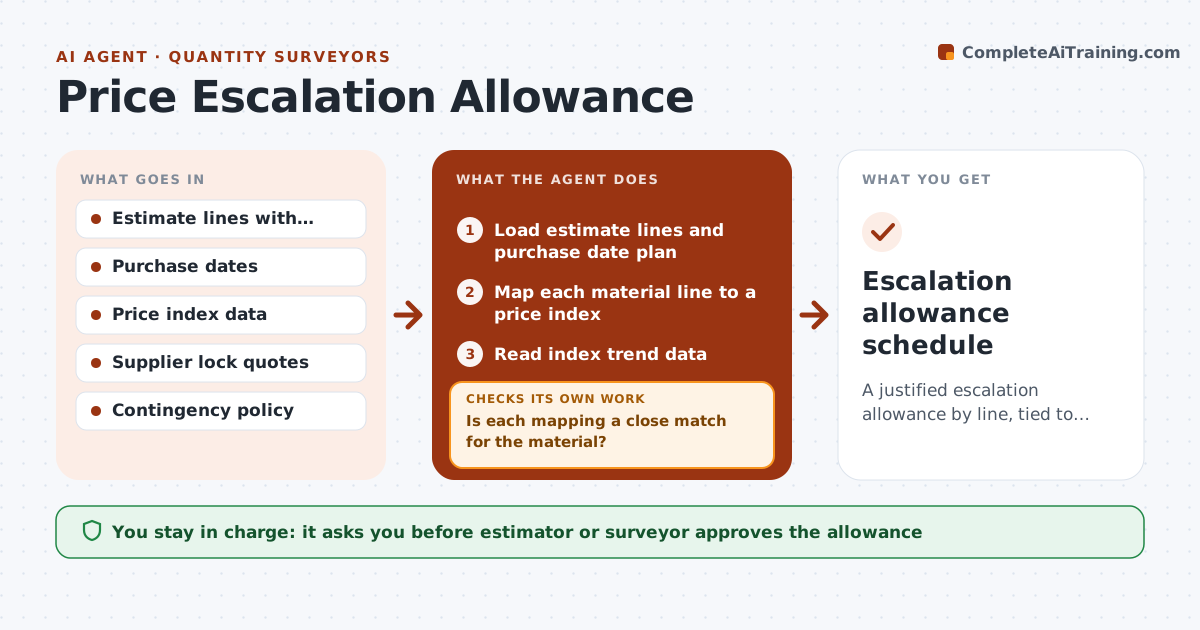
Price Escalation Allowance Agent
A justified escalation allowance by line, tied to purchase dates and updated as indexes move.
What it does
You priced steel in January and purchase it in October, and prices have moved 11%. Nobody carried an allowance. This agent reads material index trends, maps them to estimate lines and purchase dates, and calculates an allowance by line. It compares the allowance with supplier price lock options, for example locking now with a deposit versus buying later. When indexes move, it reruns the numbers and updates the total. Before proposing the allowance, it checks that each estimate line is mapped to the right index and that dates are correct. You approve the allowance. Edge case: a line mapped to an index that is a poor match, such as general steel for a special alloy, is flagged for manual judgment.
How it works
Follow the arrows from top to bottom. The orange dashed arrow is the loop: when a check fails, the agent goes back and tries again.
Read the steps as a list
- Estimate stage or monthly update
- Load estimate lines and purchase date plan
- Map each material line to a price index
- Is each mapping a close match for the material?If not: Flag the line for manual judgment or choose a different index. Back to step 3.
- Read index trend data
- Project price change to each purchase date and compute allowance
- Compare with supplier price lock options
- Do the line allowances add up to the summary total?If not: Fix the line calculations and recompute. Back to step 6.
- Estimator or surveyor approves the allowanceThe agent waits here for your OK.
- Escalation allowance schedule
How it decides
It projects each line forward using the index trend to its purchase date and compares the cost of escalation with the cost of locking prices.
- Project using the 12 month trend, capped at the largest historical swing
- Recommend lock when the lock premium is below expected escalation
- Review monthly when indexes move more than 2%
- Use manual judgment for specialty materials
Make it yours
Every agent is a starting point. You choose these settings for your own situation.
- Index sources
- Review trigger (default 2%)
- Cap on projection
- Contingency policy
What keeps you in control
It always asks you first
- Estimator or surveyor approves the allowance
Hard limits
- Never lock prices or buy materials itself
- Never present projections as guarantees
It stops when
- Done: allowance approved and applied
- Stop: index data unavailable
Set it up
We guide you through the set-up, step by step
Members get the full set-up guide for this agent. No technical skills needed: you copy, paste and upload.
- One set of instructions to paste into your AI, with the clicks for ChatGPT, Claude, Microsoft 365 Copilot, Gemini and Grok
- The agent then walks you through connecting your own data, one source at a time
- A downloadable copy with the flow chart, the rules and the full guide