AI agent for it support specialists
Printer and Peripheral Fleet Agent
Fleet faults fixed or ticketed before users report them, with firmware kept current
What it does
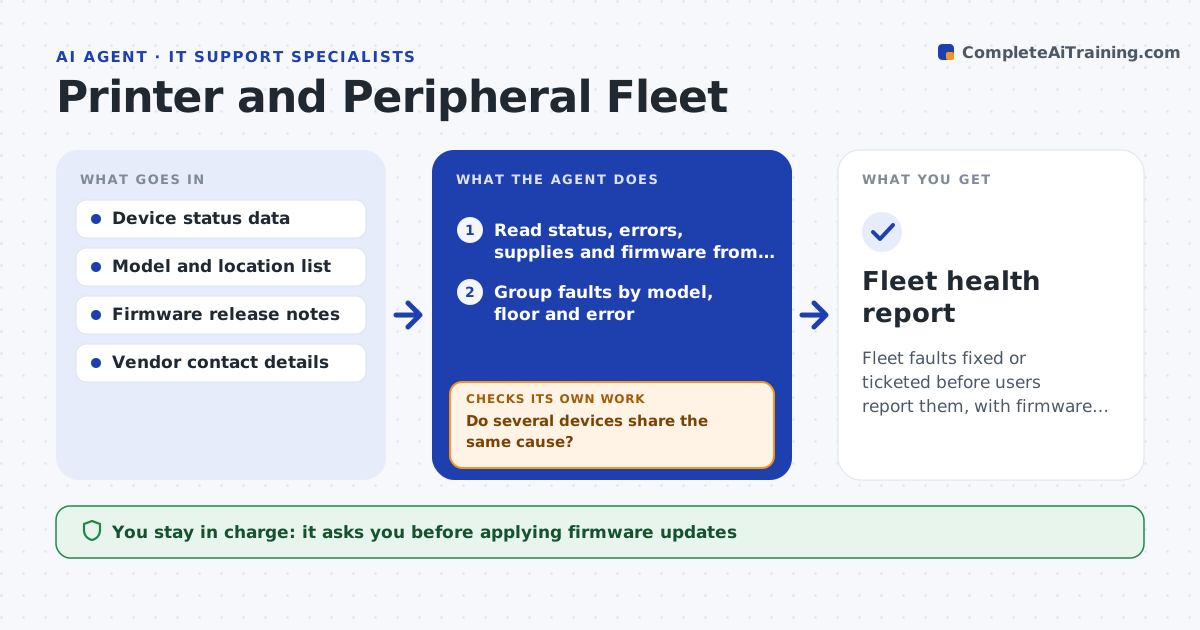
Printers run low on toner, jam, lose their network address or sit on old firmware, and each case costs a user and a technician time. This agent polls printers and other managed devices for errors, supply levels and firmware versions, and groups faults by model and location. Several printers on one floor with the same error point to a network problem, not to the printers. It tries remote fixes, such as restarting a print queue, clearing a job or reconnecting to the network, and checks that the device reports healthy afterwards. For failures it opens a vendor ticket with the evidence. The specialist approves firmware updates. Edge case: a printer showing low toner that is still printing fine is queued for a refill, not a service call.
How it works
Follow the arrows from top to bottom. The orange dashed arrow is the loop: when a check fails, the agent goes back and tries again.
Read the steps as a list
- Hourly poll
- Read status, errors, supplies and firmware from each device
- Group faults by model, floor and error
- Do several devices share the same cause?If not: treat each as a separate fault. Back to step 3.
- Try a safe remote fix such as a queue restart or reconnect
- Does the device report healthy?If not: try the next safe fix, then open a vendor ticket with the evidence. Back to step 5.
- Queue refills and supplies orders for low items
- List models with outdated firmware and the risk
- Specialist approves firmware updatesThe agent waits here for your OK.
- Fleet health report
How it decides
Faults are grouped to find shared causes. Remote fixes are limited to safe actions, and a fix counts only if the device reports healthy.
- Group faults seen on 3 or more devices on the same network
- Reorder toner at 15 percent remaining
- Limit remote fixes to queue restarts and reconnects
- Open a vendor ticket after 2 failed fixes
Make it yours
Every agent is a starting point. You choose these settings for your own situation.
- Poll interval (default hourly)
- Toner reorder level (default 15 percent)
- Safe fixes allowed per model
- Vendors and ticket routes
What keeps you in control
It always asks you first
- Applying firmware updates
- Ordering supplies above a set value
Hard limits
- Never installs firmware without approval
- Never deletes user print jobs without a clear fault
It stops when
- Done: all devices healthy or ticketed
- Stop: the polling system cannot reach the network
Set it up
We guide you through the set-up, step by step
Members get the full set-up guide for this agent. No technical skills needed: you copy, paste and upload.
- One set of instructions to paste into your AI, with the clicks for ChatGPT, Claude, Microsoft 365 Copilot, Gemini and Grok
- The agent then walks you through connecting your own data, one source at a time
- A downloadable copy with the flow chart, the rules and the full guide