AI agent for patent agents
Prior Art Search Agent
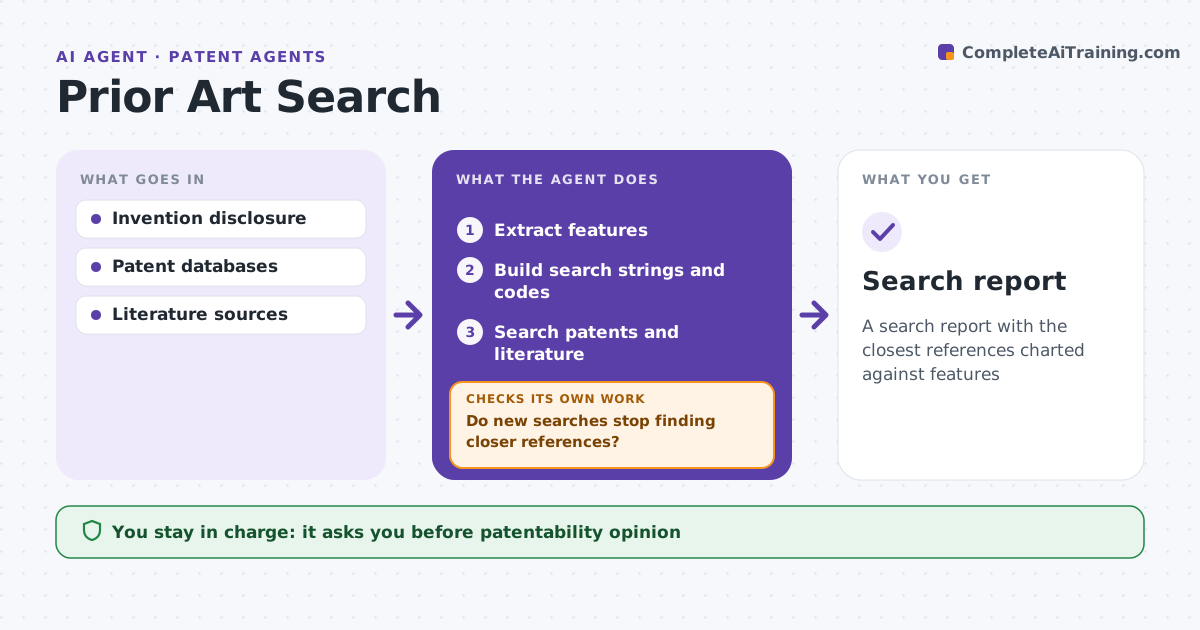
A search report with the closest references charted against features
What it does
A weak prior art search leads to wasted filing costs or patents that fail later. For a new invention, this agent builds and runs the search. It reads the invention disclosure, extracts key features, and builds search strings and classification codes. It searches patent and non-patent literature, ranks results by how many features each reference discloses, and builds a feature chart. If the top results miss key features, it refines the terms or codes and searches again. It stops when two rounds add nothing closer. References with all features are flagged. It drafts a search report. The patent agent reviews the results and gives the opinion. Edge case: a reference is in another language, so the agent uses the English family member or a machine translation and notes it.
How it works
Follow the arrows from top to bottom. The orange dashed arrow is the loop: when a check fails, the agent goes back and tries again.
Read the steps as a list
- Disclosure received
- Extract features
- Build search strings and codes
- Search patents and literature
- Chart features
- Do new searches stop finding closer references?If not: refine terms and codes and search again. Back to step 3.
- Patent agent reviewsThe agent waits here for your OK.
- Search report
How it decides
It ranks references by features disclosed and refines until results stabilize.
- Reference with all features: flag
- Foreign language: use family or translate
- Stop when two rounds add nothing new
Make it yours
Every agent is a starting point. You choose these settings for your own situation.
- Databases
- Rounds
- Chart format
- Report template
What keeps you in control
It always asks you first
- Patentability opinion
Hard limits
- Never gives the opinion
- Never discloses the invention outside secure tools
It stops when
- Done: report ready
- Stop: disclosure unclear
Set it up
We guide you through the set-up, step by step
Members get the full set-up guide for this agent. No technical skills needed: you copy, paste and upload.
- One set of instructions to paste into your AI, with the clicks for ChatGPT, Claude, Microsoft 365 Copilot, Gemini and Grok
- The agent then walks you through connecting your own data, one source at a time
- A downloadable copy with the flow chart, the rules and the full guide